Learn how businesses turn webinars into social-ready clips using Pictory AI. Step-by-step pictory ai tutorial for modern teams.
Introduction
Long-form webinars often contain valuable insights, expert discussions, product demos, onboarding material, and thought leadership content. The problem is that most audiences never watch a 60-minute webinar from start to finish.
Modern businesses are solving this challenge with AI-powered content repurposing workflows.
Using tools like Pictory AI, companies can automatically transform webinars into short-form clips optimized for LinkedIn, Instagram Reels, YouTube Shorts, TikTok, internal training, recruitment campaigns, and customer education.
This guide provides a complete pictory ai tutorial for business teams that want to streamline webinar to social clips workflows using automation. You’ll learn how to generate short videos, create AI-powered subtitles, identify key moments automatically, and scale content repurposing without adding hours of manual editing.
Whether you work in marketing, HR, operations, customer success, or enterprise communications, this tutorial will help you build a professional AI video workflow that saves time while increasing content reach.
Quick Summary
- Businesses use AI to convert webinars into short-form social content.
- Pictory AI automates clipping, subtitles, captions, and highlights.
- AI-powered webinar clips improve content ROI.
- Short-form clips increase engagement across social platforms.
- Teams can repurpose one webinar into dozens of assets.
- AI subtitle generator features improve accessibility and retention.
- Ideal for marketing, HR, onboarding, sales enablement, and internal communications.
Table of Contents
- What You’ll Learn
- Tool Overview
- Why Businesses Repurpose Webinars
- Step-by-Step Pictory AI Tutorial
- Workflow Automation Suggestions
- How Businesses Use This Tool
- Best Practices
- Common Mistakes
- FAQ
- Alternatives to Pictory AI
- Key Takeaways
- Related Guides
What You’ll Learn
By the end of this guide, you’ll understand how to:
- Upload webinar recordings into Pictory AI
- Create webinar clips AI workflows
- Generate subtitles automatically
- Turn webinars into social-ready short videos
- Optimize aspect ratios for multiple platforms
- Build scalable content repurposing AI systems
- Improve engagement using short-form content
- Reduce manual video editing time
- Export branded clips for marketing campaigns
- Create internal knowledge-sharing content
Tool Overview
What Is Pictory AI?
Pictory AI is an AI-powered video creation and editing platform designed to help businesses transform long-form content into short, engaging videos.
The platform is especially popular for:
- Webinar clipping
- Social media repurposing
- AI subtitle generation
- Script-to-video workflows
- Internal training videos
- Podcast-to-video conversion
- Marketing video automation
Why Businesses Use Pictory AI
Businesses increasingly rely on short-form video because audiences consume content faster on mobile-first platforms.
Instead of manually editing hours of footage, Pictory AI helps teams:
- Detect important moments automatically
- Generate captions instantly
- Create multiple clip variations
- Maintain brand consistency
- Accelerate publishing workflows
- Improve accessibility with subtitles
Key Features
- AI-generated subtitles
- Automatic highlight extraction
- Text-based video editing
- Brand templates
- Multi-platform exports
- Voiceover support
- Scene summarization
- Social media optimization
Ideal Use Cases
- Webinar marketing
- Corporate communications
- Employee onboarding
- Sales enablement
- Customer education
- Recruitment campaigns
- LinkedIn thought leadership
- Startup growth marketing
Official Website
Pictory AI Official Website
Official Documentation
Pictory AI Help Center
Why Businesses Repurpose Webinars
Webinars are expensive to produce.
They require:
- presenters
- scheduling
- promotion
- preparation
- technical setup
- post-production
Yet many webinars generate only a short-lived engagement spike.
Content repurposing AI changes that equation.
One 60-minute webinar can become:
- 20 LinkedIn clips
- 10 YouTube Shorts
- internal training snippets
- quote videos
- recruitment content
- customer onboarding videos
- sales enablement assets
This dramatically increases content ROI while reducing production costs.
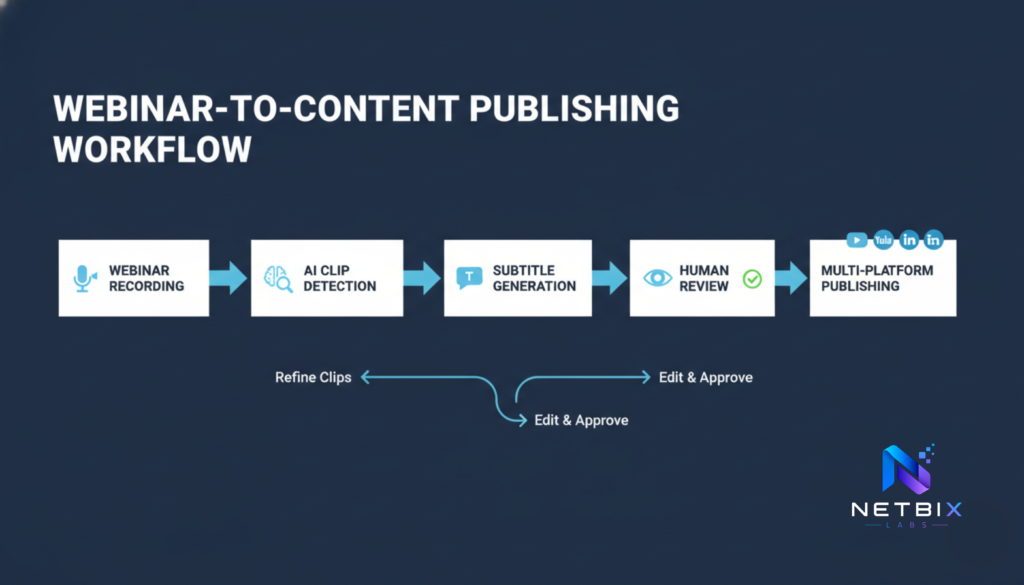
Step-by-Step Pictory AI Tutorial
Step 1: Upload Your Webinar Recording
Why This Step Matters
Your source material determines the overall quality of the final clips. Clean audio and structured webinar presentations improve AI detection accuracy.
What to Do
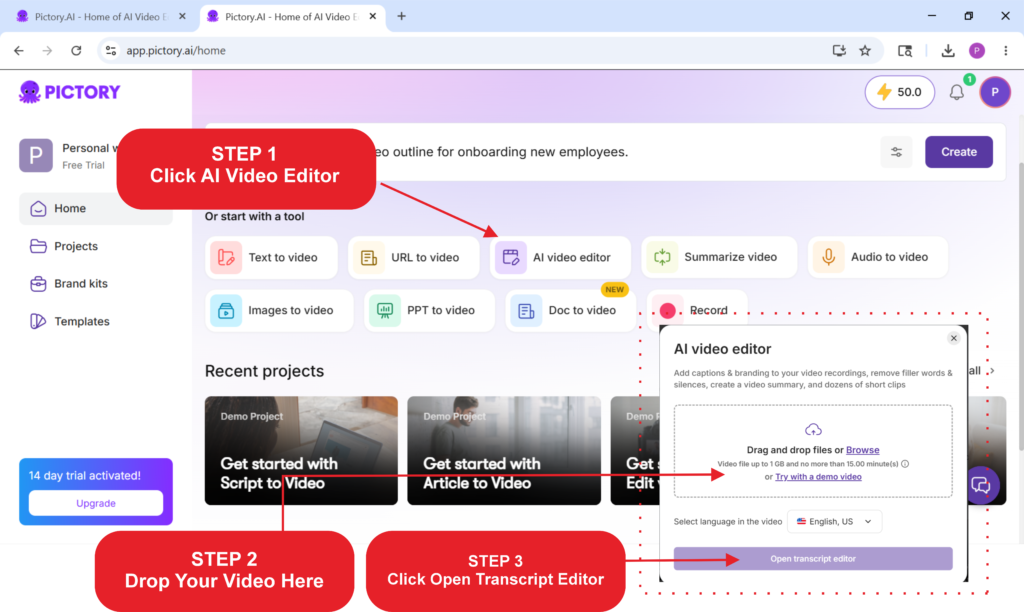
- Log into Pictory AI.
- Select “Video Highlights” or “Edit Video Using Text.”
- Upload your webinar recording.
- Wait for automatic transcription processing.
Supported formats typically include:
- MP4
- MOV
- AVI
- Zoom recordings
Expected Result
Pictory AI generates a transcript and identifies speech segments automatically.
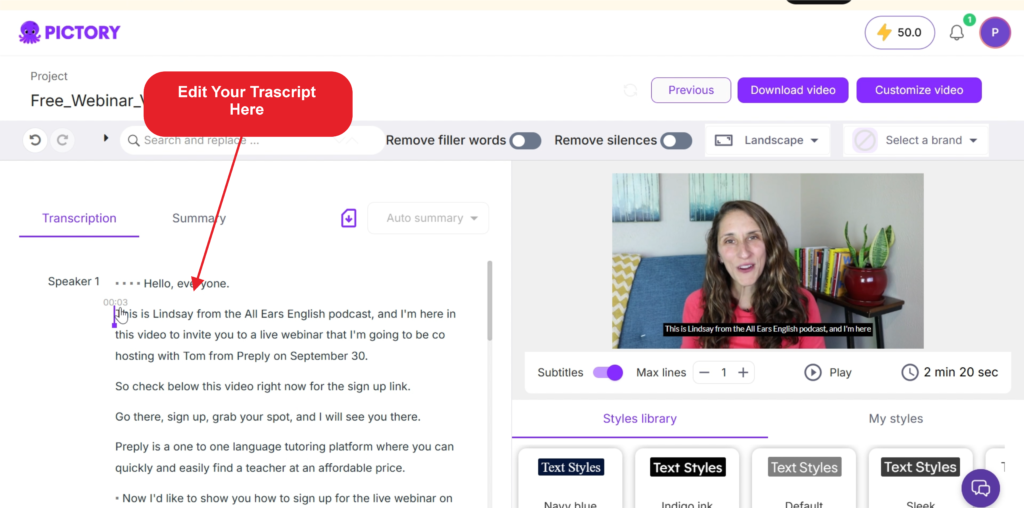
Step 2: Review the AI Transcript
Why This Step Matters
The transcript acts as the foundation for clip extraction, subtitles, and text-based editing.
What to Do
- Review transcription accuracy
- Correct speaker names
- Fix technical terminology
- Remove filler content
- Highlight important moments
This is especially important for:
- HR compliance webinars
- technical demos
- product launches
- enterprise training
Expected Result
You’ll have a clean transcript ready for automated clip creation.
Step 3: Identify High-Engagement Moments
Why This Step Matters
Short-form content performs best when clips focus on:
- strong opinions
- actionable insights
- emotional moments
- statistics
- bold statements
- practical advice
What to Do
Look for:
- key business insights
- surprising data
- audience questions
- product demonstrations
- leadership commentary
Recommended clip length:
- LinkedIn: 30–90 seconds
- Instagram Reels: 15–45 seconds
- TikTok: 15–60 seconds
- YouTube Shorts: under 60 seconds
Expected Result
You’ll create multiple short clips optimized for social engagement.
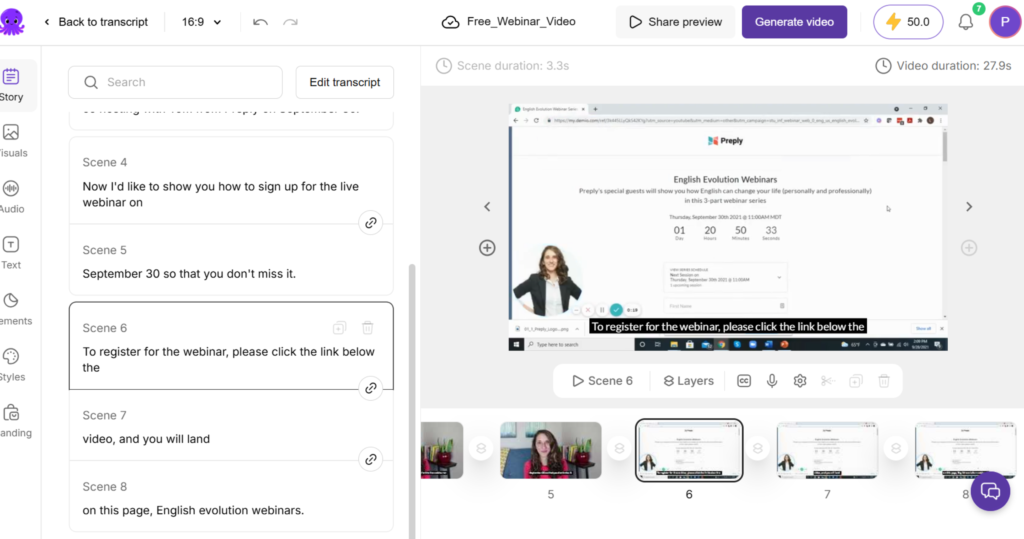
Step 4: Generate AI Subtitles Automatically
Why This Step Matters
Most social media videos are watched without sound.
An AI subtitle generator improves:
- accessibility
- watch time
- retention
- engagement
- comprehension
What to Do
Inside Pictory AI:
- enable automatic captions
- customize subtitle style
- adjust fonts and positioning
- apply brand colors
- review subtitle timing
Expected Result
Your webinar clips become easier to consume on mobile devices and social feeds.
Step 5: Optimize Videos for Social Platforms
Why This Step Matters
Each platform favors different aspect ratios and presentation styles.
What to Do
Create exports for:
- 9:16 vertical video
- 1:1 square video
- 16:9 widescreen
Adjust:
- text positioning
- face framing
- title overlays
- CTA placement
Expected Result
You’ll have platform-ready webinar to social clips assets.
Step 6: Add Branding Elements
Why This Step Matters
Consistent branding increases recognition and professionalism.
What to Do
Add:
- company logo
- lower thirds
- branded intro/outro
- CTA overlays
- website URL
- speaker identifiers
Corporate teams should standardize templates across departments.
Expected Result
Your short clips maintain a professional enterprise appearance.
Step 7: Export and Distribute Content
Why This Step Matters
Efficient distribution turns content creation into measurable business value.
What to Do
Publish clips across:
- YouTube Shorts
- Instagram Reels
- TikTok
- internal LMS platforms
- Slack channels
- email campaigns
Recommended workflow:
- create content calendar
- batch exports weekly
- schedule posts automatically
Expected Result
Your business gains more visibility from existing webinar content.
Tutorial Video
To make your learning process easier, you can watch the following short video tutorial. and you can visit the official Pictory AI website via the following link
How Businesses Use This Tool
Startups
Startups repurpose founder webinars into:
- investor updates
- thought leadership clips
- hiring campaigns
- product launch snippets
Agencies
Marketing agencies use webinar clips AI workflows for:
- client campaigns
- lead generation
- social media retainers
- content scaling
Marketing Teams
Marketing departments transform webinars into:
- nurture campaign videos
- LinkedIn content
- webinar promotions
- event recaps
HR Teams
HR departments create:
- onboarding videos
- recruitment clips
- internal training
- company culture content
Operations Teams
Operations teams repurpose:
- SOP walkthroughs
- internal documentation
- process training
- compliance briefings
Creators
Creators turn webinars into:
- monetized short content
- audience growth assets
- educational clips
- course promotions
Enterprise Workflows
Large organizations use AI content repurposing for:
- global communications
- multilingual subtitles
- executive messaging
- scalable training distribution
Best Practices for Webinar Repurposing
Focus on Single-Idea Clips
Each short video should communicate one clear message.
Prioritize Strong Openings
The first 3 seconds matter most.
Use:
- surprising statistics
- bold statements
- questions
- business pain points
Keep Branding Minimal
Avoid excessive logos or distracting overlays.
Edit for Mobile First
Most short-form video consumption happens on mobile devices.
Use Captions Strategically
Readable subtitles improve retention significantly.
Batch Your Workflow
Process multiple webinars simultaneously to save time.
Maintain Human Review
AI speeds up editing, but human review improves quality and accuracy.
Common Mistakes
Creating Clips That Are Too Long
Short-form audiences prefer concise videos.
Ignoring Audio Quality
Poor webinar audio reduces subtitle accuracy and viewer retention.
Overusing Animations
Too many visual effects can feel unprofessional in business content.
Publishing Without Platform Optimization
Different platforms require different formatting.
Skipping Caption Review
AI subtitles can misinterpret:
- technical terms
- acronyms
- speaker names
Repurposing Weak Webinar Segments
Not every webinar section deserves distribution.
FAQ
What is Pictory AI used for?
Pictory AI helps users transform long-form content into short-form videos using AI-powered editing, subtitles, and automation.
Can Pictory AI create webinar clips automatically?
Yes. The platform can identify highlights, generate captions, and create webinar to social clips workflows with minimal manual editing.
Is Pictory AI good for businesses?
Yes. Many companies use it for marketing, HR onboarding, internal communications, and sales enablement content.
Does Pictory AI generate subtitles automatically?
Yes. It includes an AI subtitle generator that creates editable captions automatically.
What platforms work best for webinar clips?
Popular platforms include:
- YouTube Shorts
- Instagram Reels
- TikTok
LinkedIn is especially effective for B2B webinar content.
How long should webinar clips be?
Most high-performing business clips range between 30–90 seconds.
Is Pictory AI beginner-friendly?
Yes. The interface is designed for non-editors and business teams without advanced video production skills.
Can businesses scale content repurposing with AI?
Absolutely. AI tools reduce editing time and allow teams to produce large amounts of content from existing webinars.
Alternatives to Pictory AI
Descript
Best for:
- podcast editing
- collaborative editing
- transcript-based workflows
Better when:
- teams need advanced audio editing
- creators want screen recording tools
Ideal for:
- podcasters
- educators
- collaborative teams
Opus Clip
Best for:
- automatic viral clip generation
- social-first short videos
Better when:
- creators prioritize TikTok or Shorts growth
Ideal for:
- creators
- influencers
- short-form marketing teams
Synthesia
Best for:
- AI avatars
- training videos
- enterprise onboarding
Better when:
- businesses need avatar-based presentations
Ideal for:
- HR teams
- enterprise learning departments
Canva Video Suite
Best for:
- design-focused teams
- quick branded content
Better when:
- visual branding matters more than automation
Ideal for:
- startups
- social media teams
- small businesses
Key Takeaways
- Webinar repurposing increases content ROI.
- Pictory AI simplifies short-form video production.
- AI subtitle generator tools improve accessibility and engagement.
- Businesses can create dozens of clips from one webinar.
- Human review still matters for professional results.
- Social-ready content improves visibility and audience reach.
- AI workflows reduce editing time dramatically.
Conclusion
Businesses are no longer treating webinars as one-time events.
With tools like Pictory AI, organizations can transform long-form presentations into scalable short-form content systems that drive engagement across multiple channels.
This pictory ai tutorial demonstrated how modern teams use AI to automate webinar clips ai workflows, create webinar to social clips assets, generate captions with an ai subtitle generator, and scale content repurposing ai strategies efficiently.
For startups, agencies, enterprise teams, and corporate departments, AI-powered video repurposing is becoming an essential part of modern digital communication.