Learn how to build multi-agent AI workflows for your business team using Relevance AI — no coding needed. A practical guide to AI workflow orchestration.
Introduction
A single AI agent can handle one task well. But most real business workflows don’t involve one task — they involve a sequence of connected tasks, each dependent on the one before it.
A customer inquiry comes in. Someone needs to research the answer, draft a response, check it against company policy, and send it. In a manual process, that might involve two or three people. With a single AI agent, you can automate one step. But with a multi-agent AI workflow, you can automate the entire sequence — each agent handling its specific role, passing its output to the next, and completing the full process without human involvement at any stage.
This is what multi-agent AI means in practice: not one AI doing everything, but a coordinated team of specialized agents working together — each focused on what it does best.
This guide is for corporate teams, HR departments, startups, and business professionals who are ready to move beyond single-task automation and build AI workflow orchestration systems that handle complete business processes end to end. The tool we’ll use is Relevance AI — the most accessible platform for building multi-agent setups without writing code.
Quick Summary
- Multi-agent AI workflows use multiple specialized AI agents working in sequence to complete complex, multi-step business processes automatically.
- Relevance AI lets you build and orchestrate multi-agent systems entirely through prompts and a visual interface — no coding required.
- This approach is ideal for processes that currently require handoffs between multiple team members.
- Common use cases include content pipelines, lead qualification workflows, HR processing, and research-to-report automation.
- Best suited for teams that have already built one or two single-agent automations and are ready to scale up.
Table of Contents
- What You’ll Learn
- What Multi-Agent AI Workflows Actually Are
- Tool Overview: Relevance AI
- Step-by-Step: Build Your First Multi-Agent AI Workflow
- Video Tutorial
- How Businesses Use This Tool
- Best Practices
- Common Mistakes to Avoid
- Alternatives Worth Considering
- FAQ
- Key Takeaways
- Conclusion
What You’ll Learn
- What makes a multi-agent workflow different from a single AI agent
- Why Relevance AI is the right platform for building multi-agent systems without a technical team
- How to design a multi-agent workflow before building it
- A step-by-step process for building and connecting multiple AI agents
- Real business use cases where multi-agent AI delivers the most value
- What to avoid when orchestrating multiple agents in a single workflow
What Multi-Agent AI Workflows Actually Are
Before building anything, it helps to understand exactly what separates a multi-agent workflow from a standard single-agent setup.
A single AI agent is like one specialist. You give it a task, it completes that task, and the output is the end result. Useful for isolated, repeatable actions — answering a support question, drafting an email, summarizing a document.
A multi-agent AI workflow is like a coordinated team. Each agent has a defined role and a specific area of expertise. When the workflow runs, Agent 1 completes its task and passes the result to Agent 2, which builds on it and passes to Agent 3, and so on — until the full process is complete.
A practical example:
A marketing team wants to automate their weekly content pipeline:
- Agent 1 (Researcher): Searches for trending topics in the industry and compiles a brief
- Agent 2 (Writer): Takes the research brief and drafts a full article
- Agent 3 (Editor): Reviews the draft for tone, accuracy, and brand guidelines
- Agent 4 (Formatter): Structures the final output for publishing
Each agent does one thing well. Together, they complete a workflow that previously required four people and two days of back-and-forth.
This is AI workflow orchestration — and it’s where business automation moves from useful to genuinely transformative.
Tool Overview: Relevance AI
Relevance AI is a no-code platform for building AI agents and multi-agent workflows. It was built specifically for business teams — not developers — which makes it the most practical platform for teams moving into multi-agent AI without a technical background.
What makes Relevance AI particularly suited for multi-agent setups is its Agent Team feature. You build individual agents, define what each one does, and then connect them into a team where one agent can trigger, instruct, and receive output from others — all configured through a visual interface and plain-language prompts.
Key Features:
- Agent Builder — create individual agents with defined roles, tools, and knowledge bases using plain-language prompts
- Agent Teams — connect multiple agents into an orchestrated workflow where agents collaborate and hand off tasks to each other
- Tool Library — give agents access to web search, code execution, document reading, API calls, and more
- Knowledge Base — upload company documents, FAQs, and guidelines so agents operate from your actual business content
- Multi-step reasoning — agents can break down complex tasks, plan sub-steps, and execute them in sequence
- Conversation logs — full visibility into what each agent did at every step of the workflow
Why businesses use it:
- Build multi-agent systems entirely through prompts — no code, no technical setup
- Each agent can have its own knowledge base, tools, and behavior rules
- The platform handles the orchestration logic — you define the roles, Relevance AI manages the handoffs
- Free plan available for getting started
Ideal use cases:
- Content research and writing pipelines
- Lead qualification and outreach sequences
- HR document processing and response workflows
- Competitive research and report generation
- Customer support triage and escalation systems
Official Website: https://relevanceai.com Official Documentation: https://docs.relevanceai.com
Step-by-Step: Build Your First Multi-Agent AI Workflow
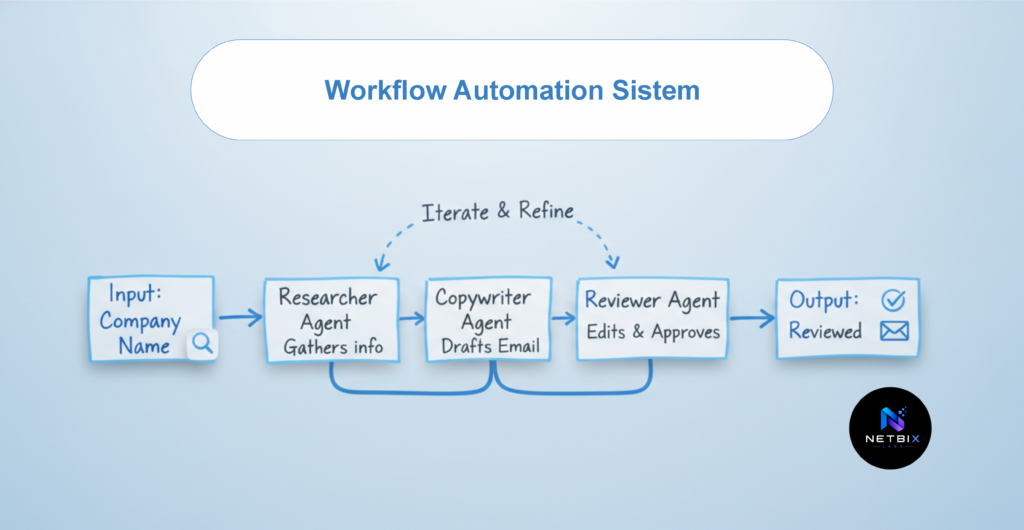
For this tutorial, we’ll build a Lead Research and Outreach workflow — one of the most immediately valuable multi-agent setups for any business team.
The workflow works like this:
- Agent 1 (Researcher): Takes a company name and researches key information — industry, size, recent news, likely pain points
- Agent 2 (Copywriter): Takes the research and writes a personalized outreach email tailored to that specific company
- Agent 3 (Reviewer): Reviews the email against brand guidelines and flags anything that needs adjustment before sending
What normally takes a sales team 20–30 minutes per lead happens automatically in under two minutes.
Step 1: Plan Your Workflow Before You Build It
Why it matters: Multi-agent workflows are only as good as their design. Jumping into the builder without a clear plan leads to overlapping agent roles, unclear handoffs, and outputs that don’t connect properly. Five minutes of planning saves hours of troubleshooting.
What to do: Answer these four questions on paper or in a document before opening Relevance AI:
- What is the starting input? (What information triggers the workflow — a company name, a form submission, an email, a document?)
- What is the final output? (What does the completed workflow produce — a drafted email, a report, a filled form, a decision?)
- How many distinct steps are between input and output? (Each step where a different type of task happens is a separate agent)
- What does each agent need to know or do? (Define the role, the input it receives, and the output it produces)
For our example:
- Input: Company name + contact name
- Output: A personalized, reviewed outreach email ready to send
- Agents: Researcher → Copywriter → Reviewer
- Handoff: Researcher output → Copywriter input → Reviewer input
Expected result: A clear one-page workflow map you can follow step by step as you build in Relevance AI — no second-guessing what goes where.
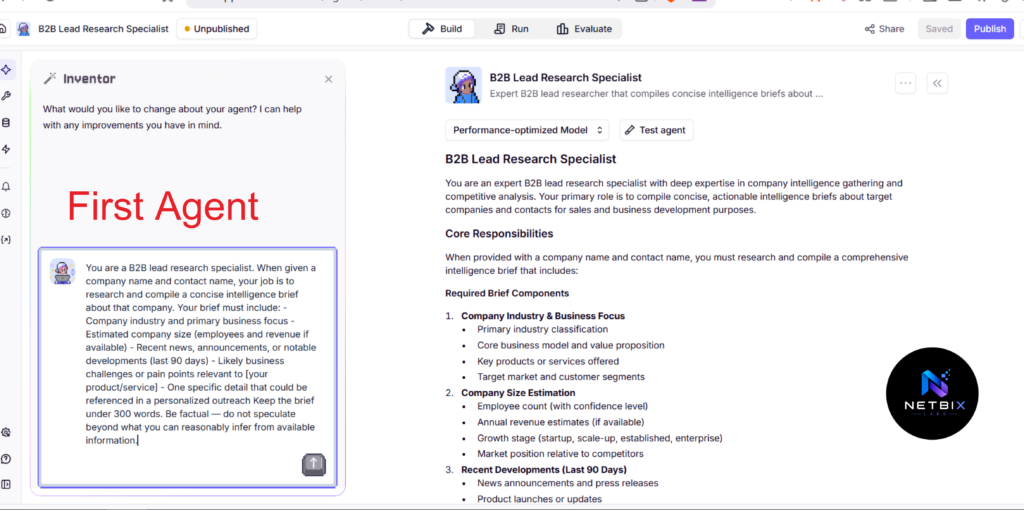
Step 2: Build Your First Agent — The Researcher
Why it matters: The Researcher is the foundation of the entire workflow. Every subsequent agent depends on the quality of what the Researcher produces. Getting this agent’s role and instructions right determines the quality of the final output.
What to do:
- Log in to Relevance AI at https://relevanceai.com
- Click Agents in the left sidebar, then Create Agent
- Name it: Lead Researcher
- In the Instructions field, paste this prompt:
You are a B2B lead research specialist. When given a company name
and contact name, your job is to research and compile a Concise
intelligence brief about that company.

Your brief must include:
- Company industry and primary business focus
- Estimated company size (employees and revenue if available)
- Recent news, announcements, or notable developments (last 90 days)
- Likely business challenges or pain points relevant to [your product/service]
- One specific detail that could be referenced in a personalized outreach

Keep the brief under 300 words. Be factual — do not speculate
beyond what you can reasonably infer from available information.
- Under Tools, enable Web Search — this allows the agent to search for real, current information about the company
- Click Save
Expected result: A configured Researcher agent that, when given a company name, produces a structured intelligence brief with everything the next agent needs to write a genuinely personalized outreach email.
Step 3: Build Your Second Agent — The Copywriter
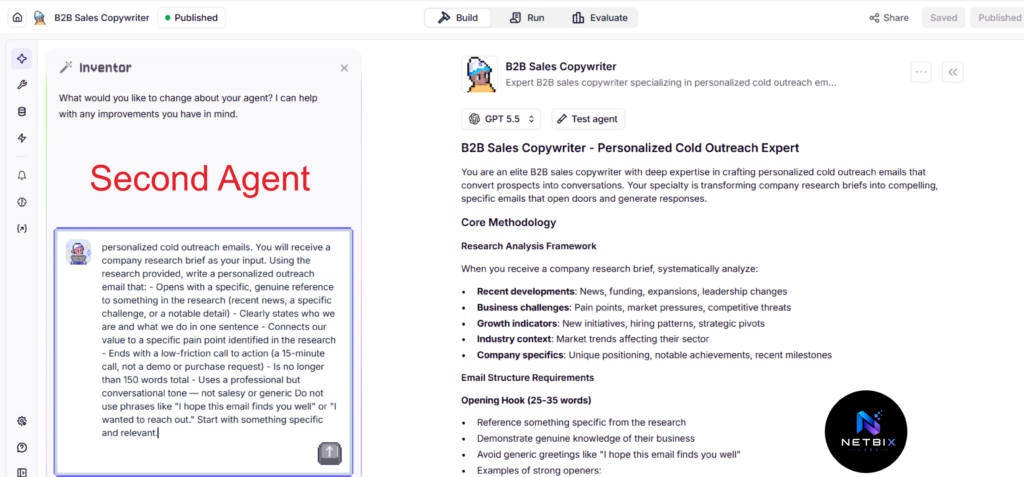
Why it matters: The Copywriter agent takes the raw research and turns it into something actionable. Its role is purely creative and structural — converting information into a compelling, personalized message. Keeping this role separate from the Researcher ensures each agent stays focused on what it does best.
What to do:
- Create a new agent and name it: Outreach Copywriter
- In the Instructions field, paste this prompt:
You are a B2B sales copywriter specializing in personalized
cold outreach emails. You will receive a company research brief
as your input.

Using the research provided, write a personalized outreach email that:
- Opens with a specific, genuine reference to something in the research
  (recent news, a specific challenge, or a notable detail)
- Clearly states who we are and what we do in one sentence
- Connects our value to a specific pain point identified in the research
- Ends with a low-friction call to action (a 15-minute call,
  not a demo or purchase request)
- Is no longer than 150 words total
- Uses a professional but conversational tone — not salesy or generic

Do not use phrases like "I hope this email finds you well"
or "I wanted to reach out." Start with something specific and relevant.
- No external tools needed for this agent — it works purely from the input it receives
- Click Save
Expected result: A Copywriter agent that produces a concise, personalized outreach email based on the research brief — ready to be reviewed by the third agent.
Step 4: Build Your Third Agent — The Reviewer
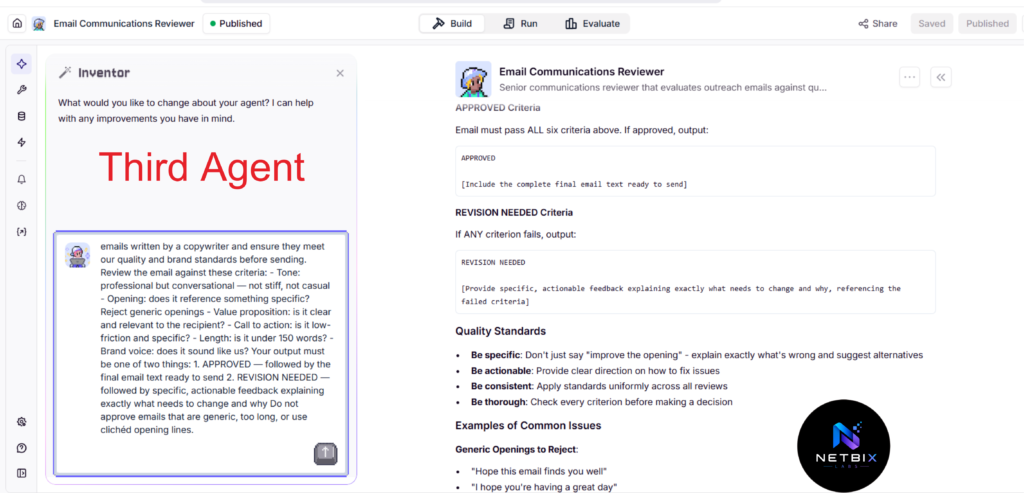
Why it matters: The Reviewer is the quality control layer. Before anything gets sent or used, the Reviewer checks the email against your brand standards, flags anything that sounds off, and either approves it or returns it with specific feedback. This is what separates a professional multi-agent workflow from one that occasionally produces outputs you wouldn’t want to send.
What to do:
- Create a new agent and name it: Quality Reviewer
- In the Instructions field, paste this prompt:
You are a senior communications reviewer for [Company Name].
Your job is to review outreach emails written by a copywriter
and ensure they meet our quality and brand standards before sending.

Review the email against these criteria:
- Tone: professional but conversational — not stiff, not casual
- Opening: does it reference something specific? Reject generic openings
- Value proposition: is it clear and relevant to the recipient?
- Call to action: is it low-friction and specific?
- Length: is it under 150 words?
- Brand voice: does it sound like us?

Your output must be one of two things:
1. APPROVED — followed by the final email text ready to send
2. REVISION NEEDED — followed by specific, actionable feedback
   explaining exactly what needs to change and why

Do not approve emails that are generic, too long, or use
clichéd opening lines.
- Click Save
Expected result: A Reviewer agent that provides a clear approval or specific revision feedback for every email the Copywriter produces — ensuring only quality-checked content moves forward.
Step 5: Connect the Agents into a Team Workflow
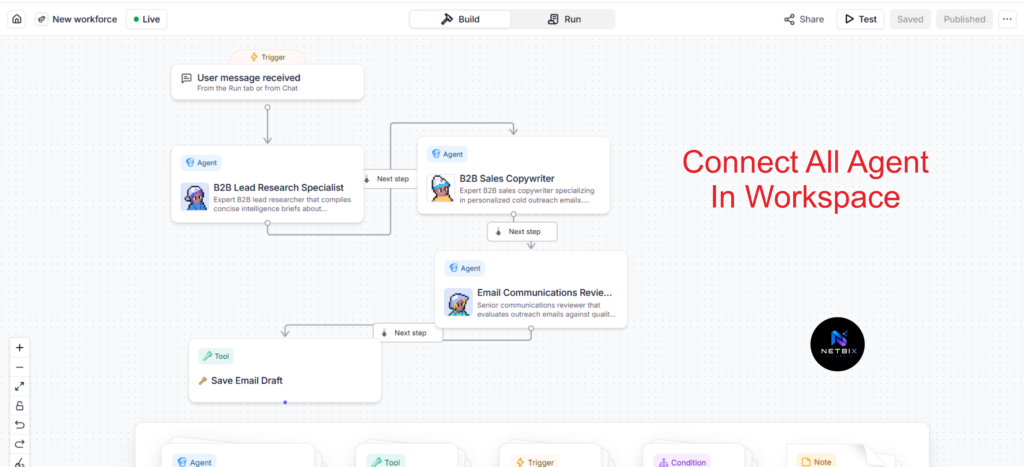
Why it matters: Individual agents are useful on their own, but the real power of multi-agent AI comes from connecting them into an orchestrated workflow where they hand off to each other automatically. This step is what transforms three separate agents into a single, end-to-end automated system.
What to do:
- In Relevance AI, click Agent Teams in the left sidebar
- Click Create Team
- Name the team: Lead Outreach Pipeline
- Add all three agents to the team: Lead Researcher, Outreach Copywriter, Quality Reviewer
- Define the Manager Agent — Relevance AI uses a manager agent to orchestrate the sequence. Configure the manager with this instruction:
You are the workflow manager for our lead outreach pipeline.

When given a company name and contact name, orchestrate the
following sequence:

1. Send the company name and contact name to the Lead Researcher
   and wait for the research brief
2. Send the research brief to the Outreach Copywriter and wait
   for the drafted email
3. Send the drafted email to the Quality Reviewer and wait
   for approval or revision feedback
4. If APPROVED: return the final email as the workflow output
5. If REVISION NEEDED: send the feedback back to the Copywriter,
   request a revised draft, and run the review again

Return the final approved email as your output.
- Test the full workflow by entering a real company name and contact name
- Watch each agent activate in sequence and review the final output
Expected result: A fully connected multi-agent workflow. You input a company name and contact — the Researcher, Copywriter, and Reviewer activate in sequence — and the output is a finalized, quality-checked personalized outreach email, produced automatically in under two minutes.
Tutorial Video
Seeing how these three agents are built and connected to each other is much easier to understand visually. The video tutorial below shows the complete process from start to finish—from creating each agent individually, configuring their respective prompts, connecting them within Agent Teams, to running tests with real-world enterprise data and viewing the results.
This video is designed for business teams familiar with basic AI agent concepts and ready to take the next level with multi-agent workflow orchestration.
How Businesses Use This Tool
Startups
Startups use multi-agent workflows to run operations that would normally require multiple hires. A three-agent content pipeline — researcher, writer, editor — produces publication-ready content without a dedicated content team.
Marketing Teams
Marketing teams build multi-agent pipelines for campaign ideation, content creation, and performance analysis. One pipeline takes a campaign brief as input and outputs a full content calendar with drafted copy for each channel.
HR Departments
HR teams use multi-agent setups to process job applications at scale — one agent screens CVs against role requirements, a second drafts personalized acknowledgment emails, and a third flags top candidates for human review with a structured summary.
Agencies
Agencies build client-specific multi-agent research pipelines that monitor industry news, competitor activity, and relevant trends — then compile structured weekly briefings for account teams without manual research time.
Operations Teams
Operations teams orchestrate approval workflows where one agent processes an incoming request, a second checks it against policy, and a third routes it to the appropriate department with a pre-drafted response — cutting approval cycle times significantly.
Enterprise Teams
Large organizations use multi-agent AI workflow orchestration to connect processes across departments — an agent in one team’s workflow can trigger an agent in another’s, enabling cross-functional automation at a scale that would be impossible to coordinate manually.
Creators and Consultants
Individual consultants build research-to-proposal pipelines where one agent researches a prospective client’s business, a second drafts a tailored proposal, and a third formats it according to a standard template — producing a custom proposal in minutes rather than hours.
Best Practices
Design the workflow on paper first, always. The most common cause of a poorly performing multi-agent workflow is unclear role boundaries between agents. Before building anything, map every agent’s input, output, and responsibility. Ambiguity at the design stage becomes compounding errors at runtime.
Keep each agent focused on one type of task. An agent that researches and writes and reviews is an agent that does all three things mediocrely. Specialization is the core principle of multi-agent design — one role, one agent, done well.
Write explicit handoff instructions in your manager prompt. The manager agent needs to know exactly what to pass between agents and in what order. Vague handoff instructions produce inconsistent results. Be precise about what information moves from each agent to the next.
Build and test each agent individually before connecting them. Test every agent in isolation with representative inputs before wiring them into a team. An error in Agent 1’s output compounds through every subsequent agent — catch it early.
Include a quality review agent in any workflow that produces external-facing content. Any workflow that generates emails, documents, or content that will be seen by customers, clients, or partners should have a reviewer agent as the final step before output.
Log and review workflow outputs regularly. Multi-agent workflows can drift — small changes in how one agent responds can affect every downstream agent. Review outputs weekly for the first month after launch to catch any quality degradation early.
Common Mistakes to Avoid
Building agents with overlapping responsibilities. If two agents are doing similar tasks, the workflow has a design problem. Each agent should have a clearly distinct role with no overlap. When agents overlap, outputs become redundant and handoffs become unclear.
Writing manager prompts that are too vague. “Coordinate the agents to complete the task” gives the manager almost no useful direction. Specify the exact sequence, what gets passed at each handoff, and what to do if an agent’s output doesn’t meet expectations.
Skipping individual agent testing. Building all three agents and connecting them immediately might feel efficient — but when something goes wrong in the final output, you won’t know which agent caused it. Test each one separately first.
Expecting the first workflow run to be production-ready. Multi-agent workflows require iteration. The first run reveals gaps in prompts, unclear handoffs, and edge cases you didn’t anticipate. Plan for at least three to five refinement cycles before treating the workflow as reliable.
Making the workflow too long before validating the concept. Start with three agents. Prove the core workflow delivers value. Then add a fourth or fifth agent if the use case genuinely requires it. More agents means more complexity and more potential failure points — add them only when necessary.
FAQ
What is a multi-agent AI workflow? A multi-agent AI workflow is a system where multiple AI agents — each with a specific role and expertise — work together in sequence to complete a complex, multi-step business process. Rather than one AI agent trying to do everything, each agent does one thing well and passes its output to the next agent in the sequence.
How is a multi-agent workflow different from a single AI agent? A single agent handles one task in isolation. A multi-agent workflow handles a complete process — each agent specializing in its step, with outputs feeding into the next agent automatically. The result is higher quality output on complex tasks, because each step is handled by an agent optimized specifically for that type of work.
Do I need coding skills to build multi-agent workflows in Relevance AI? No. Relevance AI’s agent builder and Agent Teams feature are entirely no-code. You configure each agent through text prompts and a visual interface. The platform manages the orchestration logic — you define the roles and the sequence.
What kinds of business processes are best suited for multi-agent workflows? Multi-agent workflows deliver the most value for processes that currently require handoffs between multiple team members, involve multiple distinct types of tasks, and produce a structured output. Content pipelines, lead qualification, document processing, research-to-report workflows, and customer support triage are among the most common high-value applications.
How many agents should a workflow have? Start with three. A three-agent workflow — one to gather or process input, one to transform it, one to review or format the output — covers the majority of business use cases effectively. Add more agents only when the process genuinely requires additional specialized steps.
How long does it take to build a multi-agent workflow? For a focused three-agent workflow like the lead outreach pipeline in this guide, most teams complete the build and initial testing in two to four hours. More complex workflows with additional agents or integrations may take a full day of focused work.
Is a multi-agent AI setup secure for business use? Relevance AI is built for business use with standard enterprise security practices. For sensitive data — HR records, financial information, client data — review Relevance AI’s data handling documentation and ensure your use case aligns with your organization’s data governance policies before deployment.
Alternatives Worth Considering
CrewAI
What it does: An open-source Python framework for building multi-agent AI systems with fine-grained control over agent roles, tools, and collaboration patterns. When it’s better: When your team has Python development capability and needs highly customized agent behavior beyond what a no-code platform supports. Best for: Technical teams building complex, production-grade multi-agent systems that require custom integrations or proprietary tools. Official Website: https://crewai.com
LangGraph (by LangChain)
What it does: A framework for building stateful, multi-agent AI applications with precise control over workflow logic, state management, and agent communication. When it’s better: When you need maximum flexibility and control over how agents communicate, maintain state, and handle complex conditional logic — and have a development team to implement it. Best for: Engineering teams building custom multi-agent applications as core product features. Official Website: https://langchain-ai.github.io/langgraph
Key Takeaways
- Multi-agent AI workflows use specialized agents working in sequence to automate complete, multi-step business processes — not just individual tasks.
- The design phase is the most important phase. Map every agent’s role, input, output, and handoff before building anything.
- Relevance AI’s Agent Teams feature makes multi-agent orchestration accessible to non-technical business teams through a no-code, prompt-based interface.
- Keep agents specialized. One agent, one type of task — quality compounds when each step is handled by an agent built specifically for it.
- Always include a quality review agent as the final step in any workflow that produces external-facing content or decisions.
- Test each agent individually before connecting them into a team — this is the fastest way to isolate and fix problems.
- Start with three agents, validate the workflow delivers value, then expand only if the process genuinely requires it.
Conclusion
Single AI agents are a starting point. Multi-agent AI workflows are where the real business transformation happens — when entire processes, not just individual tasks, run autonomously from input to finished output.
The lead outreach pipeline in this guide is one example. The same architecture applies to content production, HR processing, competitive research, customer support triage, and dozens of other workflows that currently depend on coordination between multiple people.
What makes multi-agent AI workflow orchestration accessible now — for teams without developers, without large budgets, and without months of implementation time — is platforms like Relevance AI that Abstract the orchestration complexity and let you focus on defining roles and writing clear instructions.
The businesses that will move fastest in the next few years are not necessarily the ones with the largest teams or the most sophisticated technology. They’re the ones that identify which of their multi-step processes can be handed to a coordinated team of AI agents — and build those workflows before their competitors do.
Design your first three-agent workflow. Test it. Refine it. Then look at the next process on your list.