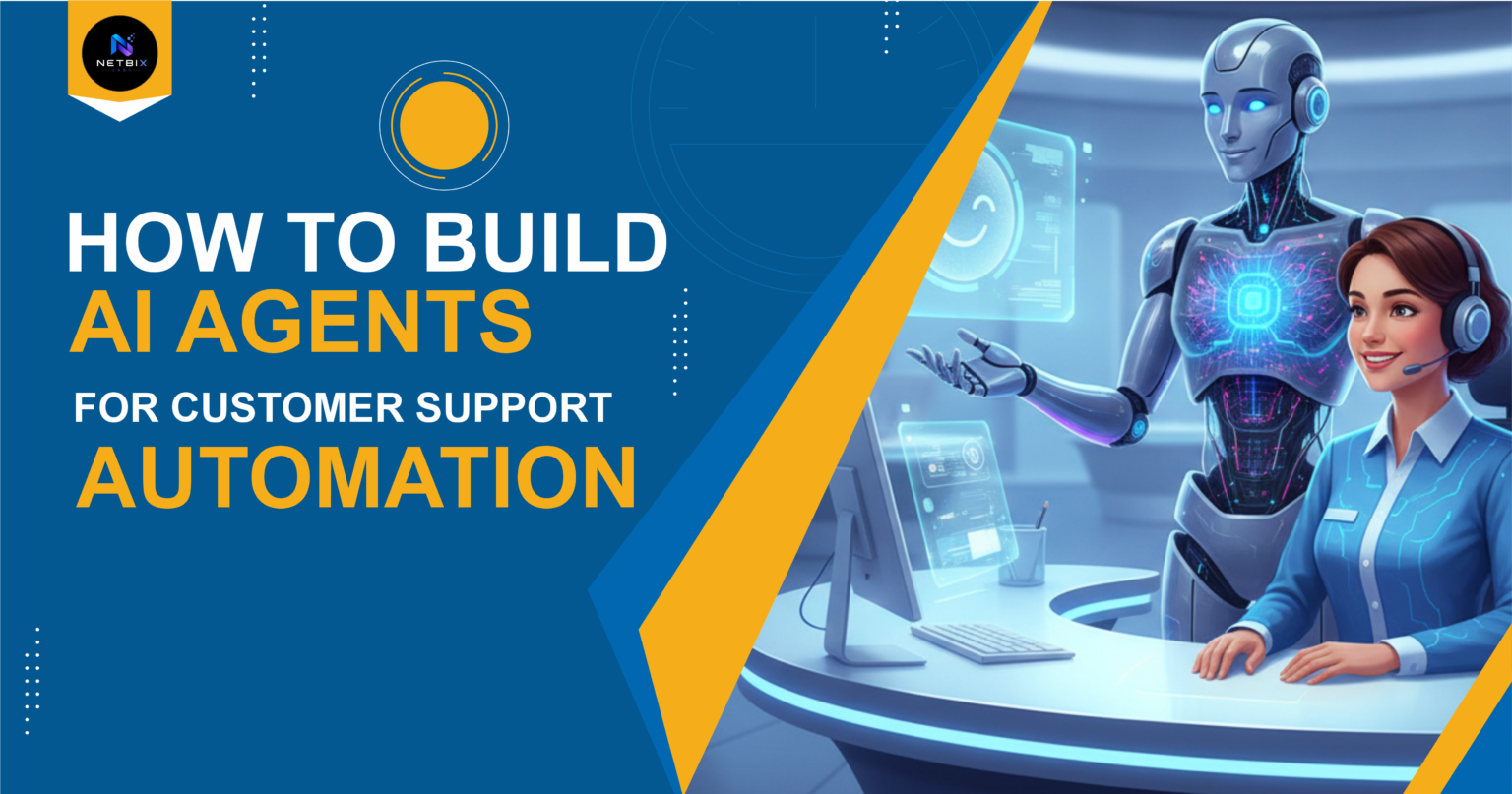
Learn how to build an AI agent for customer support automation using Relevance AI — no coding needed. A beginner-friendly guide for businesses and teams.
Introduction
Every business reaches a point where customer questions start piling up faster than the team can answer them. The same questions asked repeatedly. Response times creeping up. Support staff spending hours on queries that follow the exact same pattern every single day.
This is the problem AI agents for customer support are built to solve. Instead of a human manually reading and replying to every incoming message, an AI support agent understands the question, pulls the right answer, and responds — automatically, consistently, and at any hour.
This guide is for corporate teams, HR departments, startups, and business professionals who want to set up a working customer support AI agent without a developer, without complex software, and without weeks of setup. The tool we’ll use is Relevance AI — the most beginner-friendly platform for building AI agents through prompts alone.
By the end, you’ll have a functional AI agent ready to handle real customer questions for your business.
Quick Summary
- AI agents for customer support can handle repetitive questions automatically, 24 hours a day.
- Relevance AI lets you build a fully working support agent using only prompts — no coding required.
- Setup takes less than an hour for a basic working agent.
- The agent can be embedded on your website, connected to email, or integrated with tools your team already uses.
- Works for startups, corporate teams, e-commerce, SaaS, HR departments, and service businesses.
Table of Contents
- What You’ll Learn
- Why AI Agents Matter for Customer Support
- Tool Overview: Relevance AI
- Step-by-Step: Build Your Customer Support AI Agent
- Video Tutorial
- Workflow Diagram
- How Businesses Use This Tool
- Best Practices
- Common Mistakes to Avoid
- Alternatives Worth Considering
- FAQ
- Key Takeaways
- Conclusion
What You’ll Learn
- What a customer support AI agent actually does and how it works
- Why Relevance AI is the best starting point for beginners
- How to build, train, and deploy a support agent step by step
- How to give your agent the right knowledge about your business
- Real business use cases across different team types
- What to avoid so your agent gives accurate, helpful responses from day one
Why AI Agents Matter for Customer Support
Customer support is one of the highest-volume, most repetitive functions in any business. Research consistently shows that the majority of support tickets fall into a small number of recurring categories — billing questions, product how-tos, return policies, account access issues, and shipping status.
You might also like: How to Create AI-Powered Email Workflows for Sales Teams
Related guide: How Companies Use AI Agents to Automate Repetitive Tasks
Every hour a team member spends answering these questions manually is an hour not spent on work that actually requires human judgment.
AI customer service agents change this equation. A well-built support agent:
- Responds to customer questions instantly, at any time of day
- Gives consistent, accurate answers based on your actual business information
- Handles dozens of conversations simultaneously without degrading in quality
- Escalates to a human only when the question genuinely requires it
- Learns from your documentation, FAQs, and product information — not generic training data
For a startup with a two-person team, this means enterprise-level support coverage without enterprise-level headcount. For a corporate team, it means freeing up support staff for complex cases while routine queries are handled automatically.
Tool Overview: Relevance AI
Relevance AI is a no-code platform for building AI agents and automated workflows. It was designed specifically for business teams — not developers — which makes it the most practical starting point for anyone building their first customer support AI agent.
What separates Relevance AI from other options is its approach to knowledge. You don’t need to train a model or write code. You upload your support documentation, FAQs, or product information, and the agent uses that content to answer questions accurately. The entire setup happens through a visual interface and plain-language prompts.
Key Features:
- AI Agent Builder — create a support agent by describing its role, behavior, and knowledge in plain language
- Knowledge Base upload — feed the agent your FAQs, docs, or product pages so it answers from your actual business content
- Multi-channel deployment — embed on your website, connect to email, Slack, or WhatsApp
- Escalation logic — set rules for when the agent should hand off to a human
- Conversation history — review every interaction to improve the agent over time
- Pre-built templates — customer support agent templates ready to customize, no blank-canvas setup required
Why businesses use it:
- No developer needed — the entire build happens through prompts and uploads
- Free plan available for getting started
- Deployment to a live channel takes minutes, not days
- Transparent conversation logs so you always know what the agent is saying
Ideal use cases:
- Website customer support chat
- Automated email response drafting
- Internal HR helpdesk for employee questions
- Product FAQ automation for SaaS businesses
- Post-purchase support for e-commerce
Official Website: https://relevanceai.com
Official Documentation: https://docs.relevanceai.com
Step-by-Step: Build Your Customer Support AI Agent
Step 1: Create Your Relevance AI Account and Start a New Agent
Why it matters: Relevance AI’s free plan gives you full access to the agent builder. You can build, test, and refine a complete support agent before committing to a paid plan. Starting here means zero cost and zero risk while you learn the platform.
What to do:
- Go to https://relevanceai.com and click Get Started Free
- Sign up with your Google account or work email
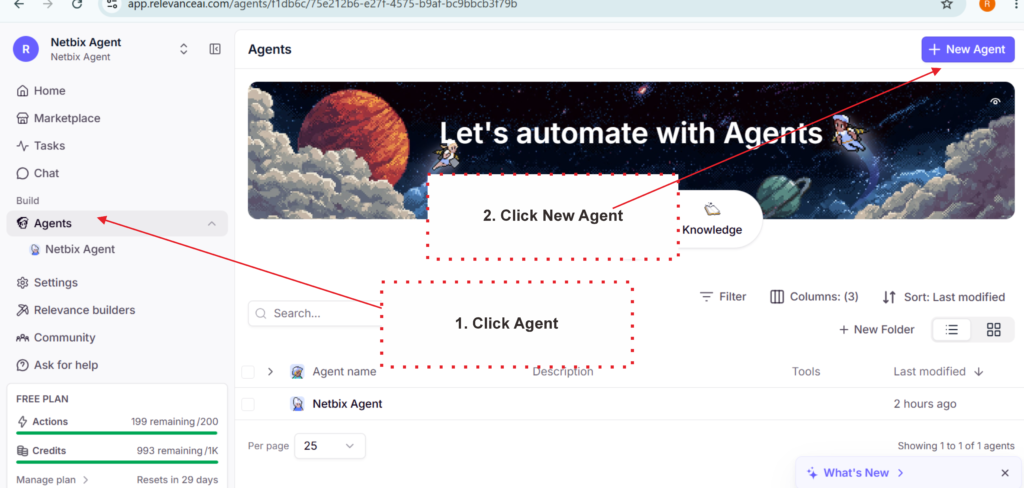
- Once inside the dashboard, click Agents in the left sidebar
- Click Create Agent
- Select the Customer Support template from the available options — this gives you a pre-configured starting point instead of a blank page
Expected result: You’re inside the agent builder with a customer support template loaded, showing fields for agent name, role description, and behavior settings.
Step 2: Define Your Agent’s Role and Behavior
Why it matters: This is where you tell the agent who it is, what it’s allowed to do, and how it should communicate. A clearly defined role produces consistent, on-brand responses. A vague role produces inconsistent answers that confuse customers.
What to do: Fill in the agent configuration fields using this structure:
Agent Name: Give it a name that fits your brand. “Aria from [Company Name]” works better than “Support Bot.”
Role Description — use this as a template:
You are [Agent Name], a customer support assistant for [Company Name].
Your job is to help customers with questions about [product/service].
Always be [friendly / professional / concise].
If you don't know the answer, say so clearly and offer to connect
the customer with a human team member. Never make up information.
Behavior rules to set:
- Always greet the customer by name if available
- Keep responses under 150 words unless a detailed explanation is needed
- If a question involves billing, refunds, or account security — escalate to a human
- Never share internal company information or pricing not listed in the knowledge base
Expected result: An agent with a clear identity, a defined communication style, and explicit boundaries around what it will and won’t handle on its own.
Step 3: Upload Your Knowledge Base
Why it matters: Without a knowledge base, your agent answers from generic AI training data — which means it guesses about your specific products, policies, and processes. Uploading your actual business content is what turns a generic chatbot into a knowledgeable support agent for your company.
What to do:
Start by preparing one or more of the following documents:
- Your existing FAQ page (copy and paste as a text document if needed)
- Product or service documentation
- Return, refund, or cancellation policy
- Pricing page content
- Common support email replies your team already uses
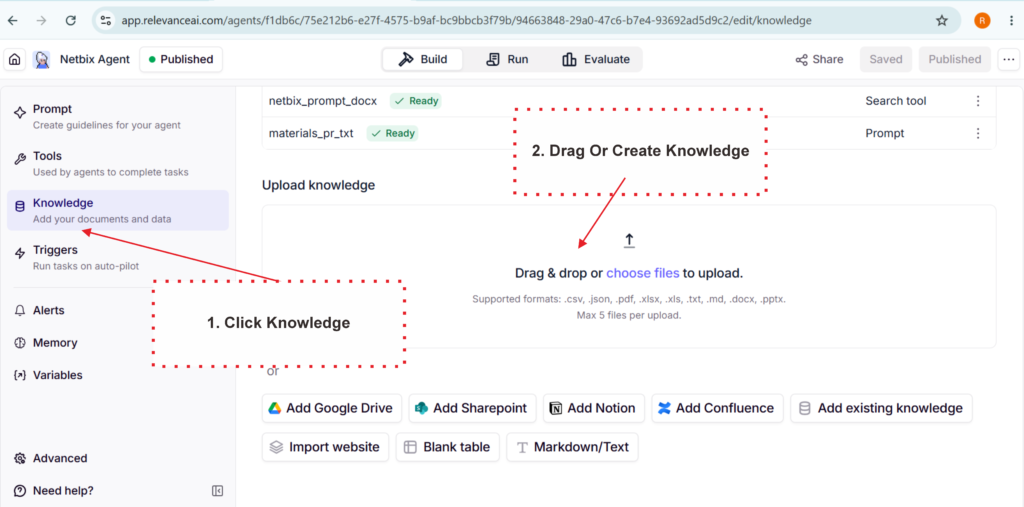
In Relevance AI, go to the Knowledge tab within your agent and click Add Knowledge. Upload your documents as PDF, Word, or plain text files. You can also paste content directly.
Keep each document focused on one topic — one file for FAQs, one for policies, one for product info. This helps the agent retrieve the right information more accurately.
Expected result: Your agent now has access to your actual business information and will pull from it when answering customer questions, rather than generating generic responses.
Step 4: Test Your Agent with Real Questions
Why it matters: Testing before deploying is what separates a professional support agent from one that embarrasses the business publicly. You need to know exactly how the agent responds to the questions your customers actually ask — including the edge cases.
What to do:
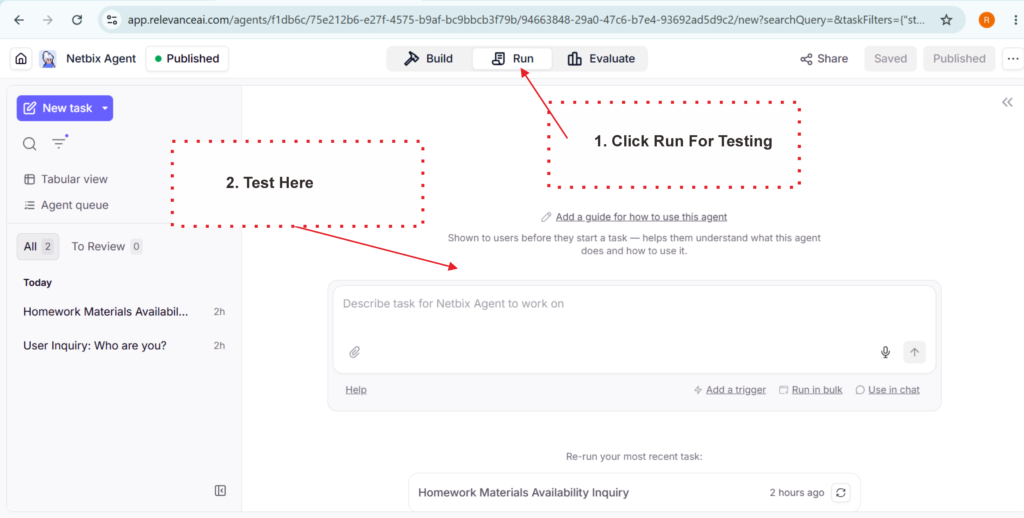
Use the built-in Test panel in Relevance AI to send your agent real customer questions. Test at least these categories:
- A standard question your agent should answer easily (“What is your return policy?”)
- A question that requires detail from your product documentation
- A question the agent shouldn’t have an answer to — to verify it escalates correctly rather than guessing
- A rude or frustrated message — to verify the agent stays calm and professional
- A billing or security question — to confirm escalation logic triggers correctly
For each response, ask: is this accurate, is it on-brand, and would a real customer find this helpful?
Expected result: A list of specific responses to adjust before going live. Most agents need 3–5 prompt or knowledge base refinements after the first round of testing. This is normal — the test phase is where the real quality improvement happens.
Step 5: Deploy Your Agent to a Live Channel
Why it matters: An agent that only exists inside Relevance AI helps no one. Deployment is what connects your agent to the channel where your customers actually are — your website, your email inbox, or your messaging tools.
What to do — choose the deployment method that fits your setup:
Option A — Website Chat Widget (most common): Go to Deploy → Website Widget in Relevance AI. Copy the embed code provided and paste it into your website’s HTML before the closing </body> tag. If you use Webflow, Framer, WordPress, or Shopify, this takes under two minutes.
Option B — Shareable Link: Relevance AI generates a direct URL for your agent. Share this link in your email signature, help center, or social profiles — customers open it and chat immediately, no embed required.
Option C — API or Zapier Integration: For connecting to email, Slack, or WhatsApp, use Relevance AI’s Zapier integration. No coding required — connect through Zapier’s visual workflow builder.
Expected result: Your AI customer support agent is live and accessible to real customers. New conversations appear in your Relevance AI dashboard where you can monitor, review, and continuously improve the agent’s responses.
Video Tutorial
Seeing how an agent is built from scratch is much easier to understand than reading step-by-step. The video tutorial below shows the complete process—from creating a Relevance AI account, filling out the agent configuration, uploading the knowledge base, testing, and deploying the widget to an existing website.
This video is specifically designed for beginners who have never built an AI agent before and want to see the results firsthand before trying it themselves.
This screen-recorded walkthrough shows the complete process of building an AI customer support agent from scratch using Relevance AI—from account setup, configuring agent roles and behaviors, uploading FAQs and policy documents as a knowledge base, testing sessions with real-life questions, and deploying it to a website chat widget. There’s no coding involved. Ideal runtime: 8–12 minutes. Embedded directly below the tutorial section to increase dwell time and provide a visual reference for readers who prefer to learn by watching.
How Businesses Use This Tool
Startups
Early-stage startups use Relevance AI to provide professional-level support coverage without hiring a dedicated support team. A single agent handles all routine queries, freeing the founding team to focus on product and growth.
E-commerce Businesses
Online stores deploy support agents to handle the highest-volume queries automatically — order status, return policies, product availability, and shipping timelines. These four question types alone represent the majority of e-commerce support volume for most stores.
SaaS Companies
SaaS businesses use support agents to answer product how-to questions, troubleshoot common errors, and guide users through onboarding steps. The knowledge base is built from existing help documentation the team has already written.
HR Departments
HR teams deploy internal-facing agents to answer employee questions about leave policies, benefits, onboarding procedures, and payroll timelines. This reduces the volume of repetitive HR queries that consume significant time each week.
Agencies
Digital agencies build white-labeled support agents for clients — particularly for clients who don’t have the internal resources to staff a support function but need professional coverage for their customers.
Operations Teams
Operations teams use agents to handle internal request routing — employees submit requests via the agent, which categorizes them and routes to the right department or triggers an automated workflow.
Enterprise Teams
Large organizations use Relevance AI agents as a first-line filter before tickets reach human agents. The agent resolves what it can, and escalates the rest with a full conversation summary — so the human agent has context before they even read the first message.
Best Practices
Keep your knowledge base current. An agent is only as accurate as the information it has access to. When your policies, pricing, or products change, update the knowledge base the same day. Stale information in a support agent erodes customer trust fast.
Set clear escalation rules from the start. Define explicitly which question types should always go to a human — billing disputes, account security, complaints, and anything requiring account-level access. Build these rules into the agent’s behavior prompt, not as an afterthought.
Write your role prompt in the voice of your brand. If your brand is warm and conversational, your agent should be too. If it’s formal and precise, reflect that. Customers notice when the support experience feels inconsistent with the rest of your brand.
Review conversations weekly. The questions customers actually ask will surprise you. Regular review of conversation logs reveals gaps in your knowledge base and common questions you haven’t addressed yet.
Start with a narrow scope. Don’t try to make your agent handle everything on day one. Start with your top five most common questions, get those responses right, then expand the agent’s scope gradually.
Test edge cases before going live. Always test what happens when a customer asks something completely outside the agent’s knowledge. The response should be graceful — not a confusing error or, worse, a made-up answer.
Common Mistakes to Avoid
Uploading a knowledge base and never updating it. Products change, policies change, pricing changes. An outdated knowledge base produces confidently wrong answers — which is more damaging than no answer at all.
Making the escalation threshold too high. Some teams configure agents to handle everything and almost never escalate. This backfires when frustrated customers receive multiple unhelpful automated responses before reaching a human. When in doubt, escalate sooner.
Skipping the testing phase. The temptation to deploy immediately after setup is real — but going live without testing edge cases almost always results in the agent saying something publicly that it shouldn’t. Test for at least 30 minutes before deploying to real customers.
Writing a vague role prompt. “You are a helpful assistant” gives the agent almost no useful direction. Be specific about the company, the product, the tone, and the boundaries. The more specific the prompt, the more consistent the responses.
Ignoring conversation logs after launch. The logs are where you learn what’s actually working. Teams that review them regularly improve their agents continuously. Teams that ignore them end up with an agent that gives the same wrong answer to the same question for months.
FAQ
What is an AI agent for customer support? A customer support AI agent is a software program that automatically reads incoming customer messages, understands the question, retrieves the relevant answer from a knowledge base, and responds — without human involvement. Unlike a basic chatbot that follows rigid scripts, an AI agent understands natural language and handles questions it hasn’t seen before.
Do I need coding skills to build an AI support agent with Relevance AI? No. Relevance AI is designed entirely for non-technical users. You configure your agent through text prompts and document uploads. No coding, no APIs to set up manually, and no developer required for the basic deployment options.
How long does it take to set up a working customer support AI agent? For a focused agent covering your top 10–15 most common support questions, most users complete the full setup — from account creation to live deployment — in under an hour. The knowledge base preparation (gathering your FAQs and policy documents) is typically the most time-consuming part.
Can the AI agent handle angry or frustrated customers? Yes, with the right configuration. You can instruct the agent in its role prompt to always remain calm, acknowledge frustration, and escalate to a human when the emotional tone of a conversation suggests the customer needs personal attention. The agent itself won’t become defensive or emotional.
What happens when the AI agent doesn’t know the answer? With proper configuration, the agent should respond honestly — acknowledging it doesn’t have the answer and offering to connect the customer with a human team member. This is far better than the agent guessing. Setting this behavior explicitly in the role prompt is one of the most important configuration steps.
Is Relevance AI free to use? Relevance AI offers a free plan that includes enough functionality to build and test a complete support agent. Paid plans unlock higher usage volumes, additional integrations, and advanced features. For most small businesses and teams getting started, the free plan is sufficient for the initial build and early deployment.
Can I use an AI support agent alongside my human support team? Absolutely — this is the most effective model. The agent handles routine, repetitive queries automatically. Complex, sensitive, or unusual cases escalate to human agents with a full conversation summary already provided. Human agents spend their time on work that actually requires human judgment, while the agent covers the volume.
Alternatives Worth Considering
Botpress
What it does: An open-source AI agent platform with strong conversation flow control and multi-channel deployment. More technical than Relevance AI but significantly more customizable. When it’s better: When you need highly specific conversation flows, custom integrations, or want to self-host your agent infrastructure. Best for: Technical teams or businesses with complex support workflows that need precise control over every conversation branch. Official Website: https://botpress.com
Tidio
What it does: A customer support platform combining live chat, AI chatbot, and helpdesk tools in one product. Less flexible for custom agent behavior but faster to deploy for standard e-commerce support. When it’s better: When you need a combined live chat and AI solution out of the box, with e-commerce platform integrations already built in. Best for: E-commerce businesses wanting a simple, all-in-one support solution without custom agent configuration. Official Website: https://tidio.com
Key Takeaways
- AI agents for customer support automation handle repetitive queries automatically, freeing your team for work that requires genuine human judgment.
- Relevance AI is the most beginner-friendly platform for building a support agent — the entire setup happens through prompts and document uploads, with no coding involved.
- The quality of your knowledge base determines the quality of your agent. Accurate, up-to-date content produces accurate, helpful responses.
- Always test before deploying — especially edge cases and escalation scenarios.
- Start narrow: get your top five most common questions handled perfectly before expanding the agent’s scope.
- Review conversation logs regularly. They’re the fastest way to identify gaps and continuously improve your agent’s performance.
- The most effective model combines an AI agent for high-volume routine queries with human agents for complex, sensitive cases.
Conclusion
Customer support is one of the clearest and most immediate wins for AI automation in business. The queries are repetitive, the correct answers already exist in your documentation, and the cost of slow or inconsistent responses is measurable in lost customers and wasted staff time.
Building a customer support AI agent with Relevance AI doesn’t require a development team, a large budget, or months of implementation. It requires a clear description of your agent’s role, your existing support documentation, and an hour of focused setup time.
The businesses seeing the most value from AI customer service aren’t the ones with the most sophisticated technology — they’re the ones that identified their highest-volume, most repetitive support queries and automated those first. Start there. Get one agent working well, learn from the conversation logs, and expand from that foundation.
Your customers don’t care whether a response came from a human or an AI. They care whether it was fast, accurate, and helpful. A well-built AI support agent delivers all three — consistently, at scale, and around the clock.