
Learn how to automate business research and reporting using ChatGPT and Make — both free to use. A practical guide for business teams with no coding needed.
Introduction
Every business runs on information. Market trends, competitor moves, industry news, performance data — teams spend hours every week searching, reading, summarizing, and formatting research into reports that decision-makers can act on.
The problem is not that research is difficult. It’s that it’s slow, repetitive, and pulls skilled people away from work that actually requires their judgment. A marketing manager spending three hours compiling a weekly competitor report is three hours not spent on strategy. An operations analyst manually collecting data from five different sources every Monday morning is an analyst not solving real operational problems.
AI research automation changes this entirely. Instead of a team member manually searching, reading, and compiling, an AI research agent does it automatically — finding relevant information, synthesizing it into a structured report, and delivering it on schedule without anyone lifting a finger.
This guide is for corporate teams, HR departments, startups, and business professionals who want to automate their research and reporting workflows using tools that are completely free to start. The combination we’ll use is ChatGPT for AI-powered research and synthesis, and Make for automated scheduling and delivery. By the end, you’ll have a working research workflow that saves your team hours every single week.
Quick Summary
- AI research automation uses AI to collect, synthesize, and report on business-relevant information automatically.
- This guide uses ChatGPT (free) and Make (free plan) — no paid subscriptions required to get started.
- A basic automated research and reporting workflow can be set up and running in under an hour.
- Works for competitive intelligence, market monitoring, industry news tracking, and internal reporting.
- Suitable for marketing teams, operations, HR, agencies, startups, and enterprise teams equally.
Table of Contents
- What You’ll Learn
- Why AI Research Automation Matters for Business Teams
- Tool Overview: ChatGPT + Make
- Step-by-Step: Build Your AI Research and Reporting Workflow
- Video Tutorial
- How Businesses Use This Tool
- Best Practices
- Common Mistakes to Avoid
- Alternatives Worth Considering
- FAQ
- Key Takeaways
- Conclusion
What You’ll Learn
- Why manual research and reporting is one of the highest-cost repetitive tasks in business
- How ChatGPT and Make work together to automate your research workflow for free
- How to build a structured research prompt that produces consistent, report-ready output every time
- How to schedule and deliver automated reports to your team without manual involvement
- Real use cases across marketing, HR, operations, and executive teams
- What mistakes to avoid so your research outputs stay accurate and actionable
Why AI Research Automation Matters for Business Teams
Manual business research follows a predictable and expensive pattern. Someone needs information. They open a browser, search multiple queries, read through results, filter out irrelevant content, take notes, synthesize findings, and format everything into a readable report. Then they do it again next week.
For a single report, this might take two to four hours. Multiplied across a team, across departments, across an entire year — the cost in time and productivity is significant.
Beyond the time cost, manual research has quality problems:
- Inconsistency — different team members search differently, prioritize different sources, and structure findings differently
- Recency gaps — manual research captures what someone found today, not necessarily the most current or relevant information
- Reporting lag — by the time a manual report is compiled and distributed, the information may already be outdated
- Scope limitations — humans can only process so many sources in a given time; AI research agents synthesize far more, faster
AI reporting agents solve all of these at once. The same research runs every time, producing consistently structured output, delivered on schedule — without the lag, the inconsistency, or the time cost.
Tool Overview: ChatGPT + Make
This workflow uses two free tools working together. Here’s what each one does:
ChatGPT (Free Plan)
ChatGPT is OpenAI’s AI assistant, available for free at https://chatgpt.com. The free plan now includes web search — meaning ChatGPT can browse the internet for current information and synthesize it into structured, readable reports based on your prompt instructions.
For business research automation, ChatGPT acts as your AI research analyst. You give it a structured prompt describing exactly what to research and how to format the output, and it produces a clean, organized report — pulling from live web sources when needed.
Why ChatGPT: It’s the most widely accessible AI tool available, the free plan includes web browsing, and it handles complex research prompts with nuanced, well-structured output. No account upgrade required to get started.
Official Website: https://chatgpt.com
Make (Free Plan)
Make is a visual workflow automation platform that connects apps and schedules automated processes. In this workflow, Make triggers ChatGPT to run your research prompt on a schedule and then delivers the output automatically to your team’s preferred destination — Slack, email, or Google Docs.
Why Make: It’s the most visual and beginner-friendly automation platform available. The free plan includes 1,000 operations per month — more than enough to run weekly research reports across several topics.
Official Website: https://make.com Official Documentation: https://www.make.com/en/help
What you’ll need before starting:
- A free ChatGPT account → https://chatgpt.com
- A free Make account → https://make.com
- A destination for your reports — Slack, Gmail, or Google Docs (all free)
Step-by-Step: Build Your AI Research and Reporting Workflow
For this tutorial, we’ll build a Weekly Competitor Intelligence Report — one of the most universally valuable recurring research workflows for any business team. The same structure applies to any research topic you want to automate.
Step 1: Define Exactly What Your Report Needs to Cover
Why it matters: Vague research produces vague reports. Before writing a single prompt, defining precisely what your report must cover is what separates a useful weekly intelligence brief from a generic collection of loosely related information. This step takes five minutes and determines the quality of everything that follows.
What to do: Write down the answers to these four questions:
- What is the subject? (Which competitor, industry, topic, or market are you researching?)
- What specific information matters most? (Product updates, pricing changes, news coverage, content published, hiring activity?)
- What time window is relevant? (Last 7 days, last 30 days?)
- What format does the output need to be in? (Executive summary, bullet points, structured sections?)
Example for a weekly competitor report:
- Subject: Competitor “BrandX” in the digital marketing industry
- Information needed: New content published, product announcements, press coverage, social media activity
- Time window: Last 7 days
- Format: Three sections — Key Developments, Content Activity, Strategic Observations — each with 3–5 bullet points
Expected result: A clear research brief you can translate directly into a ChatGPT prompt — no guessing about what to include or how to structure the output.
Step 2: Build and Test Your Research Prompt in ChatGPT
Why it matters: ChatGPT produces dramatically better research output when given a structured prompt that specifies the subject, scope, time frame, and desired output format. A well-built prompt turns ChatGPT from a general assistant into a dedicated research analyst that delivers a formatted, consistent report on demand — every single time.
What to do:
- Go to https://chatgpt.com and sign in to your free account
- Start a new chat
- Make sure web search is enabled — look for the search icon in the chat interface and confirm it’s active
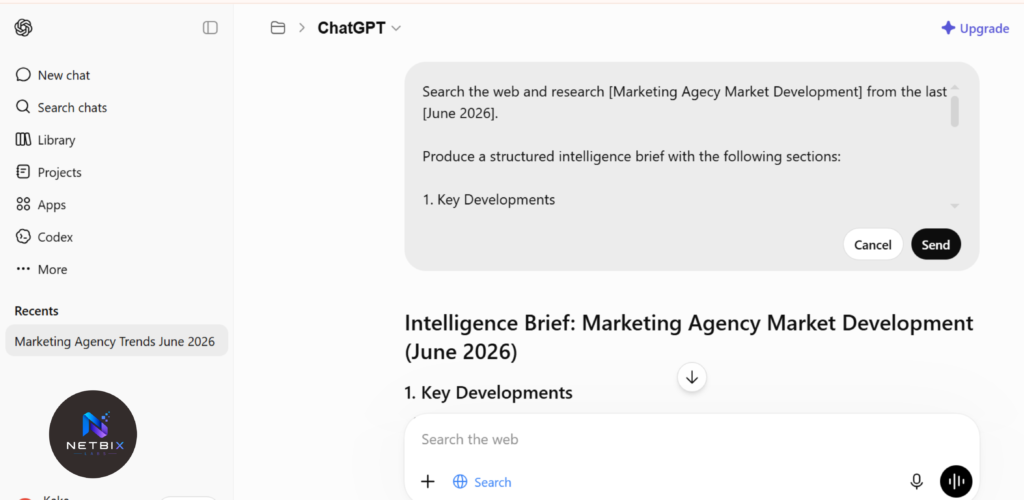
- Paste your research prompt using this structure:
Search the web and research [subject] from the last [time window].

Produce a structured intelligence brief with the following sections:

1. Key Developments
List the 3–5 most significant news, announcements, or updates
related to [subject] in the last [time window].

2. Content and Communication Activity
Summarize any notable content published, campaigns launched,
or public communications from [subject] in this period.

3. Strategic Observations
Based on the above findings, identify 2–3 patterns or signals
that a business should be aware of.

Format your output as structured bullet points under each heading.
Keep the total response under 500 words.
Use only information you can verify from current web sources.
- Review the output carefully — check for accuracy, relevance, and format consistency
- If anything is off, refine your prompt and run it again until the output meets your standard
Expected result: A structured, three-section intelligence brief formatted exactly as you specified — ready to distribute or paste into a report document with no additional formatting work.
Step 3: Save Your Research Prompt as a Reusable Template
Why it matters: The goal of research automation is consistency — the same quality report, every time, without rebuilding the prompt from scratch each week. Saving a tested, refined prompt as a reusable template is what transforms a one-time research exercise into a repeatable automated workflow anyone on your team can run.
What to do:
- Once your prompt produces a consistently good output, copy the final version
- Save it in a shared team location — Google Docs, Notion, or your team’s knowledge base
- Label it clearly: report name, topic, intended frequency, and last updated date
- Add a brief note explaining what the report covers and who it’s for — this makes it easy for any team member to run it without needing to understand the prompt itself
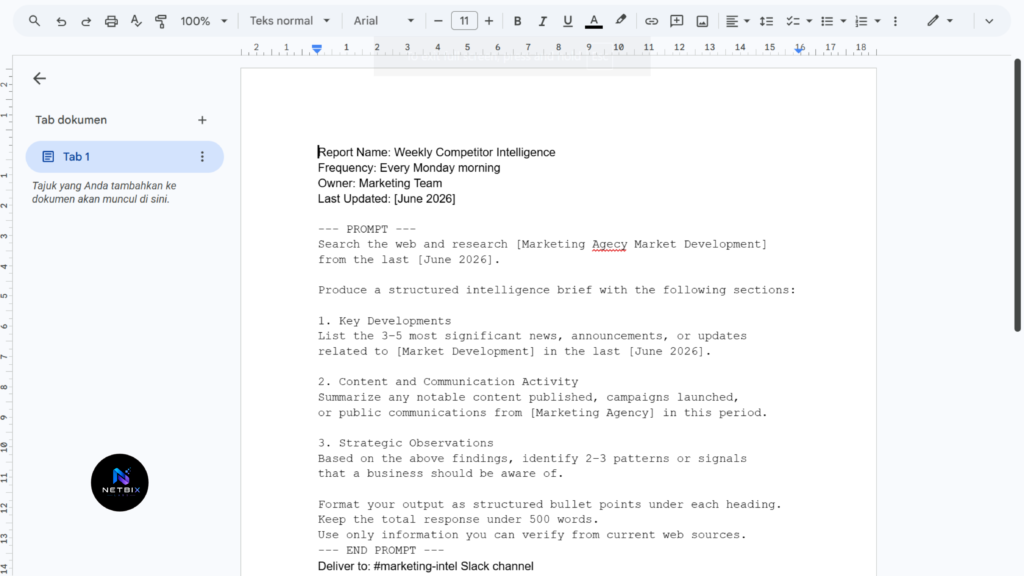
Example template document structure:
Report Name: Weekly Competitor Intelligence — BrandX
Frequency: Every Monday morning
Owner: Marketing Team
Last Updated: [date]

--- PROMPT ---
[paste your finalized ChatGPT prompt here]
--- END PROMPT ---

Deliver to: #marketing-intel Slack channel
Expected result: A saved, tested prompt template that any team member can open, copy, and run in ChatGPT in under two minutes — producing a consistent, structured intelligence brief without needing to know how to write prompts themselves.
Step 4: Automate Weekly Delivery with Make
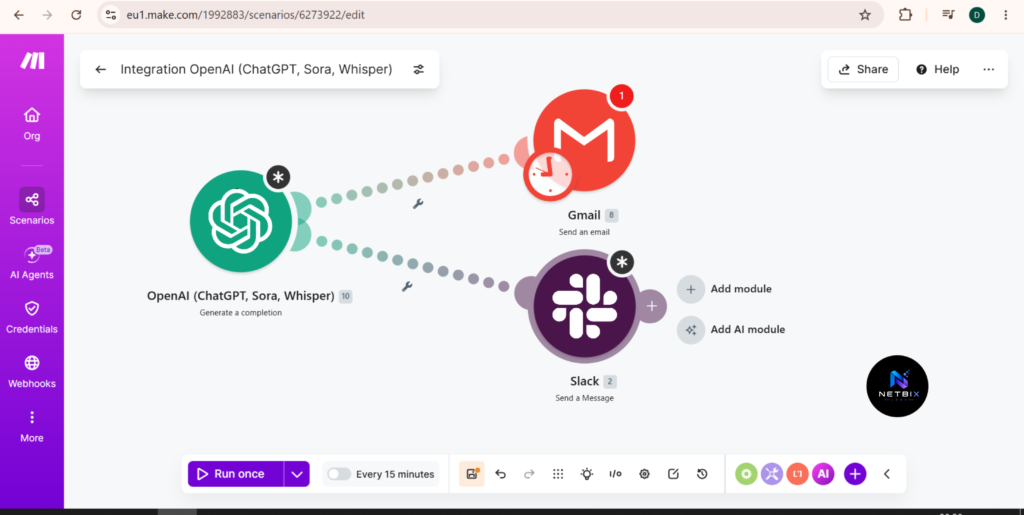
Why it matters: Running a ChatGPT research prompt manually every week is still a manual task. Connecting ChatGPT to Make via the OpenAI integration is what completes the automation — the report runs on a defined schedule and the output is delivered automatically to your team’s Slack channel, email inbox, or Google Doc without anyone initiating it.
Before you start — get your OpenAI API key:
- Go to https://platform.openai.com/api-keys
- Sign in with the same account you use for ChatGPT
- Click Create new secret key — give it a name like “Make Integration”
- Copy the key immediately and save it somewhere safe — you will only see it once
- Important: new OpenAI accounts come with free credits. Once those run out, you’ll need to add a small amount of credit (minimum $5) to keep using the API. The cost per research report is typically fractions of a cent.
What to do — follow these steps exactly:
Part A — Set up the Schedule Trigger:
- Log in to Make at https://make.com and click Create a new scenario
- Click the large + button in the center of the Canvas
- Search for Schedule and select it
- Configure the schedule:
- Run scenario: Select Every week
- Day of week: Select your preferred day (e.g., Monday)
- Time: Set the time you want the report delivered (e.g., 07:00 AM)
- Timezone: Select your local timezone
- Click OK to save the trigger
Part B — Set up the OpenAI Module:
- Click the + icon to the right of your Schedule module
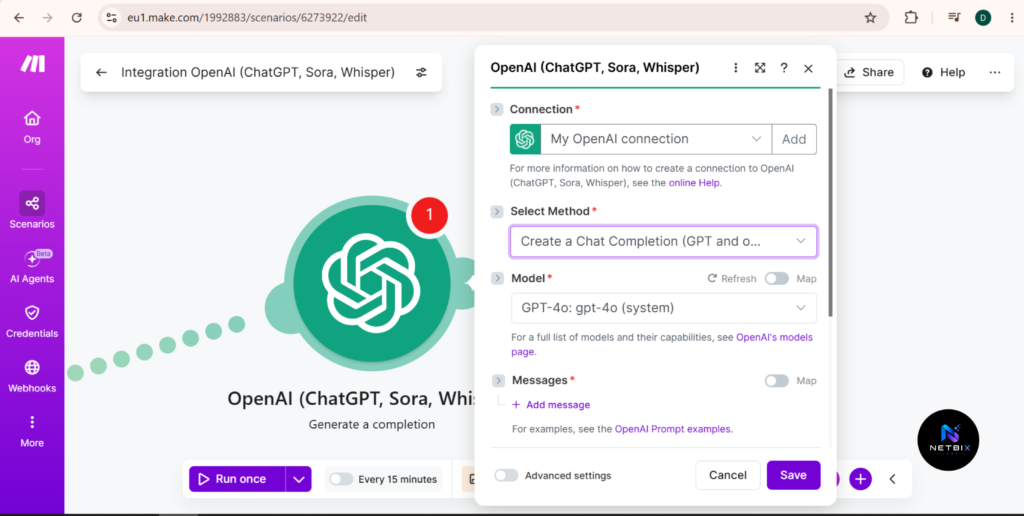
- Search for OpenAI (ChatGPT) in the module search panel
- Select the action Create a Chat Completion — this is the correct action for GPT models. Do NOT select “Create a Completion” as that uses older models
- Click Add to create a new connection
- In the connection setup:
- Connection name: Type any name, e.g., “OpenAI Research”
- API Key: Paste the API key you copied earlier
- Click Save
- Now configure the module settings:
- Model: Select gpt-4o-mini — this is the most cost-effective model for research reports. If you want higher quality output, select gpt-4o (slightly higher cost but still very affordable)
- Max Tokens: Set to 1000 — this controls the maximum length of the response. 1000 tokens is approximately 700–750 words, which is enough for a structured research report
- Temperature: Set to 0.5 — this controls creativity. Lower values (closer to 0) produce more factual, consistent output. Higher values produce more varied responses. 0.5 is the right Balance for research reports
- Scroll down to the Messages section — this is where you write your prompt:
- Click Add item
- Role: Select System
- Content: Paste this system message:
You are a professional business research analyst. Your job is to produce structured, factual intelligence reports based on the topic provided. Always format your output with clear section headings and bullet points. Keep responses concise and under 500 words. Focus only on verified, factual information.- Click Add item again
- Role: Select User
- Content: Paste your research prompt from Step 3 here — this is the actual research instruction ChatGPT will follow each time the scenario runs
- Click OK to save the module
Part C — Set up the Delivery Module:
Choose where you want the report delivered and follow the matching instructions:
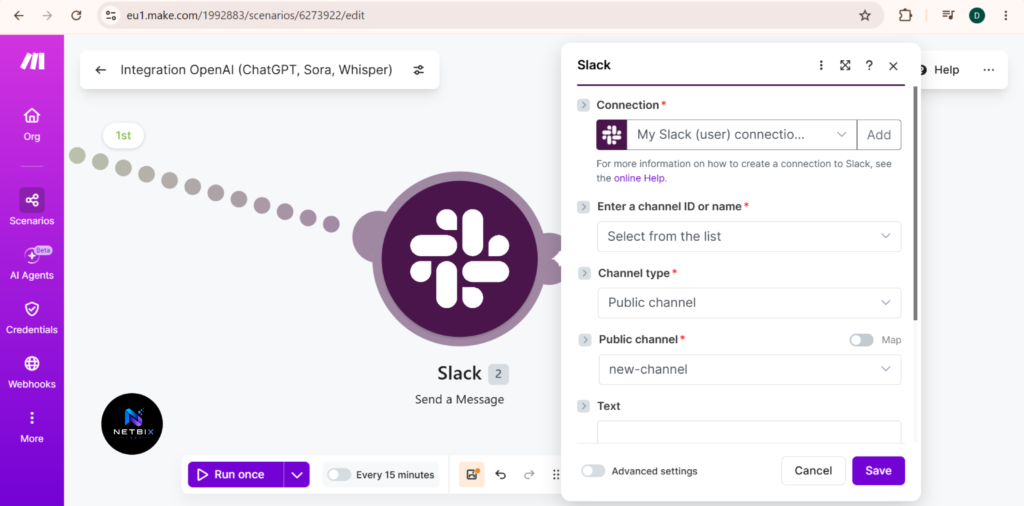
Option 1 — Deliver to Slack:
- Click the + icon to the right of your OpenAI module
- Search for Slack and select Create a Message
- Connect your Slack account when prompted
- Configure the message:
- Channel: Select the Slack channel where the report should be posted (e.g., #weekly-intelligence)
- Text: Click inside the Text field, then click the variable icon. Select the output from your OpenAI module — it will appear as something like 1. Content[]: Content or Choices[]: Message: Content. This maps the AI-generated report directly into the Slack message
- Click OK to save
Option 2 — Deliver to Gmail:
- Click the + icon to the right of your OpenAI module
- Search for Gmail and select Send an Email
- Connect your Gmail account when prompted
- Configure the email:
- To: Enter the recipient email address or distribution list
- Subject: Type a subject line, e.g., “Weekly Competitor Intelligence Report — [week date]”
- Content: Map the OpenAI output variable the same way as Slack above
- Click OK to save
Part D — Test and Activate:
- Click Run Once in the bottom left corner of the Make canvas
- Wait 30–60 seconds for all three modules to execute
- Check your Slack channel or Gmail inbox to confirm the report arrived correctly
- If a module shows a red error indicator, click on it to read the error message — the most common issues are an incorrect API key (re-enter it) or an incorrectly mapped output variable (re-select the OpenAI output from the variable dropdown)
- Once the test passes successfully, click the Scheduling toggle at the bottom left to activate the scenario
Expected result: A fully automated reporting workflow running on your set schedule. Every week, Make triggers the OpenAI module, ChatGPT generates the research report, and it’s delivered automatically to your Slack or Gmail — with zero manual involvement required.
Step 5: Review, Refine, and Expand
Why it matters: Automated research is only valuable if the outputs stay accurate and relevant over time. Building a brief weekly review into your process — especially in the first month — ensures the workflow continues to deliver quality intelligence as your business priorities shift and topics evolve.
What to do:
- Spend 5–10 minutes each week reviewing the automated report output
- Flag any sections that were consistently off-topic, too shallow, or missed key developments
- Update your saved prompt template to address recurring gaps
- Once your core competitor report is running reliably, duplicate the Make scenario and create a separate prompt for a second research topic — industry news, market trends, or a second competitor
Expected result: A research and reporting system that improves over time — starting with one reliable automated report and expanding into a broader intelligence operation that keeps your team informed without consuming their time.
Tutorial Video
This screen-recorded walkthrough shows the complete process of building an automated research and reporting workflow using ChatGPT (free) and Make (free plan) — from defining the research scope, building and testing a structured prompt in ChatGPT with an active web search, refining the output, saving the prompt as a team template, connecting ChatGPT to Make via the OpenAI integration, setting up a weekly Schedule trigger, controlling automatic posting to Slack, to conducting a test run and activating the scenario.
No subscription fee is required. Ideal length: 10–14 minutes. Embedded right at the bottom of the tutorial to provide a complete visual guide for readers who want to implement this system in their teams without additional budget.
Startups
Startups use ChatGPT + Make to monitor competitors and industry developments without a dedicated research function. Founders receive a weekly intelligence brief in their Slack every Monday morning — keeping them informed without pulling focus from building the product.
Marketing Teams
Marketing teams automate weekly reports on competitor content activity, campaign launches, and industry trends. Instead of a team member spending Friday afternoon manually compiling what competitors published that week, the report arrives automatically on Monday morning ready for the team meeting.
HR Departments
HR teams use this workflow to monitor changes in employment regulations, salary benchmarks, and industry hiring trends. A weekly automated brief keeps HR informed about developments that affect their policies and talent strategy — without adding to their already full workload.
Agencies
PR and marketing agencies build automated client intelligence reports — tracking media coverage, competitor activity, and industry news for each client. Reports are generated and delivered to account managers automatically, replacing hours of manual monitoring per client per week.
Operations Teams
Operations teams automate monitoring of supplier news, logistics developments, and regulatory updates relevant to their supply chain. Early awareness of potential disruptions or policy changes allows faster operational response and better planning.
Enterprise Teams
Large organizations use ChatGPT + Make as part of a broader business intelligence stack — automating the research and information-gathering layer that feeds into executive briefings and strategic planning processes. The AI handles information gathering; senior staff focus on interpretation and recommendation.
Creators and Consultants
Individual consultants use automated research workflows to stay current in their field without spending hours reading. A weekly briefing on their area of expertise — delivered to their inbox automatically — keeps their client advice current and their content ideas fresh.
Best Practices
Be specific about time windows in every prompt. Without a defined time window, ChatGPT may include older information alongside recent findings. Always specify “last 7 days” or “last 30 days” to keep your reports current and relevant to what’s happening now.
Always keep web search enabled. For research prompts, web search must be active in ChatGPT to pull current information. Confirm the search icon is enabled before running any research prompt — without it, ChatGPT answers from training data only, which may be outdated.
Verify important findings before acting on them. AI research automation is a starting point and a time-saver — not a replacement for human judgment on high-stakes decisions. When a report surfaces something significant, verify it against the original source before taking action.
Build one report workflow at a time. Start with your single most valuable recurring research need. Get that running reliably and consistently before adding a second. Two well-built workflows deliver more value than five poorly maintained ones.
Review and update prompts quarterly. Research priorities shift as your business evolves. Every three months, review each automated report template and ask whether it still captures what your team actually needs. A prompt written six months ago may no longer reflect your current competitive landscape.
Share your prompt templates with the team. When everyone on your team has access to the same research prompts, the consistency of intelligence across the organization improves. Store templates in a shared Google Doc or Notion page that the whole team can access and run.
Common Mistakes to Avoid
Running research prompts without web search enabled. This is the most common mistake. Without web search active, ChatGPT answers from training data — which has a knowledge cutoff and won’t reflect recent developments. Always confirm web search is on before running any research prompt.
Writing prompts that are too broad. “Research the marketing industry” will produce a generic overview that’s useful to no one. “Research changes in B2B content marketing strategies in the last 30 days” produces something actionable. Specificity is the difference between a report worth reading and one worth ignoring.
Automating before the prompt is fully tested. Connect to Make only after you’ve run the prompt manually several times and confirmed the output quality is consistent. Automating a poorly written prompt delivers a poor report on a schedule — which is worse than no automation at all.
Setting up automation and never reviewing it. An automated report that no one reads is wasted infrastructure. Build the review step into your team’s weekly rhythm from the start — even 5 minutes of review per report maintains quality and ensures the workflow keeps delivering value.
Expecting ChatGPT to know things it can’t find publicly. ChatGPT’s web search only accesses public information. It cannot access paywalled databases, private company data, or proprietary research. Don’t prompt it to provide information that isn’t publicly available — it will either fail or produce inaccurate results.
FAQ
What is AI research automation for business? AI research automation uses AI tools to perform research tasks — searching for information, synthesizing findings, and producing structured reports — automatically and on a schedule. Instead of team members manually conducting research, an AI agent handles the information gathering and the output is delivered directly to whoever needs it.
Is ChatGPT’s web search accurate enough for business research? For most business intelligence use cases — competitor monitoring, industry news, market trends — ChatGPT with web search enabled is accurate and reliable when prompts are well-structured. It pulls from live public web sources, which keeps results current. For high-stakes decisions, always verify key findings against primary sources before acting.
Do I need to pay for anything to build this workflow? No. ChatGPT’s free plan includes web search capability. Make’s free plan includes 1,000 operations per month. For a workflow running weekly reports, that’s well within the free tier limit. The only cost might arise if you scale to very high report volumes — but for most business teams starting out, everything runs for free.
How fast does the automated report deliver after the schedule triggers? Make triggers the workflow at your scheduled time, ChatGPT processes the research prompt, and the report is delivered to your Slack, email, or Google Doc within 2–5 minutes of the trigger firing — depending on the complexity of the research prompt.
Can I automate reports for multiple topics simultaneously? Yes. Once your first research workflow is running reliably, you can duplicate the Make scenario and create a separate ChatGPT prompt for each additional topic. Each workflow runs independently on its own schedule and delivers to its own destination.
How many operations does this workflow use from Make’s free plan? Each module activation counts as one operation. This three-module workflow (Schedule + OpenAI + Slack) uses three operations per run. Running one weekly report uses 12 operations per month — well within Make’s 1,000 free operations. You could run over 80 weekly reports before reaching the free plan limit.
What types of business research are not suitable for this workflow? Research requiring access to paywalled databases, proprietary industry reports, internal company data, or confidential sources is not suitable for ChatGPT web search automation. It is also not appropriate for legal, medical, or compliance research where professional expertise and verified primary sources are mandatory.
Alternatives Worth Considering
Perplexity AI
What it does: An AI-powered research engine that answers questions using real-time web sources and cites every source in its response. Particularly strong for research tasks that require source transparency and auditability. When it’s better: When source citation is a priority — for example, research that will be shared with clients or executives who need to verify where information came from. Note that API access for automation requires a paid Pro plan. Best for: Teams that prioritize cited, auditable research output and are willing to run reports manually rather than fully automating delivery. Official Website: https://perplexity.ai
Notion AI
What it does: AI writing and research assistant built directly into Notion. Can summarize web content, generate research briefs, and organize findings within your existing Notion workspace. When it’s better: When your team already lives in Notion and wants to keep research outputs in the same environment as their notes, projects, and documentation — without switching to another tool. Best for: Teams using Notion as their primary workspace who want lightweight AI research assistance integrated into their existing workflow. Official Website: https://notion.so
Key Takeaways
- AI research automation eliminates the most time-consuming part of business intelligence — the manual searching, reading, and compiling — and replaces it with structured reports generated and delivered automatically.
- ChatGPT (free) + Make (free plan) is the most accessible combination for building an automated research and reporting workflow — no paid subscriptions required to get started.
- The quality of your research prompt determines the quality of your report. Define the subject, scope, time window, and output format before writing a single word of your prompt.
- Always confirm ChatGPT’s web search is enabled before running research prompts — without it, results are based on training data only and may be outdated.
- Start with one recurring research report, get it running reliably, then expand to additional topics.
- Always verify significant findings against primary sources before acting on them — AI research automation accelerates discovery, human judgment validates it.
- At zero cost to start, this workflow delivers an immediate ROI measurable in hours of recovered team time from the first week it runs.
Conclusion
Business research is essential. Spending hours every week doing it manually is not.
The companies that move fastest on market opportunities, competitive threats, and industry shifts are not the ones with the largest research teams — they’re the ones with the best systems for staying informed without that information gathering consuming disproportionate time and resources.
AI research automation with ChatGPT and Make makes this achievable for any business team, regardless of size or budget. A structured prompt, a saved template, a simple Make scenario connecting to your delivery channel — that’s the entire system. It costs nothing to build, takes an afternoon to set up, and runs indefinitely once activated.
The weekly competitor report, the industry news brief, the market trend summary — these are the reports your team needs to make better decisions. They should arrive automatically, consistently, and accurately, without anyone spending their morning searching the web and formatting a document.
Build the first one this week. The time your team gets back starts from the moment it goes live.