Learn how to build a professional business website using an AI website builder — no code, no designer needed. A beginner’s guide to launching faster with AI.
Introduction
Hiring a web designer, waiting weeks for revisions, and spending thousands of dollars used to be the only way to get a professional business website. For most small businesses, startups, and even corporate teams launching new projects, that process is too slow and too expensive.
AI website builders have made this process dramatically simpler. You describe your business, your goals, and your preferred style — and AI generates a complete, professional website in minutes. No design skills required. No code. No lengthy back-and-forth with an agency.
This guide focuses on one tool that consistently delivers the best results for beginners: Framer. By the end, you’ll know exactly how to use it to build and launch a real business website — even if you’ve never built a website before.
Quick Summary
- AI website builders generate complete, professional websites from a short text description.
- Framer is the best starting point for beginners — it produces polished results fast, with zero coding required.
- A basic business website or landing page can be live in under an hour.
- Works for startups, marketing teams, HR departments, agencies, and solo professionals.
- No design or technical background needed.
Table of Contents
- What You’ll Learn
- Why AI Website Builders Matter for Businesses
- Tool Overview: Framer
- Step-by-Step: Build Your Business Website with Framer AI
- Video Tutorial
- Workflow Diagram
- How Businesses Use Framer
- Best Practices
- Common Mistakes to Avoid
- Alternatives Worth Considering
- FAQ
- Key Takeaways
- Conclusion
What You’ll Learn
- What makes Framer the best AI website builder for beginners
- How to generate a complete website from a single prompt
- How to customize your site without touching any code
- How to connect a custom domain and go live
- Real examples of how businesses use AI web design tools
- What to avoid so your site looks professional from day one
Why AI Website Builders Matter for Businesses
Every business needs a website — but not every business has the time, budget, or team to build one properly.
Traditional options come with real trade-offs:
- Hiring a designer or agency → expensive, slow, and requires clear briefs most non-designers struggle to write
- DIY with page builders like Wix or Squarespace → faster, but still requires design decisions and manual setup
- Building from scratch → only an option if you have a developer on the team
AI website builders remove most of these friction points. You provide Context about your business, and the AI handles layout, copywriting, color palette, and structure. What’s left for you is reviewing, personalizing, and publishing.
For a startup launching a landing page to test an idea, a marketing team running a campaign, or an HR department building a recruitment site — the ability to go from idea to live website in a single afternoon is genuinely transformative.
Tool Overview: Framer
Framer is a professional website builder with a powerful AI layer built in. It was originally known as a design and prototyping tool, but it has evolved into one of the most capable AI website builders available today.
What sets it apart for beginners is the quality of its output. Most AI website generators produce generic-looking results. Framer produces sites that look like they were designed by a professional — clean typography, smart layouts, and smooth interactions — all from a short description.
Key Features:
- AI Site Generator — describe your business in a few sentences and Framer generates a complete multi-section website
- AI Copywriting — rewrites or generates page copy based on your brand tone and goals
- Visual editor — drag-and-drop customization with no code required
- Built-in CMS — for blogs, case studies, or job listings
- Custom domain connection — publish to your own domain directly from Framer
- Responsive by default — every site looks correct on desktop, tablet, and mobile automatically
- Fast hosting included — no separate hosting setup needed
Why businesses use it:
- Fastest path from idea to live website for non-technical teams
- Design quality is consistently professional without design expertise
- Iteration is fast — changes publish instantly
- Free plan available; paid plans start at $10/month
Ideal use cases:
- Business landing pages and product pages
- Campaign microsites
- Company or portfolio websites
- Recruitment and HR pages
- Event and launch pages
Official Website: https://framer.com
Official Documentation: https://www.framer.com/learn/
Step-by-Step: Build Your Business Website with Framer AI
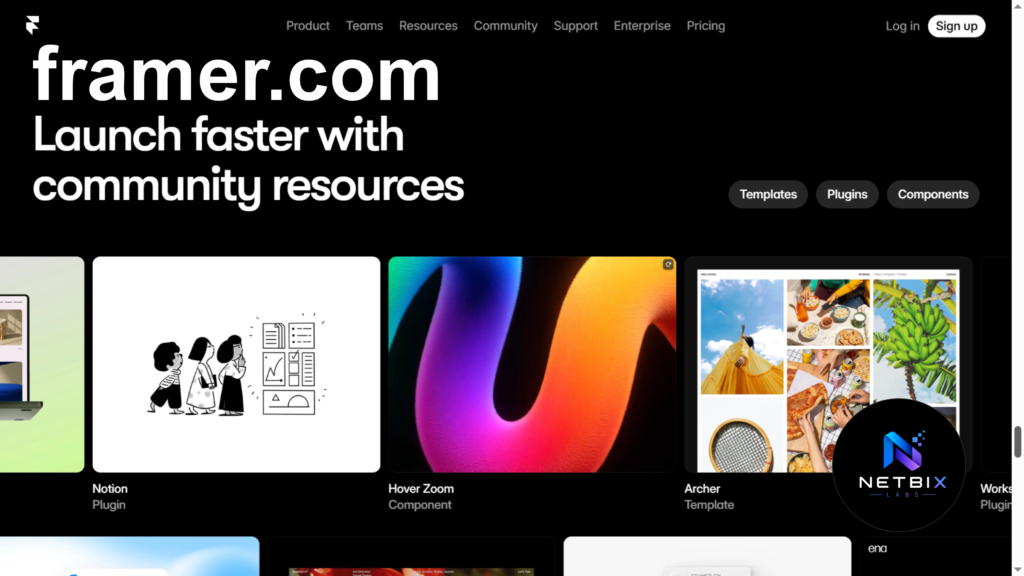
Step 1: Create a Free Framer Account
Why it matters: Framer’s AI generator is available on the free plan. You can build, customize, and preview your full website before paying anything. You only need a paid plan when you’re ready to connect a custom domain.
What to do:
- Go to https://framer.com
- Click Get Started for Free
- Sign up with your Google account or email
- Once inside, click New Project
- Select AI Website from the project options
Expected result: You’re inside Framer’s workspace with the AI generation interface open and ready.
Step 2: Describe Your Business to the AI
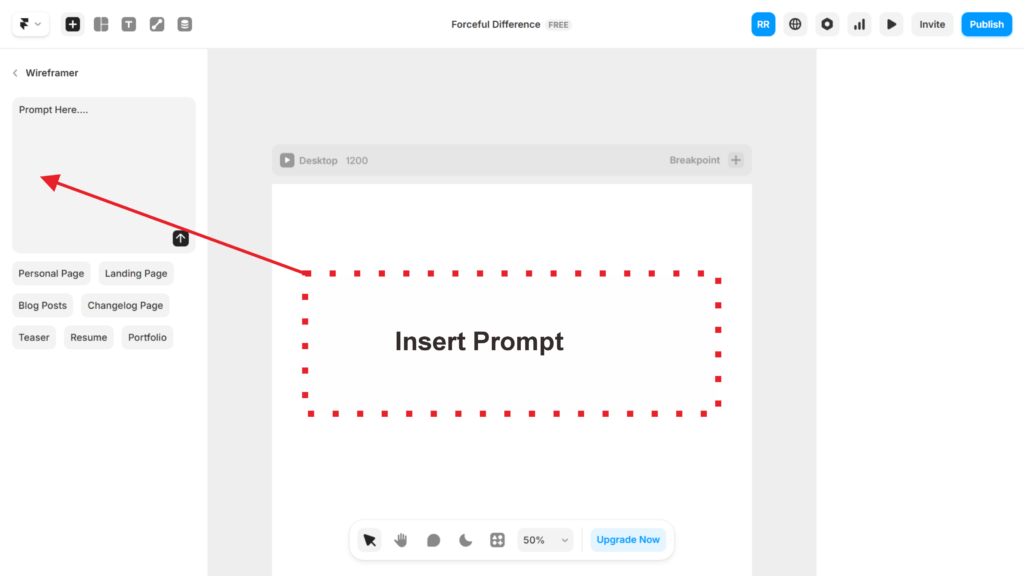
Why it matters: This is the most important step. The description you give Framer directly determines the quality of the website it generates. More context produces better results.
What to do: In the AI prompt field, write a short description using this structure:
[Business name] is a [type of business] that helps [target customer]

with [main service or product]. Our tone is [professional / friendly /

bold / minimal]. We want the site to include: a hero section,

about us, services, and a contact section
with [main service or product]. Our tone is [professional / friendly /
bold / minimal]. We want the site to include: a hero section,
about us, services, and a contact section
Example Prompt
Build a professional website for Brightpath Consulting, a business strategy firm that helps early-stage startups establish scalable operational processes and business systems.

Brand Positioning:

* Professional, trustworthy, and approachable
* Target audience: startup founders, entrepreneurs, and small business owners
* Goal: generate consultation inquiries and establish credibility

Design Requirements:

* Modern corporate design
* Clean and minimal layout
* Mobile-responsive across all devices
* Fast-loading pages
* Professional typography
* Consistent spacing and visual hierarchy
* High-converting call-to-action buttons

Website Structure:

1. Hero Section

* Strong headline communicating the firm's value proposition
* Supporting subheadline
* Primary CTA: "Book a Consultation"
* Secondary CTA: "Learn More"
* Professional business illustration or image placeholder

2. Services Section
Include service cards for:

* Business Process Development
* Operational Strategy
* Startup Growth Planning
* Workflow Optimization
* Team Structure Consulting

Each service should include:

* Icon
* Short description
* Learn More button

3. About Section

* Company story
* Mission statement
* Core values
* Why clients choose Brightpath Consulting

4. Results Section
Display:

* Key business metrics
* Number of startups served
* Client satisfaction rate
* Years of experience

5. Testimonials Section
Include realistic client testimonials with:

* Client name
* Company name
* Position
* Testimonial quote

6. Process Section
Explain consulting engagement process:

* Discovery
* Strategy
* Implementation
* Optimization

7. FAQ Section
Include common startup consulting questions.

8. Contact Section
Create a fully functional contact form containing:

* Name
* Company
* Email
* Phone Number
* Message

Form Requirements:

* Input validation
* Success confirmation message
* Error handling

Navigation:

* Home
* Services
* About
* Testimonials
* FAQ
* Contact

Footer:

* Company information
* Quick links
* Contact details
* Social media links
* Copyright notice

SEO Requirements:

* Generate SEO-friendly page structure
* Proper heading hierarchy
* Meta title and meta description
* Semantic HTML

Technical Requirements:

* All navigation links must function correctly.
* All buttons must perform a working action.
* No placeholder pages or broken links.
* Ensure accessibility best practices.
* Create a complete, production-ready website suitable for a real consulting business.
Keep it to 2–4 sentences. You don’t need to describe design details — Framer handles that automatically.
Expected result: Framer generates a complete, multi-section website in under 60 seconds — with layout, copy, colors, and imagery all included.
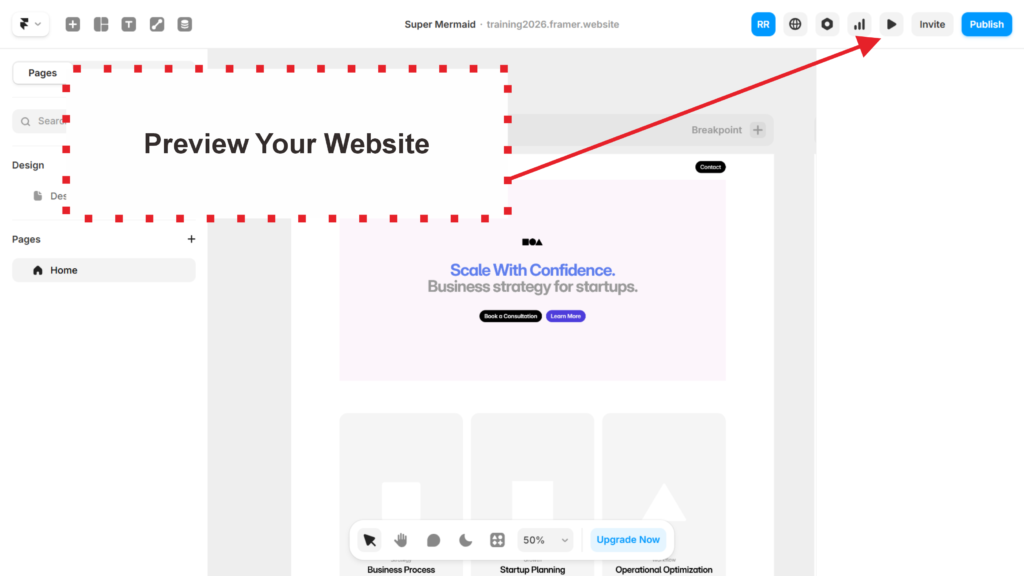
Step 3: Review the Generated Website
Why it matters: The first output is a strong starting point, but it will need some personalization. Reviewing it section by section ensures nothing important is missing or off-brand before you start editing.
What to do:
- Scroll through every section of the generated site
- Check that the headline and main copy accurately reflect your business
- Note anything that needs to be changed: wrong tone, missing sections, placeholder text
- Don’t start editing yet — complete the full review first so you have a clear picture of what needs work
Expected result: A clear list of 3–5 things to adjust. Most of the heavy lifting is already done — your list should be refinements, not rebuilds.
Step 4: Customize the Content
Why it matters: A website that looks professional but says the wrong things about your business is worse than no website at all. This step is where you make the site actually yours.
What to do: Click on any text element to edit it directly. Focus on these three areas first:
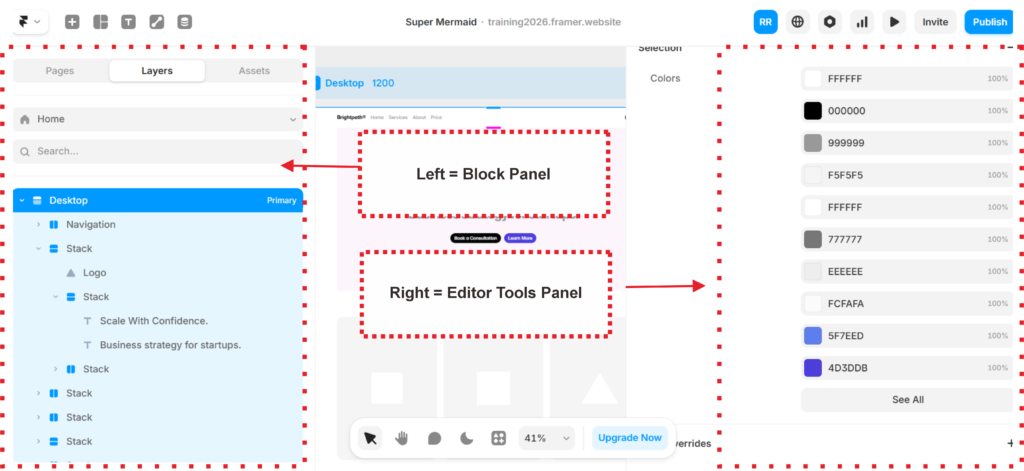
- Headline — your main value proposition. Make it specific. “Business strategy for early-stage startups” beats “Welcome to our website.”
- Services or product descriptions — replace any AI-generated placeholder descriptions with your real offerings
- Call to action — make sure your button text and destination are correct (“Book a call” → links to your calendar, not a generic form)
For images, Framer pulls from Unsplash automatically. Click any image to swap it for a different one from their library, or upload your own.
Use Framer’s AI text tool to rewrite any section — just highlight the text, click the AI button, and type an instruction like “make this more Concise” or “rewrite in a friendlier tone.”
Expected result: A website that accurately represents your business, with real copy, correct calls to action, and images that match your brand.
Step 5: Publish and Share Your Site
Why it matters: A website sitting in draft mode helps no one. Publishing takes two minutes, and Framer gives you a free staging URL immediately — no domain purchase required to start sharing.
What to do:
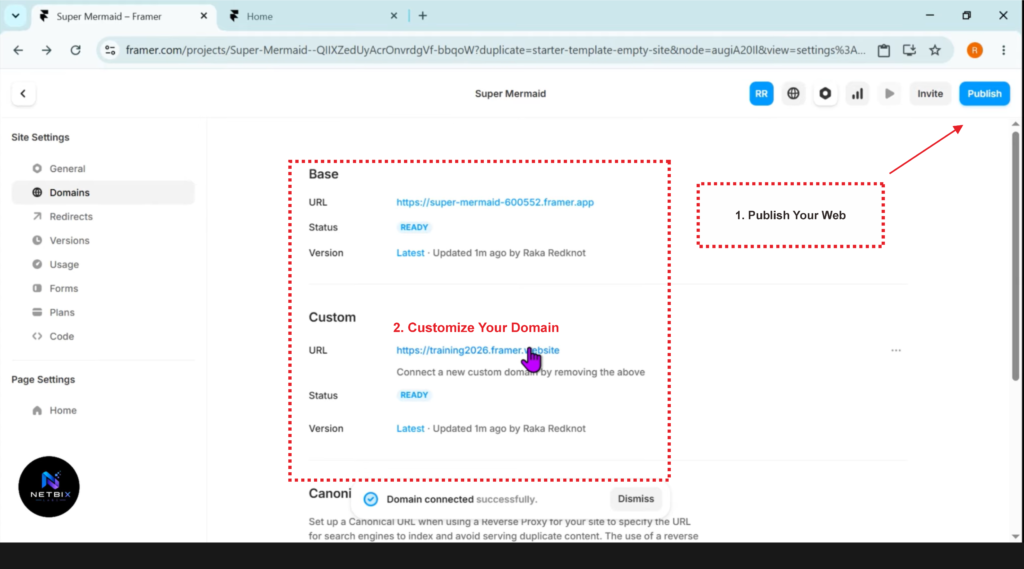
- Click Publish in the top right corner
- Framer gives you a free URL (yoursite.framer.website) — this is live and shareable immediately
- To connect a custom domain: go to Site Settings → Custom Domain, enter your domain, and follow the DNS instructions (takes 5–10 minutes, domain purchase required separately)
- Share the URL with your team, post it on LinkedIn, or add it to your email signature
Expected result: A live, publicly accessible website on a real URL — ready to share within minutes of publishing.
Video Tutorial
Seeing the process firsthand is much easier than reading about it. The video tutorial below shows the entire process from start to finish—from opening Framer for the first time, writing a business prompt, reviewing the generated output, editing the content, and publishing the website to a shareable URL.
This video is ideal for watching while simultaneously following the steps above.
A screen-recorded walkthrough shows a first-time user building a complete business landing page in Framer from scratch—writing an AI prompt, reviewing the generated output, editing the headline and service copy, and publishing to a live URL.
How Businesses Use Framer
Startups
Founders use Framer to build a landing page before writing a single line of product code. It’s the fastest way to test messaging, collect early signups, and pitch investors — all before committing to full product development.
Marketing Teams
Marketing teams launch campaign-specific landing pages without waiting on developers. A product launch, a webinar signup page, or a seasonal promotion can go live the same day the campaign is approved.
HR Departments
HR teams build dedicated recruitment pages that reflect company culture — separate from the main corporate website. Framer makes it easy to create a page that showcases the team, open roles, and employee benefits in a way that attracts the right candidates.
Agencies
Small agencies use Framer to build client websites quickly and iterate based on feedback in real time. Rather than handing off static mockups for approval, they share a live URL that the client can click through immediately.
Creators and Consultants
Freelancers, coaches, and consultants use Framer to build personal brand websites that look professional without a design background. The AI generation handles the visual heavy lifting; they focus on the messaging.
Enterprise Innovation Teams
Large organizations use Framer for internal project microsites, event pages, and initiative landing pages that need to be built fast but look credible — without going through the main brand or IT approval process.
Best Practices
Write a specific business description. The more context you give the AI — who your customers are, what problem you solve, what tone you want — the better the first output will be. Vague prompts produce generic websites.
Edit the headline first. The headline is what every visitor reads first and what determines whether they stay or leave. Don’t accept the AI-generated version as-is — make it specific to your actual value proposition.
Keep the navigation simple. For most business websites, four navigation items is enough: Home, About, Services, Contact. More than that increases bounce rate.
Use your own photos if possible. Stock photography is fine for a first version, but real photos of your team, workspace, or product build significantly more trust with visitors.
Test on mobile before publishing. Framer makes sites responsive automatically, but always check your live site on a phone before sharing it widely. Resize your browser window or use your phone to preview the staging URL.
Don’t launch with placeholder contact info. This sounds obvious, but many sites go live with “[email protected]” still in the footer. Double-check every piece of contact information before publishing.
Common Mistakes to Avoid
Trying to make it perfect before publishing. The best version of your website is the one that’s actually live. Launch with 80% and improve based on real feedback rather than waiting for 100% in isolation.
Writing the headline for yourself instead of your customer. “We are a leading provider of innovative solutions” tells a visitor nothing. “We help small businesses close more sales with less admin” tells them everything they need to know in one line.
Adding too many sections. A focused landing page with a clear call to action almost always outperforms a long page with ten different sections. Start lean. Add more only if analytics show visitors are looking for it.
Forgetting to set a favicon and page title. These small details signal professionalism. Update your site name and favicon in Framer’s site settings before publishing — they’re visible in browser tabs and search results.
Using the free Framer subdomain for a serious business. The free URL (yoursite.framer.website) is fine for testing, but it undermines credibility for a live business. Connect a real domain before sharing with clients or customers.
FAQ
What is an AI website builder? An AI website builder is a tool that generates a complete website — layout, copy, images, and structure — from a short text description of your business. Instead of building a site manually from scratch, you describe what you need and the AI creates a first version you can then customize.
Is Framer really free to use? Yes. Framer’s free plan lets you build and preview a complete website with no time limit. You only need a paid plan (starting at $10/month) to connect a custom domain. For testing or sharing via the free subdomain, the free plan is fully functional.
How long does it take to build a website with Framer AI? Most users have a complete, published website within 30 to 60 minutes on their first attempt. That includes generating the initial site, customizing the content, and publishing to a live URL.
Do I need any design or coding skills? No. Framer’s visual editor works entirely through clicking and typing. The AI generates the design automatically, and you edit content the same way you’d edit a document. No CSS, no HTML, no design tools required.
Can I use Framer for an e-commerce website? Framer is best suited for informational websites, landing pages, and portfolio sites. It does not have a built-in shopping cart or checkout system. For e-commerce, Shopify or Webflow Commerce are better options.
What’s the difference between Framer and Wix or Squarespace? Wix and Squarespace require you to manually configure your website from templates. Framer’s AI generates a customized website from your description — skipping the template selection and manual layout setup entirely. Framer also produces more design-forward results than either platform by default.
Can I move my website away from Framer later? Framer doesn’t export raw HTML/CSS in a straightforward way, so migrating to another platform requires rebuilding. For most small businesses and startups, this isn’t a practical concern — but it’s worth knowing if long-term platform flexibility is a priority.
Alternatives Worth Considering
Webflow
What it does: A professional no-code website builder with fine-grained design control, a powerful CMS, and e-commerce capabilities. Less AI-driven than Framer but more flexible for complex sites. When it’s better: When you need precise control over every design element, a blog or content hub, or built-in e-commerce. Best for: Growing businesses that need a site to scale with them over time. Official Website: https://webflow.com
Typedream
What it does: A simple, fast website builder focused on clean landing pages and product sites, with AI copywriting assistance built in. When it’s better: When you want something even simpler than Framer and don’t need advanced customization. Best for: Solopreneurs and creators launching a personal site or simple product page. Official Website: https://typedream.com
Key Takeaways
- AI website builders like Framer have made it possible to launch a professional business website in under an hour — with no design or coding skills.
- The quality of your AI prompt determines the quality of your first output. Spend two minutes writing a clear, specific business description and you’ll save hours of editing afterward.
- Framer’s free plan is genuinely useful — build, customize, and publish to a staging URL before spending anything.
- The most important thing to get right is your headline. Everything else is secondary.
- Launch before it’s perfect. A live website that’s 80% right beats a polished site that’s still in draft two weeks from now.
- For e-commerce or very complex sites, Webflow is the better fit. For everything else — landing pages, business sites, campaign pages, recruitment pages — Framer is the fastest path to a professional result.
Conclusion
Building a business website used to be a project. With an AI website builder like Framer, it’s now an afternoon task — one that any team member can complete without a design background or technical skills.
The real shift isn’t just about speed. It’s about removing the dependency on external resources so your team can move when ideas are fresh, test messaging while it’s still relevant, and iterate based on what real visitors actually respond to — not what a designer guessed they would.
If you’ve been putting off launching a website because it felt complicated or expensive, Framer is the most direct path to getting something live today. Start with a focused description of your business, generate your first version, and publish it. You can always improve it tomorrow. What you can’t do is get feedback on a page that doesn’t exist yet.
The best AI website builder is the one you actually use. Start there.