Discover how AI phishing detection tools protect businesses from email threats. An honest review of the top 3 providers — features, pros, cons, and pricing compared.
Introduction
In 2024, a mid-sized logistics company in the US received what appeared to be a routine email from their CFO. The message requested an urgent wire transfer of $87,000 to a new vendor account. The finance team processed it without question. The CFO had never sent that email.
This is Business Email Compromise — one of the most common and costly forms of phishing today. The FBI estimates BEC attacks caused over $2.77 billion in US losses in 2024 alone. What makes these attacks so dangerous isn’t technical sophistication. It’s how convincingly human they look. No malicious links. No suspicious attachments. Just a well-crafted email that impersonates someone the recipient trusts.
Traditional spam filters never stood a chance against this kind of attack. They look for known threats — blacklisted domains, flagged URLs, suspicious file types. A phishing email that looks exactly like a legitimate message from a known contact passes every one of those checks without triggering a single alert.
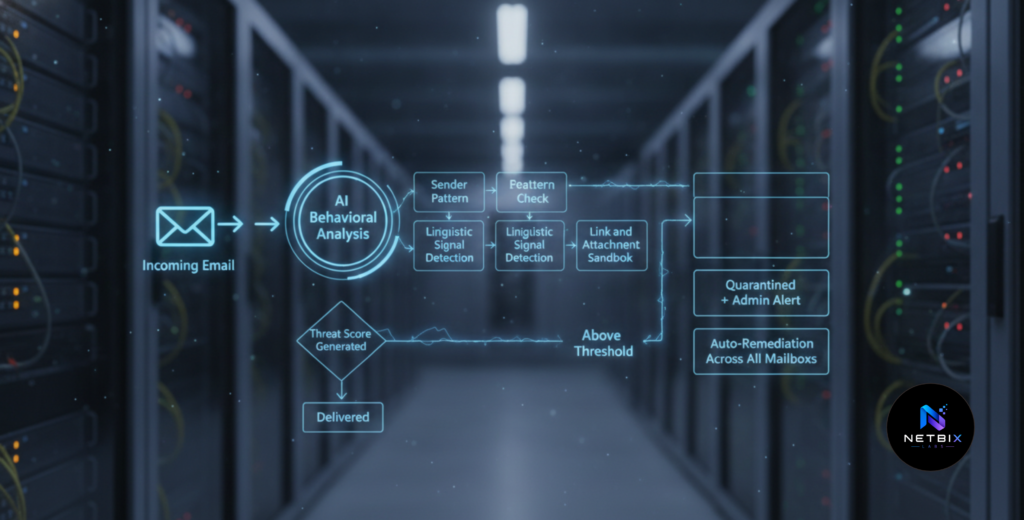
This is precisely where AI phishing detection changes the equation. Instead of matching against known threat signatures, AI analyzes behavioral patterns, communication history, linguistic anomalies, and contextual signals — catching what no rule-based system can.
This guide doesn’t walk you through setting up a specific tool. Instead, it gives you what most businesses actually need before making a security investment: an honest, side-by-side review of the top three AI email security providers — what each one does well, where each one falls short, and which type of business each one suits best.
Quick Summary
- Modern phishing attacks — especially Business Email Compromise — are designed specifically to bypass traditional email filters and look indistinguishable from legitimate email.
- AI phishing detection works by analyzing behavioral signals, sender patterns, and contextual anomalies rather than matching against known threat signatures.
- This guide reviews three leading providers: Proofpoint, Microsoft Defender for Office 365, and Barracuda Email Protection.
- Each provider suits a different type of organization — understanding the differences helps you make the right investment for your specific context.
- No single tool eliminates phishing risk entirely. AI detection is one critical layer in a broader security posture that includes employee awareness and strong authentication practices.
Table of Contents
- What You’ll Learn
- Why AI Phishing Detection Works Differently from Traditional Email Security
- How to Evaluate an AI Email Security Provider
- Provider Review 1: Proofpoint
- Provider Review 2: Microsoft Defender for Office 365
- Provider Review 3: Barracuda Email Protection
- Side-by-Side Comparison
- Video Tutorial
- How Businesses Use These Tools
- Best Practices
- Common Mistakes to Avoid
- FAQ
- Key Takeaways
- Conclusion
What You’ll Learn
- Why traditional email security consistently fails against modern phishing attacks
- The specific signals AI uses to detect threats that rule-based systems miss
- An honest review of Proofpoint, Microsoft Defender for Office 365, and Barracuda — including real user feedback on pros and cons
- How pricing works for each provider and what budget range to expect
- Which provider suits which type of organization
- What to look for beyond the tool itself when building a phishing defense strategy
Why AI Phishing Detection Works Differently from Traditional Email Security
Traditional email security operates on a blacklist model. It compares incoming emails against databases of known malicious domains, URLs, file signatures, and spam patterns. When a match is found, the email is blocked. When no match is found, it’s delivered.
You might also like: How Small Businesses Use AI to Reduce Operational Costs
Related guide: How Companies Protect Internal Data While Using AI Tools
The fundamental weakness of this approach is that it is entirely reactive. It catches threats that have already been identified. Attackers know this — and they design every new attack specifically to avoid triggering existing signatures.
AI phishing detection takes a different approach entirely. Rather than looking for known bad, it learns what normal looks like — and flags deviations.
AI models in email security analyze:
- Sender behavior patterns — does this sender’s communication style, frequency, and typical content match their historical pattern? A sudden urgent wire transfer request from a CFO who never emails finance directly is an anomaly.
- Linguistic signals — does the message contain urgency triggers, authority manipulation, or pressure language common in social engineering? Natural language processing identifies these patterns even in well-written emails.
- Domain and header analysis — is the sending domain newly registered? Does the display name match the email address? Are there subtle character substitutions in the domain name?
- Link and attachment behavior — does a URL redirect through multiple hops to a final destination inconsistent with the anchor text? Does an attachment exhibit behavior typical of credential harvesters?
- Contextual signals — does this email arrive at an unusual time? Does it reference relationships or projects that don’t exist in the recipient’s communication history?
The result is detection that catches attacks no blacklist has ever seen — including the highly personalized, AI-generated phishing campaigns that are now standard in the threat landscape.
How to Evaluate an AI Email Security Provider
Before reviewing specific tools, it helps to know what factors actually differentiate providers in practice. These are the dimensions that matter most for most business buyers:
- Detection accuracy — catch rate for sophisticated threats, and false positive rate for legitimate emails incorrectly quarantined
- Deployment complexity — how long does setup take, and what level of IT expertise does it require?
- Email platform compatibility — does it work with Microsoft 365, Google Workspace, or both?
- Remediation capability — can it automatically remove a confirmed threat from all affected mailboxes simultaneously?
- Employee awareness features — does it include phishing simulation and security awareness training?
- Pricing model — per-user subscription, per-mailbox, or bundled with an existing platform?
- Support quality — how responsive is technical support when something goes wrong?
With these criteria in mind, here is an honest review of the three leading providers.
Provider Review 1: Proofpoint
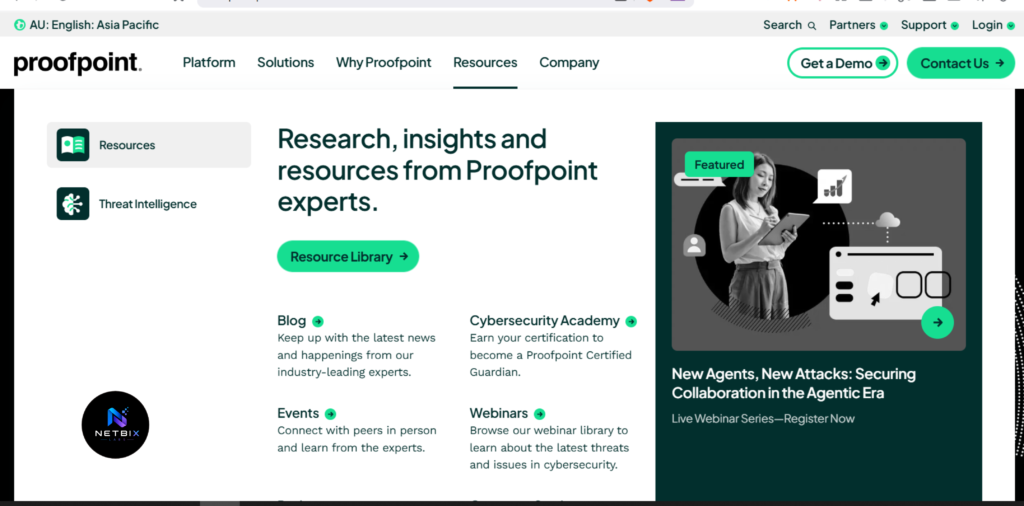
Proofpoint is one of the longest-established names in enterprise email security. Its AI-powered detection engine — the Nexus Threat Intelligence platform — combines machine learning with global threat intelligence gathered from over a billion emails analyzed daily across its customer base. It is consistently ranked among the highest-performing email security platforms for detection accuracy.
What Proofpoint does well:
- Detection breadth — Proofpoint catches phishing, BEC, malware, ransomware delivery, and credential theft with high accuracy. Its machine learning impostor classifier specifically targets BEC attacks — the hardest category for most tools to catch reliably.
- Targeted Attack Protection (TAP) — provides detailed forensic visibility into attack campaigns, showing who was targeted, what the attack contained, and what action the recipient took.
- Threat Response Auto-Pull (TRAP) — automatically removes confirmed malicious emails from all affected mailboxes retroactively, even after delivery. This is one of Proofpoint’s most operationally significant features.
- Security awareness training integration — phishing simulations and training content are available within the same platform, creating a closed loop between detection and employee education.
- Scalability — Proofpoint is built for large-scale deployments and handles high email volumes without performance degradation.
Where Proofpoint falls short:
- Cost — Proofpoint is among the more expensive options in the market. Essentials plans for small businesses start around $2–$5 per user per month, but mid-tier and enterprise bundles with full threat protection range from $25–$70 per user per year, with large enterprise suites exceeding $100,000 annually.
- Setup complexity — initial configuration, particularly email routing rules and policy customization, often requires a consultant or experienced IT administrator. Users consistently flag this as a barrier for organizations without dedicated security staff.
- Multiple consoles — different Proofpoint modules (TAP, TRAP, Email Fraud Defense, Security Awareness) operate through separate dashboards, which creates a fragmented management experience.
- False positives — some users report that overly aggressive filtering occasionally quarantines legitimate business emails, requiring manual review and whitelist adjustments.
Pricing:
- Essentials (SMB): from $2–$5 per user per month
- Mid-tier bundles: $25–$70 per user per year
- Enterprise: custom pricing, typically $100,000+ annually for full suite
Best suited for: Mid-to-large enterprises with dedicated IT or security teams, high compliance requirements, and budgets that support premium security investment. Organizations in financial services, healthcare, and legal sectors — where email threats carry significant regulatory consequences — are typical Proofpoint customers.
Official Website: https://www.proofpoint.com
Provider Review 2: Microsoft Defender for Office 365
Microsoft Defender for Office 365 is the native AI security layer built into the Microsoft 365 ecosystem. For organizations already running Microsoft 365, it represents the most seamless path to AI-powered phishing detection — no new vendor, no separate deployment, and no context switching between security and productivity platforms.
Defender uses machine learning models trained on threat signals from across Microsoft’s enormous global user base — one of the largest email datasets in the world — giving its AI detection engine significant breadth of threat intelligence.
What Microsoft Defender does well:
- Native Microsoft 365 integration — Defender works directly within Teams, SharePoint, OneDrive, and Exchange Online. Security policies, threat dashboards, and alert management are all within the same Microsoft admin environment organizations are already using. This reduces adoption friction dramatically for Microsoft-standardized teams.
- Safe Links and Safe Attachments — real-time URL scanning rewrites links and detonates attachments in a sandbox environment before delivery, blocking malicious content even from previously unknown sources.
- Automated Investigation and Response (AIR) — when a threat is detected, Defender automatically investigates related alerts, determines scope, and takes remediation actions across the affected environment without requiring manual IT intervention on every incident.
- Cost efficiency for existing Microsoft customers — Defender for Office 365 Plan 1 is included in Microsoft 365 Business Premium, which many organizations already pay for. Adding advanced detection capability without a separate vendor contract is a significant cost advantage.
- Familiarity — IT teams already managing Microsoft 365 can administer Defender through the same console without learning a new platform.
Where Microsoft Defender falls short:
- Less effective as a standalone solution — Defender’s value is heavily dependent on being deeply embedded in the Microsoft ecosystem. Organizations using Google Workspace or hybrid email environments get significantly less value.
- Setup complexity for advanced features — basic protection activates relatively easily, but advanced policy configuration, custom detection rules, and fine-tuning for specific threat scenarios can be complex for less technical administrators.
- Pre-made rules with limited customization — some users report frustration with detection rules that cannot be easily inspected or modified, making it difficult to understand why certain emails were flagged or to fine-tune behavior for specific business contexts.
- Alert volume — without careful tuning, Defender can generate high volumes of security alerts that overwhelm smaller IT teams who don’t have the capacity to triage them consistently.
Pricing:
- Defender for Office 365 Plan 1: included in Microsoft 365 Business Premium (~$22/user/month)
- Defender for Office 365 Plan 2: part of Microsoft 365 E5 (~$57/user/month) or as a standalone add-on (~$5/user/month)
- Entry-level standalone: from approximately $150/year
Best suited for: Organizations already standardized on Microsoft 365 who want to maximize the security value of their existing investment. Particularly strong for mid-sized businesses and enterprises where the IT team is already managing Microsoft infrastructure and wants unified security without introducing a separate vendor.
Official Website: https://www.microsoft.com/en-us/security/business/siem-and-xdr/microsoft-defender-office-365
Provider Review 3: Barracuda Email Protection
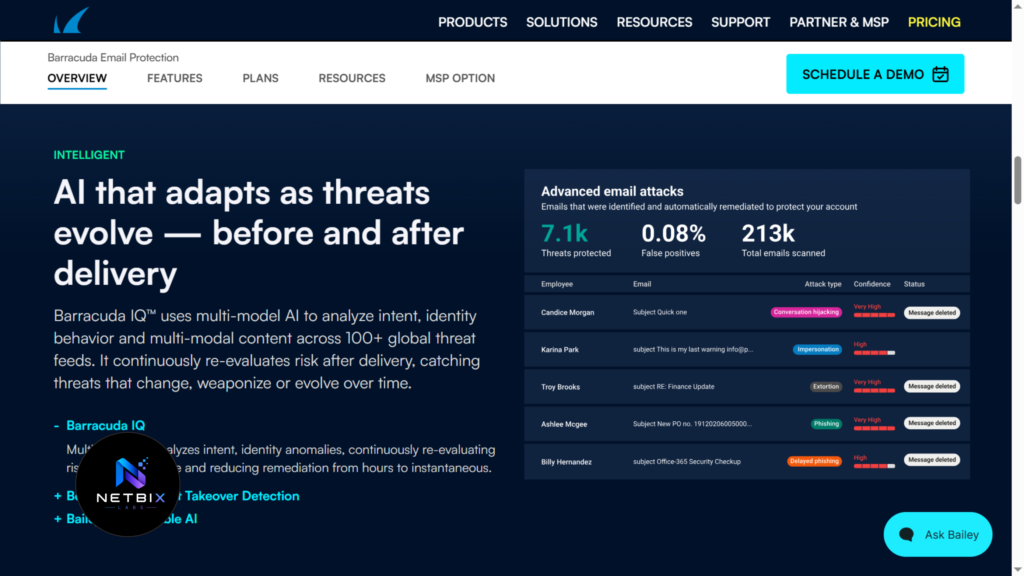
Barracuda Email Protection is an AI-powered email security platform known for its strong detection capabilities, user-friendly interface, and competitive pricing — particularly for small and mid-sized businesses that need enterprise-grade protection without enterprise-level complexity or cost.
Barracuda’s AI continuously learns from patterns and behaviors across its customer base, and its platform works across Microsoft 365, Google Workspace, and on-premises email environments — giving it more flexibility than Microsoft Defender for organizations with mixed or non-Microsoft infrastructure.
What Barracuda does well:
- Cross-platform compatibility — Barracuda works equally well with Microsoft 365, Google Workspace, and on-premises Exchange. This makes it the strongest option for organizations that aren’t fully standardized on a single email platform.
- Detection without configuration — Barracuda’s AI handles robust threat prevention with minimal required setup. Users consistently highlight that it works effectively without needing extensive policy configuration or ongoing tuning, which is valuable for organizations with limited IT resources.
- Impersonation and BEC protection — Barracuda’s AI specifically targets impersonation attacks — emails that mimic executives, suppliers, or known contacts — with high accuracy. Real-time analysis and immediate inbox purge removes confirmed threats before most recipients open them.
- User-friendly interface — consistently rated higher than Proofpoint and Microsoft Defender for ease of use and navigation, making it accessible for IT generalists who aren’t specialized security professionals.
- Strong support — Barracuda’s customer support quality is frequently cited as a differentiator in user reviews, with faster response times and more helpful technical assistance than larger enterprise vendors.
- Microsoft 365 Backup — Barracuda’s email protection bundles often include cloud backup for Microsoft 365 data, adding a recovery layer that most pure security tools don’t include.
Where Barracuda falls short:
- Pricing transparency — Barracuda requires a custom quote for most plans rather than publishing clear per-user pricing publicly, which makes upfront budget planning more difficult. Published pricing for the Email Security Gateway starts significantly higher than Proofpoint Essentials.
- Zero-day vulnerability history — in 2023, Barracuda’s Email Security Gateway (on-premises appliance) suffered a significant zero-day exploit that affected customers running the hardware appliance. While Barracuda’s cloud-based products were not affected, this incident raised questions about on-premises deployment security that some buyers still flag.
- Less brand recognition in enterprise security — for large enterprise security teams evaluating vendors, Barracuda carries less institutional recognition than Proofpoint or Microsoft, which can affect internal procurement decisions even when the technical performance is comparable.
Pricing:
- Email Protection (cloud, SMB-focused): typically $10–$100 per user per year depending on plan and features
- Email Security Gateway (on-premises/cloud hybrid): starts significantly higher — custom quote required
- Free trial available before purchase
Best suited for: Small to mid-sized businesses that need strong AI phishing protection with a user-friendly interface, flexible platform compatibility (not exclusively Microsoft), and competitive pricing. Also a strong choice for organizations that value responsive customer support and want bundled email backup alongside security.
Official Website: https://www.barracuda.com/products/email-protection
Side-by-Side Comparison
| Factor | Proofpoint | Microsoft Defender | Barracuda |
|---|---|---|---|
| Detection Accuracy | Excellent | Very Good | Very Good |
| BEC Protection | Excellent | Good | Excellent |
| Setup Complexity | High | Medium | Low |
| Platform Compatibility | Microsoft 365, Google Workspace | Microsoft 365 (best), limited others | Microsoft 365, Google Workspace, on-prem |
| Auto-Remediation | Yes (TRAP) | Yes (AIR) | Yes |
| Employee Training | Yes (built-in) | Limited | Yes (add-on) |
| Pricing Model | Per user / custom | Bundled or add-on | Per user / custom quote |
| Starting Price | ~$2–5/user/month (SMB) | ~$5/user/month add-on | $10–100/user/year |
| Best For | Large enterprise, compliance-heavy | Microsoft 365 organizations | SMB, mixed platforms |
| Support Quality | Good | Variable | Excellent |
Review Video
A comparison video review covering three leading AI email security providers—Proofpoint, Microsoft Defender for Office 365, and Barracuda Email Protection. Each provider is discussed from a business perspective: what it does well, what its weaknesses are, what pricing to expect, and the types of organizations it’s best suited for. The video opens with a real-life case study of a BEC attack that bypassed traditional email filters, explains why AI detection is fundamentally different, and then goes into an in-depth review of each provider with a side-by-side comparison at the end. Ideal runtime: 10–14 minutes. Format: talking head with screen inserts showing the interface of each tool and a comparison table.
How Businesses Use These Tools
Startups
Early-stage startups with small teams and limited IT resources gravitate toward Barracuda for its low-friction setup and user-friendly interface. The protection activates quickly without requiring a security specialist, giving founders peace of mind without dedicating significant time or budget to security operations.
Marketing Teams
Marketing teams — frequent targets of account takeover and impersonation attacks due to their management of ad accounts and client budgets — benefit from any of the three providers’ BEC detection capabilities. Microsoft Defender is particularly common in marketing organizations already operating within Microsoft 365.
HR Departments
HR teams handle highly sensitive employee data and are regularly targeted with impersonation attacks requesting personnel information or payroll changes. All three providers detect these attacks, but Proofpoint’s TAP dashboard gives HR security administrators the most forensic visibility into who is being targeted and how.
Agencies
Digital agencies managing client credentials and financial accounts across multiple platforms often choose Barracuda for its cross-platform flexibility — protecting mailboxes regardless of whether the agency and its clients are on Microsoft 365 or Google Workspace.
Operations Teams
Operations teams that handle high volumes of supplier and vendor communication — a common vector for invoice fraud and payment redirect attacks — rely on AI detection to flag the anomalies in these impersonation emails that pass every traditional filter.
Enterprise Teams
Large enterprise organizations with dedicated security operations teams most commonly deploy Proofpoint for its detection depth, forensic visibility, and integration with broader SIEM and security orchestration workflows. Microsoft Defender is the second most common enterprise choice for organizations fully committed to the Microsoft security ecosystem.
Best Practices
Layer AI detection with multi-factor authentication. AI phishing detection catches threats before they reach the inbox. MFA protects accounts even when a credential theft attack does succeed. These two controls work together — one reduces the probability of a successful attack, the other limits the damage when one occurs.
Run phishing simulations before assuming your team is protected. Even with strong AI detection in place, some threats will reach inboxes. Regular phishing simulations — available through Proofpoint and Barracuda — reveal how employees respond to the threats that get through, and identify who needs additional awareness training.
Review your threat dashboard regularly. The data generated by AI email security tools about what’s being detected, who’s being targeted, and which attack types are most common in your environment is as valuable as the protection itself. Weekly reviews build organizational awareness of your specific threat landscape.
Don’t configure AI security tools and forget them. Email threat patterns evolve. Detection rules drift. False positive rates change as your communication patterns shift. Assign ownership of the security tool to a specific person and build quarterly reviews into your calendar.
Combine AI detection with DMARC, SPF, and DKIM authentication. Domain authentication protocols prevent attackers from sending emails that appear to come from your domain. These technical controls complement AI detection and are particularly effective at blocking domain spoofing attacks. All three providers support these protocols.
Common Mistakes to Avoid
Choosing based on brand recognition alone. Proofpoint and Microsoft have higher brand profiles than Barracuda, but that doesn’t mean they’re automatically the right choice for every organization. Barracuda consistently outperforms in ease of use and support quality, and is often the better fit for smaller teams without dedicated security staff.
Assuming one layer of protection is enough. AI email security is essential — but it’s one layer. Organizations that deploy a detection tool and consider their security posture solved are still vulnerable to credential theft through other channels, weak passwords, and internal human error.
Underestimating the importance of employee awareness. AI tools stop the vast majority of phishing attempts. But employee behavior determines what happens when something gets through. Security awareness training and phishing simulations are not optional extras — they are necessary complements to any AI detection investment.
Not testing for false positives after deployment. Every AI detection tool occasionally quarantines legitimate business emails. Not testing this after deployment — particularly for critical communication flows with key vendors or clients — can result in important messages going undelivered without anyone realizing.
Delaying the investment until after an incident. The most common reason businesses contact security vendors is that they’ve already experienced a phishing attack. Deploying AI phishing detection before an incident is dramatically less costly than managing the aftermath of a successful one.
FAQ
What is AI phishing detection and why is it better than spam filters? AI phishing detection analyzes behavioral signals, communication patterns, and contextual anomalies in every email — not just matching against databases of known threats. Spam filters block what they’ve seen before. AI detection identifies threats it has never seen, including highly personalized BEC attacks that contain no malicious links or attachments.
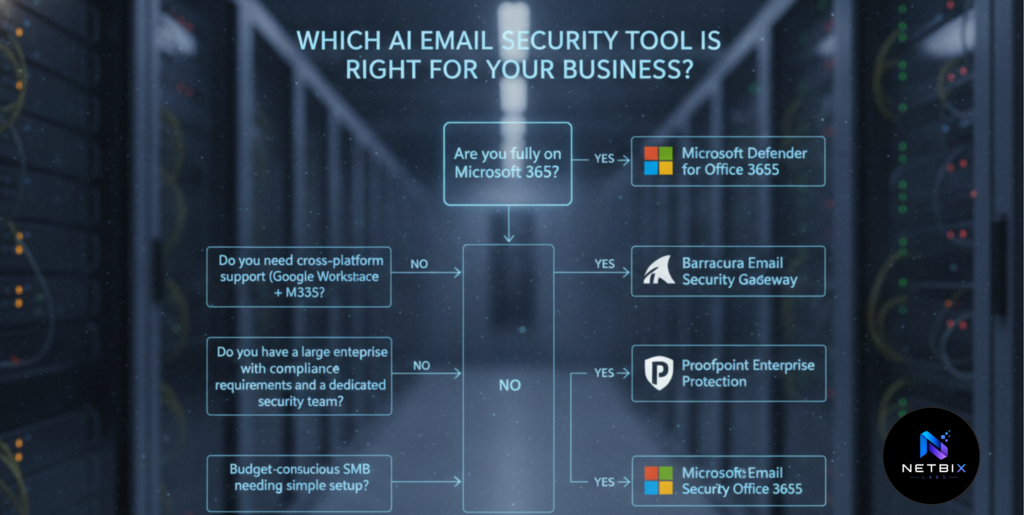
Which is better: Proofpoint, Microsoft Defender, or Barracuda? It depends on your organization’s specific context. Proofpoint delivers the highest detection depth and is best suited for large enterprises with compliance requirements. Microsoft Defender is the strongest choice for organizations deeply embedded in Microsoft 365 who want unified security without a separate vendor. Barracuda is the best fit for small to mid-sized businesses that need strong protection with simpler setup and competitive pricing — especially in non-Microsoft environments.
How much should a business budget for AI email security? For small businesses, Proofpoint Essentials starts around $2–$5 per user per month. Barracuda’s SMB plans typically run $10–100 per user per year. Microsoft Defender is often the most cost-effective for existing Microsoft 365 Business Premium subscribers, where it’s included in a plan many organizations already pay for. Enterprise pricing for all three providers scales significantly with user count and feature requirements.
Do these tools work with Google Workspace as well as Microsoft 365? Barracuda supports both Microsoft 365 and Google Workspace equally well, and also works with on-premises Exchange. Microsoft Defender is primarily optimized for Microsoft 365 and offers limited value in Google Workspace environments. Proofpoint supports both platforms but is most commonly deployed in Microsoft environments.
Will AI email security stop all phishing attacks? No tool stops all phishing attacks. AI detection dramatically reduces the volume of threats that reach inboxes — and catches sophisticated attacks that traditional filters miss — but some attacks will always get through. The most resilient defense combines AI detection with employee security awareness training, multi-factor authentication, and strong password policies.
How long does it take to deploy an AI email security tool? Barracuda and Microsoft Defender can be deployed relatively quickly — Barracuda in hours to a day, Defender in minutes for basic protection within an existing Microsoft 365 environment. Proofpoint’s full deployment — particularly with advanced policy configuration and integration with existing security infrastructure — often takes days to weeks and may require professional services assistance.
Key Takeaways
- Modern phishing attacks — especially Business Email Compromise — are designed to bypass traditional email filters entirely. AI detection is now a necessity, not an optional upgrade.
- AI phishing detection works by analyzing behavioral patterns and contextual signals rather than matching known threat signatures — allowing it to catch attacks no blacklist has ever seen.
- Proofpoint is best for large enterprises with compliance requirements and dedicated security teams. Microsoft Defender is best for organizations fully committed to Microsoft 365. Barracuda is best for SMBs needing strong protection with simpler setup and cross-platform support.
- None of these tools eliminates phishing risk alone. AI detection is one critical layer — combine it with MFA, DMARC/SPF/DKIM, and employee security awareness training for genuine defense-in-depth.
- The data generated by AI security dashboards — who’s being targeted, which attack types are most common, which employees are most at risk — is as valuable as the protection itself. Review it regularly.
- The best time to invest in AI phishing detection is before an incident, not after one.
Conclusion
The logistics company from the opening of this guide lost $87,000 to a single phishing email. Not because their employees were careless — but because the attack was specifically designed to look indistinguishable from a legitimate internal request. No traditional spam filter would have caught it. An AI detection tool analyzing the sender’s behavioral anomalies and the unusual context of the request almost certainly would have.
This is the shift that AI phishing detection represents. Not a marginal improvement on existing email filtering — a fundamentally different approach to detection that catches what rules-based systems are structurally incapable of identifying.
Proofpoint, Microsoft Defender for Office 365, and Barracuda each bring this capability to market with different strengths, different price points, and different ideal use cases. The right choice depends on your organization’s size, existing infrastructure, IT capability, and budget — not on which vendor has the highest brand profile.
What matters most is making a decision and acting on it. The sophistication of phishing attacks is accelerating. The businesses that protect their teams with AI detection before the next attack are the ones that avoid becoming the next cautionary example.
Review the providers. Request demos from the ones that fit your context. And deploy before the next sophisticated phishing campaign lands in your team’s inboxes.