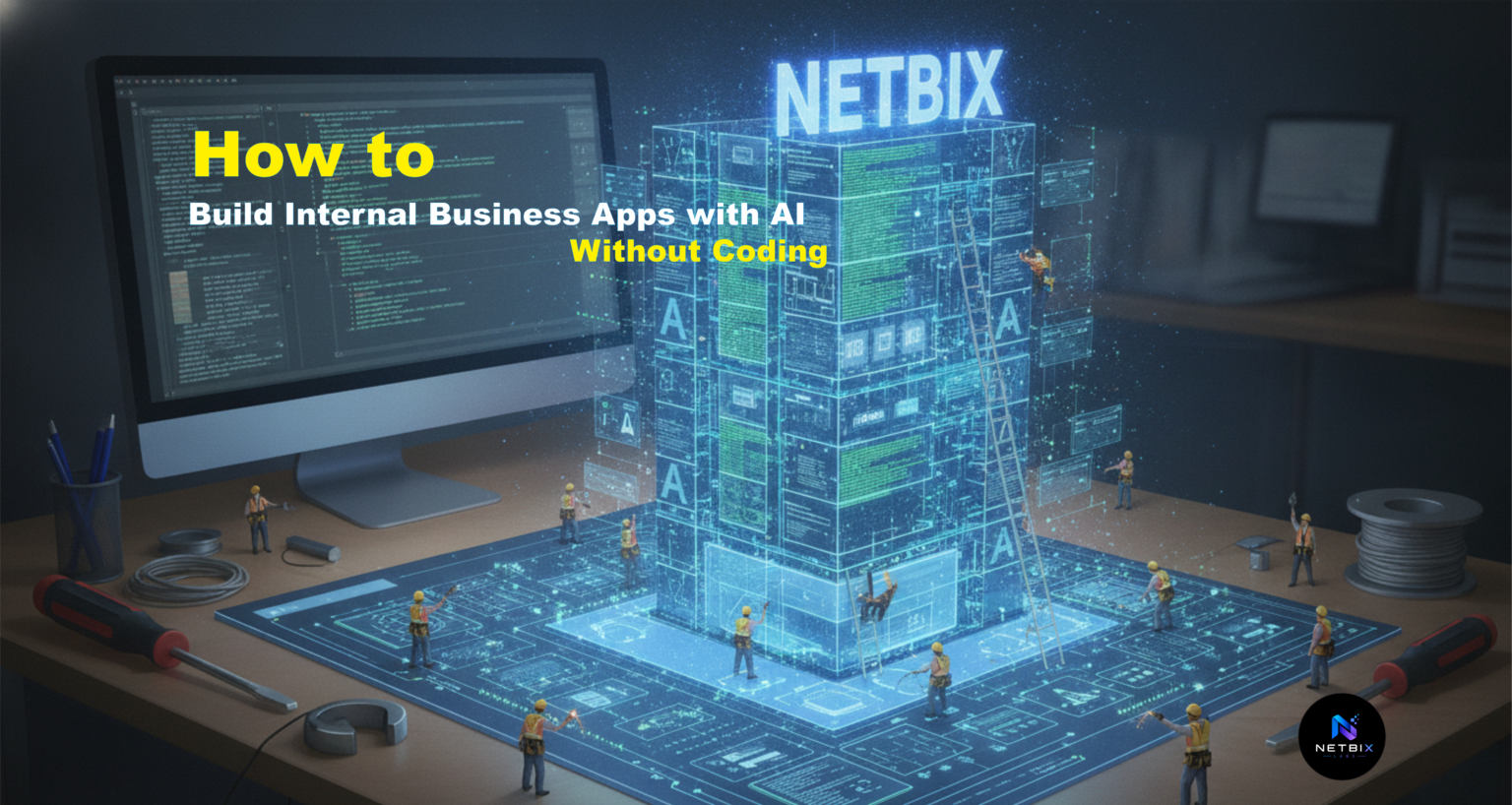
Learn how to Build Internal Business Apps with AI Without Codingusing AI app builders. A practical guide to creating internal tools and business automation apps for teams.
Introduction
Most corporate teams operate on a patchwork of off-the-shelf tools that do not quite fit their specific workflows. A customer success team manages their own database in a spreadsheet because the CRM does not have the fields they need. An HR team manually compiles hiring pipeline data from multiple sources into a dashboard because no single tool shows them what they need. An operations team spends hours on manual data entry that should be automated because building a custom internal tool would require hiring a developer for a month.
This pattern is so common that it has become invisible — teams accept the time waste as normal rather than fixing it.
AI app builders change this calculus entirely. A business team can now build a custom internal tool in an afternoon — a web app, a portal, a dashboard, or an automation system — without writing any code or waiting for developer availability. The no code ai apps approach combines pre-built components, data connectivity, and AI-powered automation into a visual builder that anyone can operate at the level of a spreadsheet.
This guide is written for operations managers, HR leads, startup founders, business analysts, and corporate team leaders who want to understand how to build genuinely useful internal tools using a business app builder — and specifically, how to leverage AI to make those tools more intelligent and less maintenance-heavy.
By the end, you will have a complete framework for defining, building, and deploying an internal ai internal tools system using Softr — one of the most accessible no-code platforms available.
Quick Summary
- A no code ai apps platform lets teams build custom internal tools without developer involvement — databases, portals, dashboards, and automation systems are all possible.
- The highest-value internal apps for most teams are: customer or project databases with custom views, team dashboards, lead management portals, and approval workflows.
- Softr is a no-code platform that turns any data source (Airtable, Google Sheets, SQL database, API) into a full-featured web application in hours rather than months.
- A complete internal business app — database, views, filters, forms, and integrations — can be built and deployed in 4–6 hours using Softr.
- Softr pricing starts at free (up to 1,000 monthly users) with paid plans from $99/month for unlimited users and advanced features.
- AI features in Softr include: AI-generated content summaries, automated form prefilling, smart filtering, and AI-assisted data organization.
Table of Contents
- What You’ll Learn
- Why Internal Tools Are Built Wrong (Or Not at All)
- Tool Overview: Softr for Building AI-Powered Internal Apps
- Step-by-Step Tutorial: Build Your First Internal Business App
- Video Tutorial: How to Build Internal Business Apps Using Softr
- How Businesses Use AI App Builders
- Best Practices for No-Code App Development
- Common Mistakes When Building Internal Apps
- FAQ
- Alternative AI App Builders
- Key Takeaways
- Conclusion
Related guide: How Startups Create MVP Apps Faster Using AI MVP Builders
What You’ll Learn
- How to plan an internal app that solves a specific business problem
- How to connect your data sources to a no-code app builder
- How to structure an app layout that your team will actually use
- How to add AI features that reduce manual work in your app
- How to configure user access, permissions, and team sharing
- Which internal apps deliver the fastest ROI for most teams
Why Internal Tools Are Built Wrong (Or Not at All)
The standard approach to internal tools has always been: identify a problem, write requirements, hire a developer, wait two to three months, get something close to what you asked for, then spend another month in iterations because the built tool does not quite match how the team actually works.
You might also like: How to Create AI Dashboards for Business Operations Without Writing Code
The result is that most internal tools either do not get built at all — teams develop workarounds instead — or they are built once and then become outdated as processes evolve, because updating them requires developer time again.
This cycle exists because building an internal tool was genuinely difficult. It required full-stack development, database design, user interface design, security configuration, and ongoing maintenance. For a tool that only 15 people would use, the cost-benefit math did not work out.
AI app builders collapse this timeline and cost structure. A business team can now define exactly what they need, configure the app themselves in an afternoon, and deploy it to their team by day’s end. When requirements change, they can update the app themselves without requesting developer changes. The problem that required a month of developer time now takes an afternoon of team time.
This is not hyperbole — it is the actual capability difference between building with traditional code and building with a business app builder platform.
Tool Overview: Softr for Building AI-Powered Internal Apps
What It Is
Softr is a no-code platform that turns any data source into a fully functional web application — without writing code or managing infrastructure. Connect your data (Airtable, Google Sheets, SQL database, API, Zapier), choose pre-built components (tables, forms, filters, kanban boards, calendars), arrange them visually, and publish. The result is a web app your team can use immediately.
Softr specializes in internal business applications — the tools that teams build for their own use rather than public-facing software. It is the fastest path from “we need this app” to “everyone is using it.”
Key Features
- Data source connectivity — connect to Airtable, Google Sheets, MySQL, PostgreSQL, REST APIs, and 50+ data sources
- Pre-built blocks — tables, forms, kanban boards, calendars, maps, charts, details pages, and more (50+ component types)
- Conditional logic — show/hide blocks, enable/disable buttons, or filter data based on user input or data values without writing code
- User authentication — Google Auth, email-based access, team-based permissions, and row-level security
- Responsive design — apps automatically adapt to mobile and desktop — no separate mobile app build required
- AI features — AI-powered summaries, smart form prefilling, content generation, and data classification
- Workflow automation — use Zapier or Make integration to trigger actions in other tools when data changes
- Custom domain — publish under your own domain (mycompany.softr.app or custom.mycompany.com)
Why Businesses Use It
Teams use Softr because it removes the gap between “we need a tool” and “we have a tool” from months to hours. Operations teams build project dashboards. HR builds applicant tracking systems. Sales builds lead management portals. Finance builds expense approval workflows. The speed and ease of deployment means tools that would never have been built because the ROI could not justify developer time suddenly become feasible.
Ideal Use Cases
- Employee directory or contact management portal
- Customer or project database with custom views and filters
- Lead generation and management system
- Applicant tracking system for recruiting
- Vendor or supplier management portal
- Expense or request approval workflows
- Team performance dashboard or metrics portal
- Knowledge base or internal wiki with AI search
- Event or reservation booking system
Official Website: https://www.softr.io
Official Documentation: https://www.softr.io/help
Step-by-Step Tutorial: Build Your First Internal Business App
The app we are building is a simple customer project tracker — a shared portal where a team can see all active client projects, filter by status or owner, add new projects, and track completion. This is one of the most universally useful internal apps for agencies, consulting firms, and corporate teams.
Step 1: Visit Softr.io and Create Your Account
Start by visiting the Softr website and creating a new account. You can sign up using your Google account for a faster registration process or use your email address if preferred.
Once logged in, you’ll gain access to the Softr dashboard, where you can create, manage, and publish no-code applications. Softr provides a user-friendly interface designed to help businesses build internal tools, client portals, directories, and custom applications without writing code.
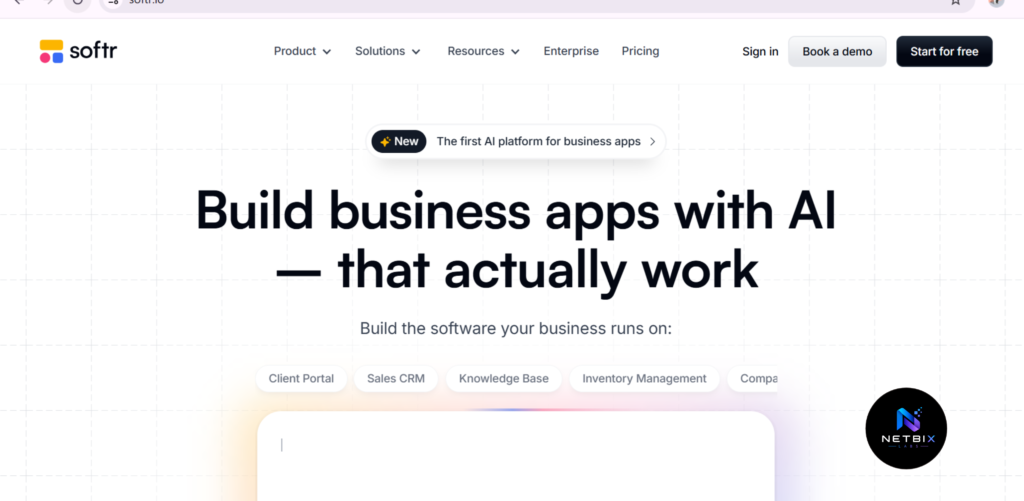
Step 2: Build Your App Using an AI Prompt
After logging in, choose the option to create a new application using AI.
The quality of your prompt plays a major role in the final result. Be as specific as possible when describing your application. Include details such as the app type, pages, features, user roles, search functions, filters, forms, and overall design preferences.
A well-written prompt helps the AI generate a more complete and accurate application structure, reducing the amount of manual editing required later.
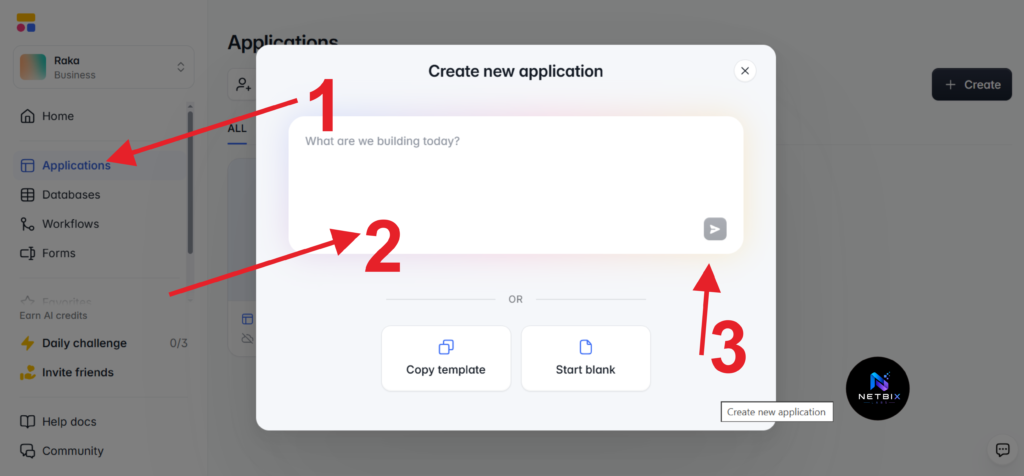
The following is an example of a structured prompt.
PROMPT For Build APP
—————————————Build a professional Employee Directory and Employee Self-Service (ESS) App for a company with approximately 100 employees.
The application should have a modern corporate design, be fully responsive, mobile-friendly, and easy to use for both employees and administrators.
Core Features:
1. Dashboard
* Total Employees
* Total Departments
* Employees On Leave
* New Employees This Month
* Quick Access Navigation Cards
* Employee Statistics Overview2. Employee Directory
* Display employee photo, full name, job title, department, email, and phone number
* Search employees by name
* Search employees by job title
* Filter employees by department
* Sort employees alphabetically
* Employee card layout with profile picture and contact details3. Department Categories
* HR Department
* Marketing Department
* Sales Department
* Finance Department
* IT Department
* Operations DepartmentWhen users click a department category, display only employees assigned to that department.
4. Employee Profile Page
Each employee profile should include:* Profile Photo
* Full Name
* Employee ID
* Job Title
* Department
* Manager
* Email Address
* Phone Number
* Office Location
* Hire Date
* Employee Bio/About Section5. Employee Self-Service Portal
Employees should be able to:* Submit Leave Requests
* Submit Sick Leave Requests
* Submit Remote Work Requests
* Update Personal Information
* View Request Status
* View Leave History6. Leave Management
* Leave Request Form
* Start Date
* End Date
* Leave Type
* Reason for Leave
* Approval Status
* Manager Approval Workflow
* Leave Request History7. Employee Messaging
Each employee profile should include:* “Send Message” button
* Direct Message Form
* Subject Field
* Message Field
* Send ButtonUsers should be able to send internal messages directly to specific employees from their profile page.
8. Employee Contact Directory
* Click-to-email button
* Click-to-call button
* Send Message button
* Employee contact card9. User Roles & Permissions
Administrator:* Manage all employees
* Approve leave requests
* Edit employee information
* View reportsManager:
* View department employees
* Approve team leave requests
* Send messagesEmployee:
* View directory
* Update personal information
* Submit leave requests
* Send messages10. Design Requirements
* Modern corporate UI
* Clean dashboard
* Professional company intranet style
* Responsive for desktop, tablet, and mobile
* Minimalist design
* Easy navigation
* Professional blue and white business themeDatabase Structure:
Employees
Departments
Leave Requests
Messages
ManagersUse Google Sheets as the primary database and create relationships between employees, departments, leave requests, and internal messages.
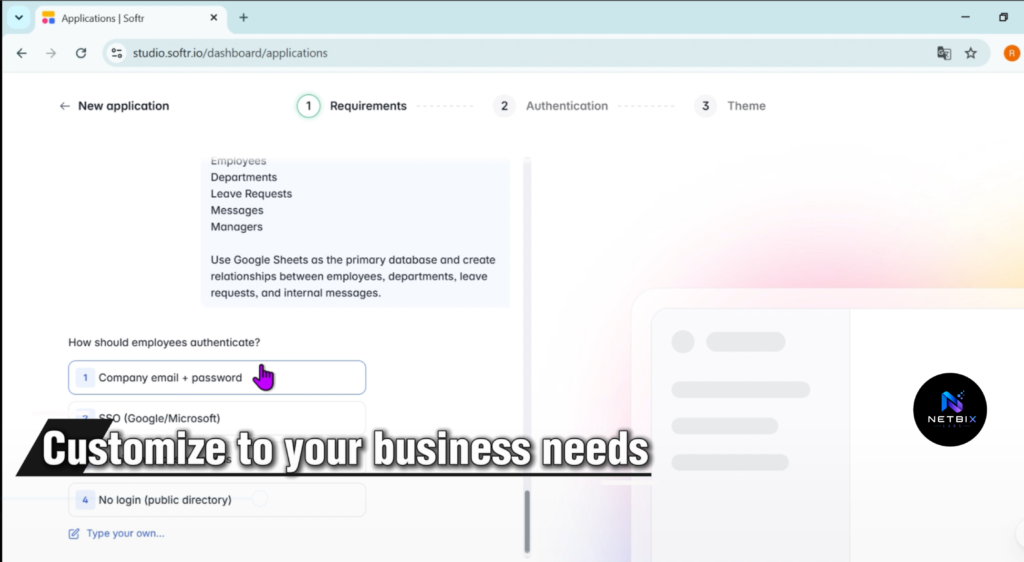
Step 3: Customize Your Requirements Carefully
Before generating the application, review and customize the AI settings and requirements.
This is one of the most important steps in the process. Take time to verify that all requested features, pages, workflows, and user permissions match your business needs. Making adjustments at this stage can save significant time later and improve the quality of the generated application.
The more precise your requirements are, the better the AI-generated result will be.
Step 4: Generate the Application
Once your prompt and settings are ready, click the Generate button.
Softr AI will analyze your requirements and automatically create the initial version of your application, including pages, layouts, components, and basic workflows based on your prompt.
Depending on the complexity of your project, the generation process may take a few moments.
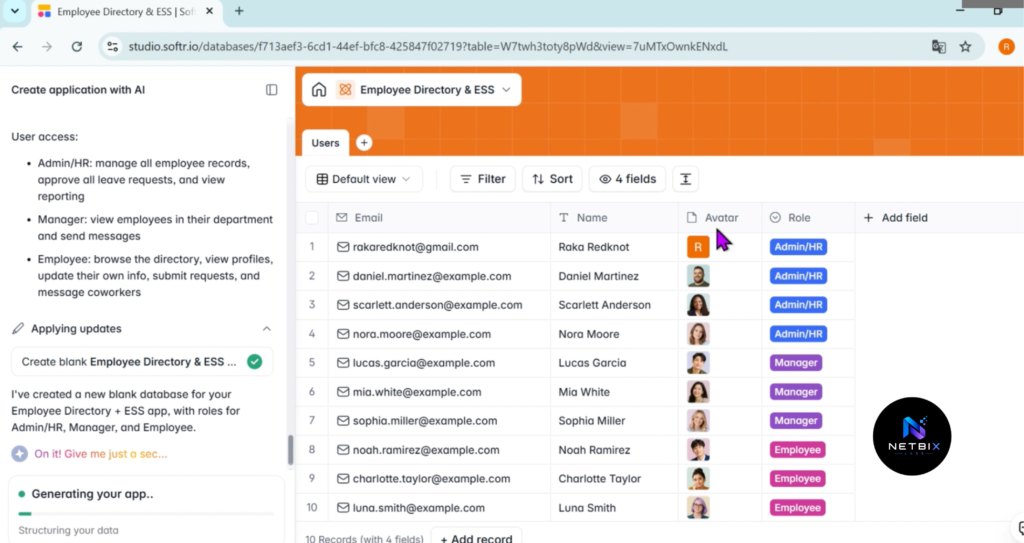
Step 5: Review, Edit, and Refine Your App
After the application is generated, carefully review each page and feature.
You can modify layouts, update content, change branding elements, add new blocks, adjust permissions, connect data sources, and fine-tune the user experience. This step allows you to transform the AI-generated draft into a polished application tailored to your organization’s needs.
Remember that AI provides a strong starting point, but customization is what makes the application truly valuable.
Step 6: Publish and Share Your Application
Once you’re satisfied with the design and functionality, publish your application.
Softr will provide a live URL that you can share with employees, clients, or team members. Before launching, it’s a good practice to test the application on desktop and mobile devices to ensure everything works as expected.
Congratulations! You now have a fully functional no-code application built with Softr AI and ready for real-world use.
Video Tutorial: How to Build Internal Business Apps Using Softr
Building an App with an AI Prompt in Softr
You’ll learn how to create a new application using Softr AI, write an effective prompt, configure your app requirements, and generate the initial version of your application. The video also highlights best practices for creating detailed prompts that help produce more accurate and professional results.
Watching the tutorial can help you better understand the workflow and avoid common mistakes, making it easier to build your first no-code application with confidence.
How Businesses Use AI App Builders
Startups
Founding teams use no code ai apps platforms to build internal tools that would otherwise require hiring a developer — customer relationship systems, project trackers, team performance dashboards, and hiring pipelines. This capability means startups can invest engineering resources in product rather than internal tools.
Agencies
Creative and digital agencies use business app builders to build custom client management systems, project tracking portals, and resource allocation tools. The ability to build a custom tool in hours rather than months means agencies can solve team-specific workflow problems immediately rather than working around limitations of off-the-shelf tools.
Marketing Teams
Marketing teams use ai app builder platforms to build lead management systems, campaign tracking dashboards, and approval workflows. A marketing team can build a lead scoring and routing system in a day — something that would previously require a developer or a high-cost third-party tool.
HR Teams
HR departments use no-code app builders for applicant tracking systems, employee directories, performance review tracking, and benefits administration portals. These are high-value tools that previously required dedicated HR software; now a team can build a custom version that matches their exact process in 4–6 hours.
Operations Teams
Operations teams build vendor management systems, request and approval workflows, supply chain tracking portals, and team resource allocation dashboards. These tools are critical to operations but often not covered adequately by standard software — building custom business automation apps solves this directly.
Creators and Solopreneurs
Independent professionals use ai internal tools builders to manage their client work — client databases, project tracking, invoice tracking, and scheduling portals. A solopreneur can now have a professional-looking internal system without paying for multiple third-party tools.
Enterprise Workflows
Large organizations use ai app builder platforms for departmental-level tools that do not warrant a six-month development project — HR approval workflows, IT asset management, real estate booking systems, and cross-team coordination portals. The ability to build a tool in days means departments can solve their own problems without waiting for IT development backlog.
Best Practices for No-Code App Development
Start with a single, high-value problem. Do not try to build a comprehensive system covering all team workflows. Identify the single most painful workflow — the one that consumes the most time or causes the most errors — and build an app for that first. Expand later once the first app is live and validated.
Let the data structure drive the design. A no-code app is only as good as the underlying data. Spend more time organizing your data (fields, options, relationships) correctly in Airtable or your data source than on the visual design. The interface is secondary; clean, well-organized data is primary.
Test with real users before announcing. Build the app, invite 2–3 team members to test it, and gather feedback. The feedback cycle takes 30 minutes and usually catches issues that would frustrate the entire team if not addressed before broader launch.
Use row-level security appropriately. For teams where different members need to see different subsets of data (sales reps seeing their own leads, managers seeing their own team), configure row-level security in Softr. This prevents accidental visibility of confidential information and creates a more trustworthy interface.
Plan for growth. When designing your initial data structure, think about how it will scale. Add fields that you might need in six months — do not minimize the schema to fit only today’s needs. Adding fields is much easier than redesigning the schema later.
Keep the interface simple. The most used internal apps are the simplest ones. Resist the temptation to add every possible feature immediately. Start with a table view, add a form for creating records, enable filtering on the most common dimensions. Add complexity only when users ask for it.
Common Mistakes When Building Internal Apps
Building without understanding the actual workflow. Many app-building projects start by asking “what fields do we need?” rather than “what does the team actually do?” The best way to design an app is to watch the team do the work manually and then build something that mirrors and improves that process, not one that restructures how they work based on what seems logical to the builder.
Creating an overly complex schema. Beginners often add dozens of fields “in case we might need them someday.” Too many optional fields make the form overwhelming and the interface cluttered. Start with the 5–6 fields the team needs today. Adding a field takes 15 minutes; removing unused ones later creates confusion.
Forgetting about maintenance and updates. Many app projects go live and then are never updated. As the team’s workflow evolves, the app should evolve with it. Plan for quarterly reviews of the app — asking users what they would change or what is missing — and make updates. A neglected app eventually stops being used.
Not setting clear permissions. An internal app with unclear permissions — where anyone can delete anyone else’s records, or everyone can see confidential information — creates more problems than it solves. Spend 20 minutes thinking about who should be able to do what and configure permissions accordingly.
Trying to solve too many problems in one app. An app that tries to manage projects, clients, team performance, and resource allocation becomes bloated and confusing. One app, one problem. Build a project tracker. Later, build a separate client management system. Keep them focused.
Skipping the user testing phase. Building in isolation and then unveiling the app to the team often results in significant rework. Show it to users as you build (or at least before launch), gather feedback, and iterate. 30 minutes of user feedback early saves hours of rework later.
FAQ
What is a no code ai app builder and how is it different from regular app development? A no-code app builder lets you create web applications using a visual interface and pre-built components rather than writing code. You click to add blocks (tables, forms, charts), configure them to pull from your data source, and publish. Traditional app development requires writing code, managing databases, and deploying infrastructure. A no-code builder handles all of that invisibly — you focus only on what the app should do, not how it works technically.
Can I build a professional-looking app with no-code platforms? Yes — modern no-code platforms produce professionally designed apps. Softr, Bubble, FlutterFlow, and other platforms include modern UI components, responsive design (mobile and desktop), custom styling, and professional templates. An app built in Softr looks as polished as an app built by a developer — the user experience quality has become equivalent.
What data sources can I connect to a no-code app builder? Most no-code platforms support Airtable, Google Sheets, SQL databases (MySQL, PostgreSQL), REST APIs, and 50+ integrations. You can also pull data from Zapier if you need to transform data before displaying it in your app. The flexibility to connect to almost any data source means you can build an app on top of your existing data infrastructure.
Who can use a no-code app builder — do I need technical skills? Anyone can learn to use a no-code app builder. The learning curve is similar to Excel or Google Sheets — you do not need coding experience, but you should be comfortable with basic database concepts (tables, rows, columns, filtering, sorting). Most people can build a functional internal app after 2–3 hours of learning the platform.
How much does it cost to build an app with a no-code platform? No-code platforms typically charge monthly subscription fees. Softr starts at free (for small teams) and ranges from $99–$499/month depending on users and features. The total cost is usually the software subscription plus your time to build and maintain the app. Compare this to hiring a developer ($100–$200 per hour for 4–6 weeks = $20,000–$50,000) and the ROI is obvious for most internal tools.
Can I maintain and update the app myself, or do I need a developer? You can maintain and update the app yourself — that is one of the primary advantages of no-code platforms. Adding a new field, changing a label, updating permissions, or tweaking the layout takes minutes without any developer involvement. The system is designed to be maintainable by non-technical users.
Alternative AI App Builders
Bubble
What it does: Bubble is a comprehensive no-code platform for building full-featured web applications. It supports complex workflows, custom logic, user authentication, payments, APIs, and integrations. Bubble is more powerful than Softr but also requires more learning.
When it’s better: When your app needs complex logic or features beyond simple data management — payment processing, multi-step workflows, advanced user management, or API integrations. Bubble’s flexibility comes at the cost of a steeper learning curve.
Who should use it: Teams building more sophisticated applications, SaaS startups building products (not just internal tools), and organizations needing extensive customization.
Website: https://bubble.io
FlutterFlow
What it does: FlutterFlow is a visual app builder focused on mobile applications (iOS and Android) built on the Flutter framework. It produces native-performance mobile apps without code. It also supports web apps and integrates with Firebase and other backends.
When it’s better: When your primary need is a mobile app that works offline and has native mobile performance. FlutterFlow produces better mobile apps than web-focused platforms like Softr, at the cost of more complexity in setup.
Who should use it: Teams building mobile-first applications, especially field teams that need offline functionality, and organizations that want native mobile performance.
Website: https://flutterflow.io
Retool
What it does: Retool is an internal tools platform optimized for connecting to databases, APIs, and building data-heavy applications. It specializes in internal dashboards, admin panels, and CRUD applications. Retool is particularly strong for technical teams that need to build tools quickly.
When it’s better: When your primary use case is connecting to databases or APIs and building internal dashboards and admin panels. Retool is slightly more technical than Softr but more powerful for data-heavy applications.
Who should use it: Technical teams building internal tools, database administrators creating admin interfaces, and organizations with complex data connectivity needs.
Website: https://retool.com
Airtable with Automations (No External Builder)
What it does: Airtable itself, combined with its native automations and views, can serve as a simple app builder for straightforward data management. You do not need a separate platform — Airtable’s interface, forms, and automations handle many internal tool use cases directly.
When it’s better: For very simple use cases (contact management, task tracking, basic project management) where you want to minimize external platform dependencies. Airtable is powerful enough for many internal tools without needing an additional layer.
Who should use it: Teams already using Airtable, organizations preferring to minimize tool proliferation, and teams building relatively simple data management systems.
Website: https://airtable.com
Key Takeaways
- No code ai apps platforms eliminate the gap between “we need a tool” and “we have a tool” — what previously took months of developer time now takes hours of configuration.
- The ai app builder approach works best for well-defined, single-purpose applications — start with the one workflow that causes the most friction and build an app for that.
- An ai internal tools system built in Softr or similar platform looks and functions like a professionally developed app — the quality and polish are equivalent to developer-built tools.
- The business app builder approach requires upfront investment in data organization (making sure your Airtable or spreadsheet is well-structured) but rewards that investment with faster building and more reliable apps.
- Row-level security, user permissions, and access control should be configured thoughtfully — do not skip these steps assuming you will add them later.
- The most successful internal apps are the ones that are maintained and evolved based on user feedback — plan for quarterly reviews and incremental improvements rather than “build once and freeze.”
Conclusion
Building internal business applications without code represents a fundamental shift in how organizations can solve operational problems. The ai app builder approach means that the expensive, months-long process of requesting developer time for an internal tool is replaced by a Saturday afternoon of your own time plus $99/month in software costs.
The workflow in this guide — defining requirements, organizing data, building views and forms, configuring access, and publishing — is a framework applicable to dozens of different internal tools. A customer management system, a hiring pipeline tracker, an expense approval workflow, a team asset library, a resource allocation dashboard — all are variations on the same pattern.
The teams that will operate most efficiently in 2025 are the ones that can build their own tools to match their specific workflows, rather than forcing their workflows to match generic off-the-shelf software. Business app builders make that self-service tool creation accessible to any team.
Start with your most painful workflow. Build an app to fix it. Iterate based on feedback. The speed and low cost of this approach means the ROI is immediate and undeniable.