Learn how to create corporate training videos with HeyGen AI, using AI avatars, onboarding workflows, and scalable business training systems.
Introduction
Training employees at scale has always been expensive, slow, and difficult to maintain.
Traditional corporate training videos often require:
- camera equipment
- presenters
- video editors
- production schedules
- expensive revisions
- localization teams
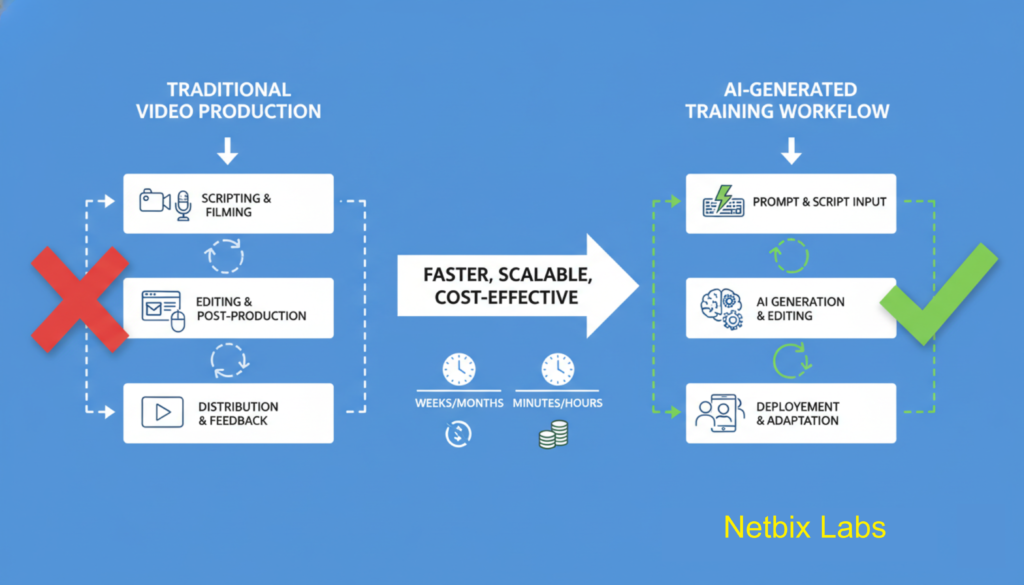
For modern businesses, especially startups, remote teams, agencies, and enterprise organizations, this approach no longer scales efficiently.
That’s where AI-powered video creation changes the game.
Using HeyGen, companies can create professional employee onboarding videos, internal learning materials, SOP walkthroughs, compliance training, customer education videos, and multilingual business content using AI avatars and automated voice generation.
This guide will show you exactly how to create corporate training videos with HeyGen AI step-by-step — including planning, scripting, avatar setup, branding, localization, and distribution strategies for real business environments.
Whether you’re building:
- HR onboarding systems
- customer success training
- internal documentation videos
- enterprise learning modules
- scalable AI training video workflows
…this tutorial will help you create professional results without a traditional production team.
Quick Summary
- HeyGen allows businesses to create AI-generated training videos using avatars and voice synthesis.
- Ideal for HR, onboarding, SOP training, internal education, and multilingual corporate communication.
- Reduces video production costs and turnaround time dramatically.
- No camera, actors, or studio required.
- Great for startups, agencies, enterprise teams, and remote organizations.
- Supports scalable AI avatar business workflows.
Table of Contents
- What You’ll Learn
- What Is HeyGen AI?
- Why Businesses Use AI Training Videos
- Setting Up Your HeyGen Workspace
- Planning Your Corporate Training Workflow
- Writing Effective Training Scripts
- Creating an AI Avatar Presenter
- Building Your Employee Onboarding Video
- Adding Branding and Visual Elements
- Translating Videos for Global Teams
- Exporting and Distributing Training Content
- Business Use Cases
- Best Practices
- Common Mistakes
- HeyGen Alternatives
- FAQ
- Key Takeaways
- Related Guides
What You’ll Learn
By the end of this tutorial, you’ll know how to:
You might also like: How Marketing Teams Create LinkedIn Video Campaigns Using AI
Related guide: How to Generate Product Demo Videos Using Google Veo 3
- Create professional AI training videos
- Build employee onboarding video systems
- Use AI avatars for business communication
- Create multilingual training content
- Improve internal training scalability
- Reduce production costs for corporate education
- Build repeatable corporate training AI workflows
- Optimize videos for remote and distributed teams
What Is HeyGen AI?
HeyGen is an AI video generation platform that allows businesses to create studio-style videos using digital avatars, AI voiceovers, and automated video workflows.
Instead of filming real presenters, businesses can generate videos from text scripts using realistic AI presenters.
HeyGen Documentation & Resources
Key Features
AI Avatars
Create virtual presenters for training, onboarding, marketing, and support videos.
Text-to-Video
Convert scripts directly into narrated videos.
Multilingual Translation
Translate videos into multiple languages while preserving voice synchronization.
Voice Cloning
Create branded or personalized AI narration.
Templates
Speed up production using reusable corporate layouts.
Screen Recording Integration
Combine tutorials and walkthroughs with AI presenters.
Why Businesses Use AI Training Videos
Modern organizations increasingly rely on AI video tools because they solve major operational problems.
Traditional Corporate Video Challenges
- High production costs
- Long editing cycles
- Difficult updates
- Inconsistent presenters
- Localization complexity
- Scheduling issues
Benefits of AI Training Video Systems
- Faster content production
- Easy script updates
- Scalable onboarding
- Consistent branding
- Rapid localization
- Lower production costs
- Better remote team support
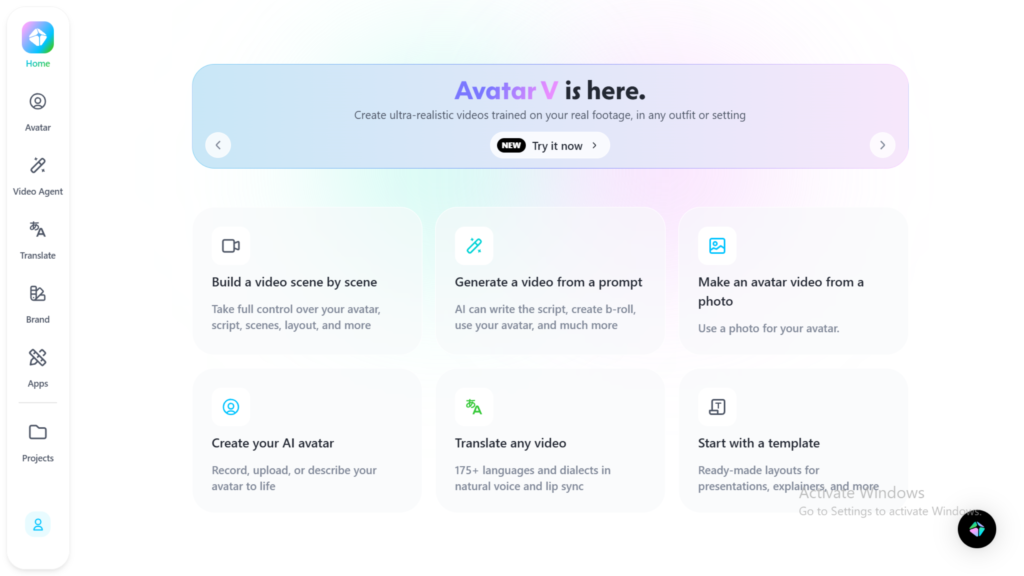
Step 1: Create Your HeyGen Account
Why This Step Matters
Your workspace acts as the central hub for all AI training video production.
A properly organized workspace helps businesses:
- manage teams
- maintain branding consistency
- store templates
- streamline collaboration
What to Do
- Visit HeyGen
- Create an account
- Choose a business-oriented plan
- Configure your workspace name
- Invite team members if needed
For larger organizations, create separate folders for:
- HR onboarding
- compliance training
- customer education
- operations SOPs
- internal communications
Expected Result
You’ll have a centralized AI video production environment ready for corporate content creation.
Step 2: Plan Your Corporate Training Workflow
Why This Step Matters
Many businesses fail because they create videos before defining learning outcomes.
Training videos should solve a clear operational problem.
What to Do
Define:
- target audience
- learning objectives
- delivery platform
- video length
- onboarding stage
- employee role
Example onboarding modules:
- Company introduction
- Security compliance
- CRM training
- Communication guidelines
- Software tutorials
- Customer handling procedures
Recommended Video Structure
Introduction
Explain the purpose.
Core Training
Teach the workflow clearly.
Summary
Reinforce key actions.
Call-to-Action
Direct employees toward next steps.
Expected Result
You’ll have a scalable structure for repeatable training production.
Step 3: Write an Effective AI Training Script
Why This Step Matters
The quality of your AI avatar business video depends heavily on the script.
AI presenters perform best with:
- short sentences
- conversational tone
- clear structure
- instructional clarity
What to Do
Write scripts using:
- concise language
- direct instructions
- natural pacing
- short paragraphs
Example Script Structure
Opening
“Welcome to the customer onboarding training module.”
Problem Context
“In this lesson, you’ll learn how to manage support tickets efficiently.”
Training Instructions
Explain processes step-by-step.
Reinforcement
Summarize key operational actions.
Script Writing Tips
- Avoid long paragraphs
- Use active voice
- Add pauses naturally
- Keep sections modular
- Focus on clarity over complexity
Expected Result
You’ll have a script optimized for AI narration and employee comprehension.
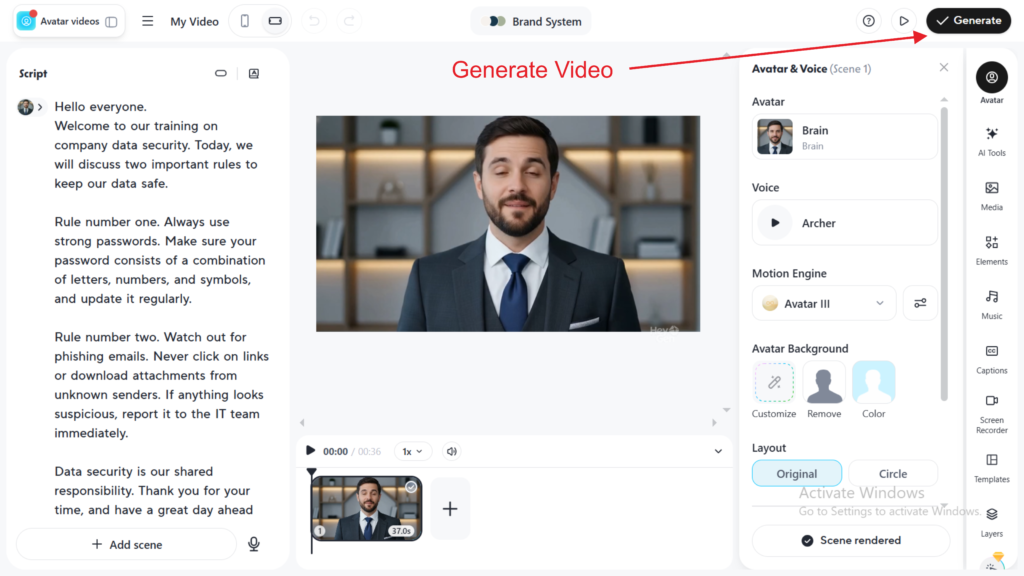
Example English Script
“Hello everyone. Welcome to our short training on company data security. Today, we will discuss two important rules to keep our data safe.
Rule number one. Always use strong passwords. Make sure your password consists of a combination of letters, numbers, and symbols, and update it regularly.
Rule number two. Watch out for phishing emails. Never click on links or download attachments from unknown senders. If anything looks suspicious, report it to the IT team immediately.
Data security is our shared responsibility. Thank you for your time, and have a great day ahead!”
Step 4: Create Your AI Avatar Presenter
Why This Step Matters
The avatar becomes the “face” of your corporate training system.
Consistency builds professionalism and familiarity.
What to Do
Inside HeyGen:
- Open Avatar Library
- Choose a professional presenter
- Select language and voice
- Adjust tone and pacing
- Preview lip-sync quality
Many businesses create separate avatars for:
- HR
- customer success
- technical onboarding
- leadership communication
Choosing the Right Avatar
Corporate Training
Use calm, professional avatars.
Startup Teams
Use conversational and modern styles.
Enterprise Communication
Use polished business presenters.
Expected Result
You’ll create a branded AI presenter suitable for corporate education.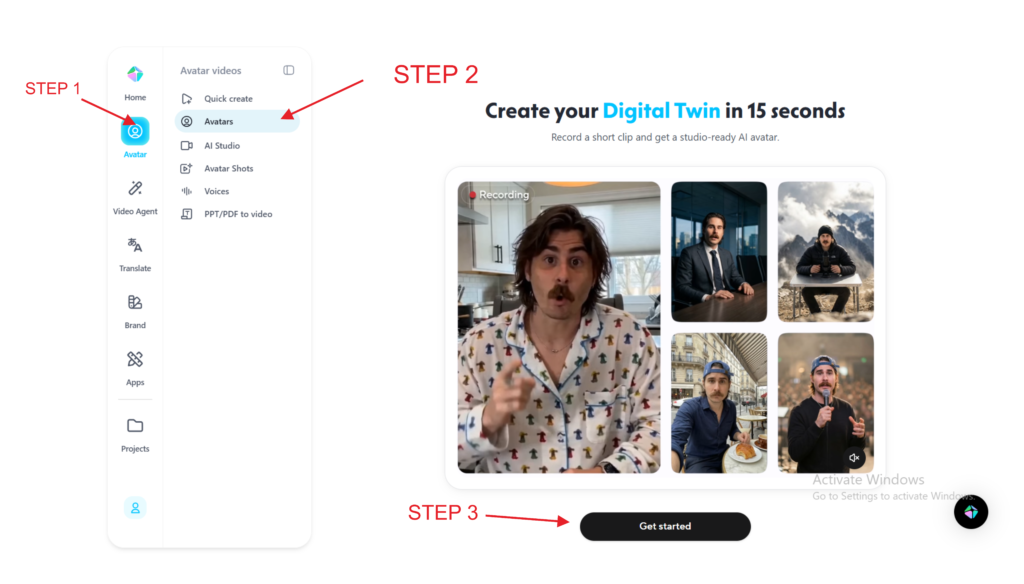
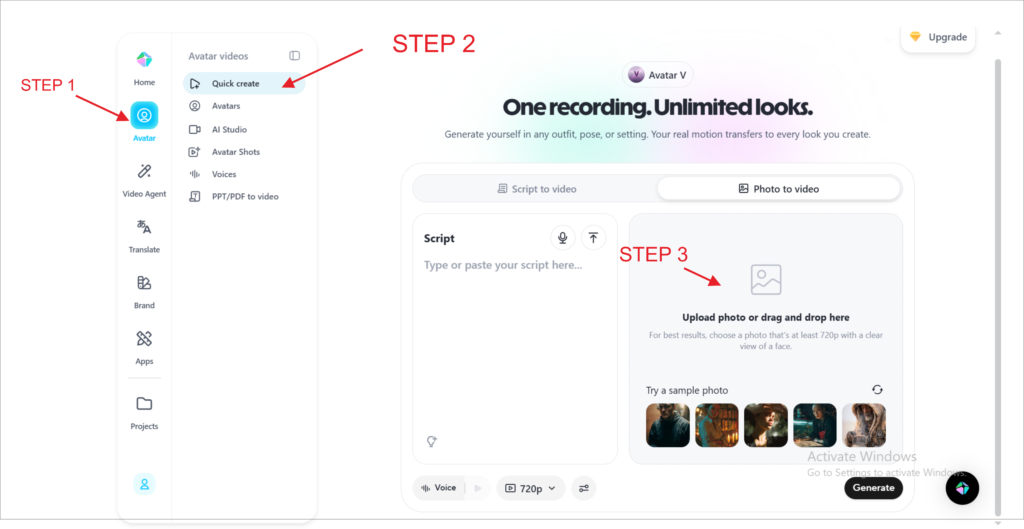
If you are not sure about creating a video avatar, you can also use your avatar photo with the following steps.
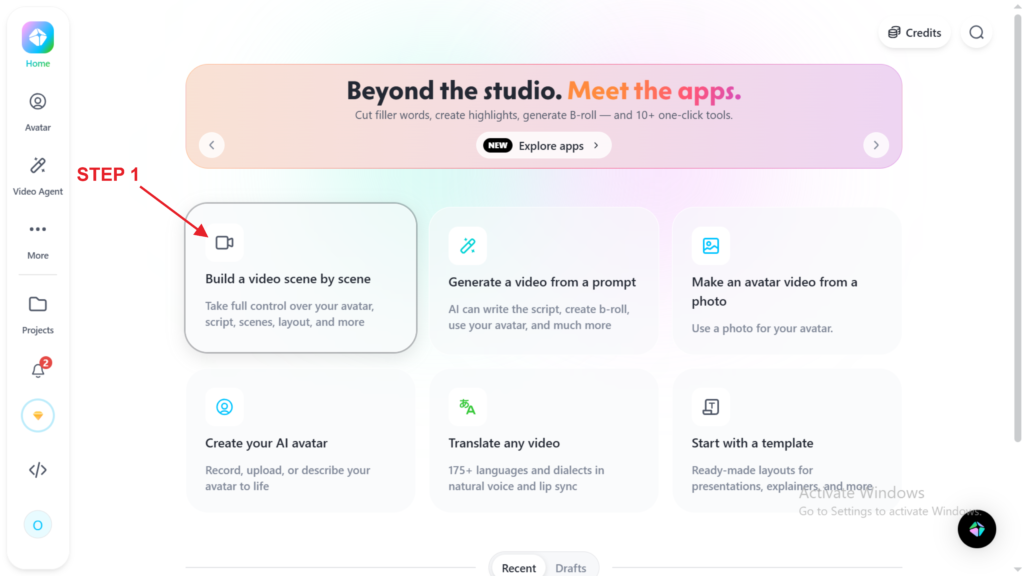
Step 5: Build Your Employee Onboarding Video
Why This Step Matters
Employee onboarding videos improve consistency while reducing repetitive HR work.
What to Do
Create onboarding sections such as:
- company mission
- organizational structure
- workplace policies
- communication tools
- software access
- security protocols
Use:
- slides
- screen recordings
- SOP visuals
- diagrams
- captions
Recommended Length
- 2–5 minutes per module
- Avoid long monolithic videos
- Create modular learning content
Expected Result
You’ll have scalable onboarding assets that can be reused across departments.
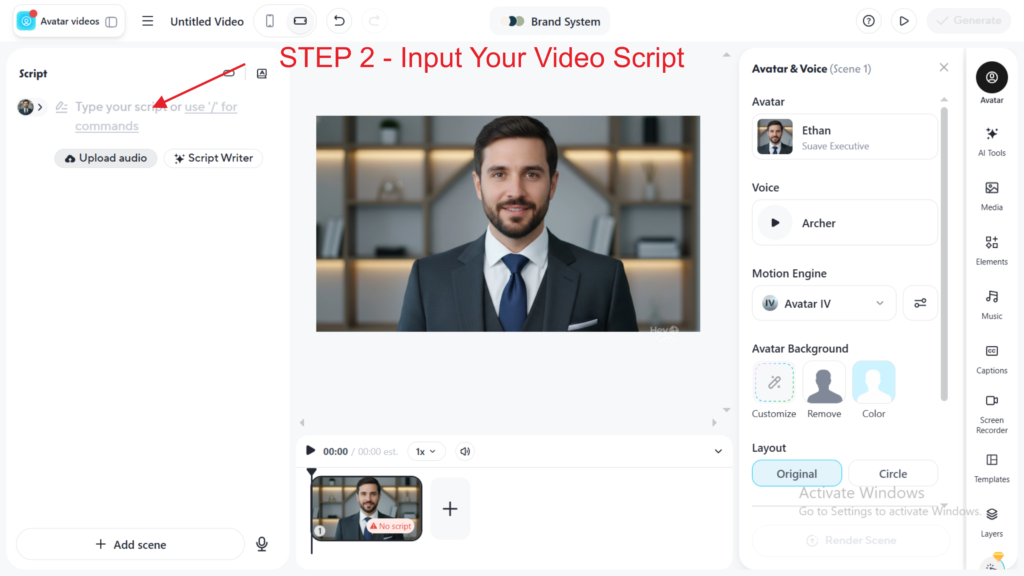
Step 2 Input Video Script
Step 6: Add Branding and Visual Elements
Why This Step Matters
Corporate branding improves trust, professionalism, and employee engagement.
What to Do
Add:
- company logo
- brand colors
- lower thirds
- transitions
- typography
- intro/outro sequences
Include visual aids:
- process diagrams
- KPI dashboards
- software walkthroughs
- workflow illustrations
Visual Design Tips
- Use clean layouts
- Avoid clutter
- Keep typography readable
- Use consistent branding
Step 7: Translate Videos for Global Teams
Why This Step Matters
Global businesses often struggle with multilingual training delivery.
AI localization dramatically reduces translation costs.
What to Do
Use HeyGen’s translation tools to:
- translate narration
- synchronize lip movements
- generate multilingual subtitles
- localize onboarding content
Useful for:
- remote companies
- international HR teams
- global customer support
- distributed operations
Step 8: Export and Distribute Your Training Videos
Why This Step Matters
Distribution determines whether employees actually consume the training.
What to Do
Export videos in formats compatible with:
- LMS platforms
- internal portals
- Notion
- SharePoint
- Slack
- Microsoft Teams
- onboarding systems
Recommended hosting:
- Vimeo
- Loom
- internal knowledge base
- company intranet
Distribution Best Practices
- Track completion rates
- Segment by department
- Use short modules
- Add quizzes
- Gather feedback
Expected Result
Your organization will have a scalable video-based training infrastructure.
Tutorial Video
To make it easier to create videos in Heygen, you can also watch the following short video tutorial.
How Businesses Use This Tool
Startups
Startups use AI training videos to:
- onboard rapidly growing teams
- document workflows
- reduce founder dependency
HR Teams
HR departments create:
- onboarding modules
- compliance education
- culture training
- benefits walkthroughs
Agencies
Agencies produce:
- client tutorials
- onboarding videos
- campaign walkthroughs
- internal SOP training
Marketing Teams
Marketing departments use AI avatar business systems for:
- product education
- sales enablement
- campaign training
- internal updates
Operations Teams
Operations teams create:
- process documentation
- warehouse procedures
- quality assurance training
- software walkthroughs
Enterprise Organizations
Enterprises use corporate training AI systems for:
- global compliance
- multilingual education
- standardized onboarding
- knowledge retention
Best Practices for AI Training Videos
Keep Videos Short
Micro-learning improves retention.
Ideal length:
- 2–7 minutes
Focus on One Objective
Each video should solve one problem.
Use Consistent Branding
Maintain:
- voice
- avatar
- visual style
- terminology
Add Captions
Captions improve accessibility and engagement.
Use Real Business Examples
Employees learn faster from practical scenarios.
Build a Template Library
Reusable templates accelerate production.
Common Mistakes to Avoid
Creating Videos That Are Too Long
Long videos reduce completion rates.
Overusing AI Voices
Monotone narration hurts engagement.
Ignoring Script Quality
Even the best AI avatars cannot fix poor writing.
Skipping Human Review
Always review:
- pronunciation
- compliance
- policy accuracy
- terminology
Lack of Structure
Disorganized videos confuse learners.
Overcomplicating Visuals
Too many animations reduce clarity.
HeyGen Alternatives
Synthesia
Best for:
- enterprise training
- corporate education
- multilingual business communication
Better when:
- large enterprise governance matters
Ideal for:
- enterprise HR teams
Lumen5
Best for:
- marketing-oriented videos
- social content
Better when:
- visual storytelling is the priority
Ideal for:
- content marketing teams
VEED.io
Best for:
- fast editing workflows
- creators and startups
Better when:
- lightweight editing matters
Ideal for:
- small teams
Descript
Best for:
- audio editing
- podcast workflows
- transcript-based editing
Better when:
- editing flexibility matters
Ideal for:
- media teams
FAQ
What is the best AI tool for corporate training videos?
HeyGen is one of the leading platforms for AI training video creation because it combines avatars, voice synthesis, localization, and business-friendly workflows.
Can HeyGen create employee onboarding videos?
Yes. Businesses commonly use HeyGen for employee onboarding videos, HR training, SOP walkthroughs, and compliance education.
Are AI avatar business videos suitable for enterprises?
Yes. Many enterprises use AI avatars for scalable internal communication and multilingual training systems.
How long should AI training videos be?
Most effective corporate training videos are between 2 and 7 minutes long per topic.
Can HeyGen translate training videos?
Yes. HeyGen supports multilingual video translation with synchronized voice and lip movement features.
Is AI video production cheaper than traditional production?
In most cases, yes. AI video tools significantly reduce filming, editing, presenter, and localization costs.
Key Takeaways
- AI training videos help businesses scale onboarding efficiently.
- HeyGen simplifies professional video creation using AI avatars.
- Modular training improves employee engagement.
- Multilingual AI localization supports global teams.
- Strong scripting is essential for high-quality output.
- Corporate training AI systems reduce production costs and operational friction.
Conclusion
Creating professional corporate training videos no longer requires expensive production teams or complex studio setups.
With HeyGen AI, businesses can build scalable onboarding systems, multilingual education programs, and modern AI training video workflows faster than ever before.
For startups, HR departments, agencies, and enterprise organizations, AI-generated employee onboarding video systems are becoming a major operational advantage.
The companies that adopt corporate training AI early will likely gain:
- faster onboarding
- lower training costs
- better knowledge retention
- improved global scalability
- more agile internal communication systems
As AI avatar business workflows continue evolving, tools like HeyGen are rapidly becoming part of the modern enterprise content stack.