In the hyper-competitive landscape of digital agencies, the difference between thriving and merely surviving often boils down to one critical factor: efficiency. Are you tirelessly repeating manual tasks, draining precious time and resources that could be invested in client strategy, innovation, or business development?
For countless digital agencies, startups, and marketing teams, the answer is a resounding “yes.” Client onboarding, reporting, content distribution, lead nurturing, and even internal communications often become bottlenecks, stifling growth and leading to burnout. This isn’t just an operational snag; it’s a fundamental business problem costing agencies millions in lost opportunities and employee turnover.
This is precisely where n8n automation steps in as a game-changer. Imagine an open-source workflow automation platform that gives you the power to connect virtually any app or API, automate complex sequences, and liberate your team from the tyranny of repetitive work. This isn’t just about saving time; it’s about unlocking scalable growth, improving client satisfaction, and fostering a culture of innovation.
This premium guide is designed for digital agency owners, operations managers, tech-savvy marketers, and startups looking to master n8n automation for digital agencies. We’ll demystify the platform, walk you through a practical, agency-centric tutorial, and equip you with the knowledge to revolutionize your operations. Prepare to transform your agency from a manual task-runner into a streamlined, high-performance machine.
Quick Summary (TL;DR)
- The Problem: Digital agencies struggle with manual, repetitive tasks that hinder scalability and profitability.
- The Solution: n8n, an open-source workflow automation tool, offers a powerful, flexible, and cost-effective way to automate these tasks.
- Key Benefits: Dramatically improves efficiency, reduces errors, frees up team capacity, and supports rapid business scaling.
- What You’ll Learn: How n8n works, a step-by-step tutorial for agency-specific workflows, best practices, and comparisons like
n8n vs make. - Outcome: Empower your agency to operate with unprecedented efficiency, driving better results for clients and sustained growth for your business.
Table of Contents
- Introduction
- Quick Summary (TL;DR)
- What You’ll Learn
- Tool Overview: Understanding n8n
- Step-by-Step Tutorial: Automating an Agency Lead Qualification & Nurturing Workflow with n8n
- Step 1: Setting Up Your n8n Instance
- Step 2: Triggering the Workflow with a New Lead Submission
- Step 3: Enriching and Qualifying Lead Data
- Step 4: Adding the Lead to Your CRM
- Step 5: Initiating a Nurture Sequence and Internal Notification
- Step 6: Error Handling and Monitoring
- Visual & UX Enhancement Requirements
- How Businesses Use This Tool
- Best Practices for n8n Automation
- Common Mistakes to Avoid
- FAQ Section
- Alternatives Section
- Key Takeaways
- Related Guides
What You’ll Learn
By the end of this comprehensive n8n automation tutorial for digital agencies, you will be able to:
- Understand the core functionalities and benefits of n8n as an open source marketing automation platform.
- Confidently set up and manage your own n8n instance, whether cloud-hosted or self-hosted.
- Design, build, and deploy practical, agency-specific automated workflows.
- Integrate n8n with various applications and APIs to streamline client management, marketing campaigns, and internal operations.
- Distinguish between n8n and other automation tools like
n8n vs makeand Zapier, making informed decisions for your tech stack. - Implement best practices for robust, scalable, and error-proof automations.
- Leverage workflow automation for startups, agencies, and larger corporate teams to drive efficiency and growth.
Tool Overview: Understanding n8n
n8n (pronounced “n-eight-n”) is a powerful, extensible workflow automation tool that helps businesses connect applications, automate tasks, and build custom workflows without extensive coding. Unlike many proprietary solutions, n8n stands out as an open-source platform, offering unparalleled flexibility, transparency, and control over your data.
What is n8n?
At its core, n8n is a “fair-code” licensed tool that allows you to create sophisticated integrations and automations. It’s a visual workflow builder where you drag and drop “nodes” (individual steps or actions) to define sequences. Each node represents a specific application, service, or programming logic (like HTTP requests, data manipulation, or conditional branching).
Key Features:
- Visual Workflow Editor: An intuitive drag-and-drop interface makes building complex automations accessible to non-developers.
- Extensive Integrations: Connects to hundreds of popular applications (CRMs, marketing tools, databases, communication apps) and offers generic HTTP requests for any API.
- Self-Hosted or Cloud: Agencies can choose to host n8n on their own servers for maximum data privacy and control, or opt for the convenient n8n Cloud service.
- Code Nodes: For advanced users, JavaScript code nodes allow for custom logic and virtually limitless integration possibilities.
- Data Transformation: Powerful capabilities to parse, transform, and map data between different applications.
- Error Handling: Robust features for managing workflow errors and notifications.
- Community Support: A vibrant open-source community provides extensive resources and peer support.
Why Businesses Use It:
Businesses, especially digital agencies and startups, gravitate towards n8n for several compelling reasons:
- Cost-Effectiveness: Being open-source, the self-hosted version has no per-task or per-user fees, making it significantly more affordable than proprietary alternatives as you scale.
- Flexibility & Control: Unrestricted by vendor lock-in, users have full control over their data and the ability to customize workflows to an unprecedented degree. This is crucial for agencies with unique client needs or complex internal processes.
- Scalability: From simple
workflow automation for startupsto enterprise-grade system integrations, n8n can handle growing workloads efficiently. - Security & Privacy: Self-hosting allows agencies to keep sensitive client data within their own infrastructure, addressing critical security and compliance concerns.
- Innovation: The ability to integrate with bleeding-edge APIs and build custom solutions means agencies can quickly adapt to new technologies and offer unique services.
Ideal Use Cases:
- Lead Management: Automating lead capture, qualification, CRM updates, and nurture sequences.
- Client Reporting: Generating automated performance reports from various ad platforms and analytics tools.
- Content Distribution: Scheduling and publishing content across multiple social media channels.
- Internal Operations: Automating HR tasks, project management updates, and cross-departmental communications.
- Data Synchronization: Keeping client data consistent across CRMs, email marketing platforms, and project management tools.
Official Website: https://n8n.io/
Official Documentation: https://docs.n8n.io/
Step-by-Step Tutorial: Automating an Agency Lead Qualification & Nurturing Workflow with n8n
This tutorial will guide you through building a practical workflow for a digital agency: automatically capturing new leads from a website form, qualifying them, adding them to a CRM, and triggering both a nurture sequence and an internal notification. This exemplifies a core n8n automation tutorial for digital agencies use case.
[INFOGRAPHIC SUGGESTION: Comparison chart showing manual lead handling vs. n8n automated lead handling, highlighting time savings and reduced errors.]
Step 1: Setting Up Your n8n Instance
Why This Step Matters: Before you can build any workflows, you need a running n8n environment. Choosing between self-hosted and cloud impacts control, cost, and maintenance.
What to Do:
For this tutorial, we’ll assume you’re using n8n Cloud for simplicity, which offers a managed service. If you prefer self-hosting, the setup involves Docker or npm.
- Sign Up for n8n Cloud: Visit n8n.io and navigate to the “Cloud” section to sign up for an account.
- Create a New Instance: Follow the on-screen prompts to create your first n8n instance. This usually involves choosing a region and giving your instance a name.
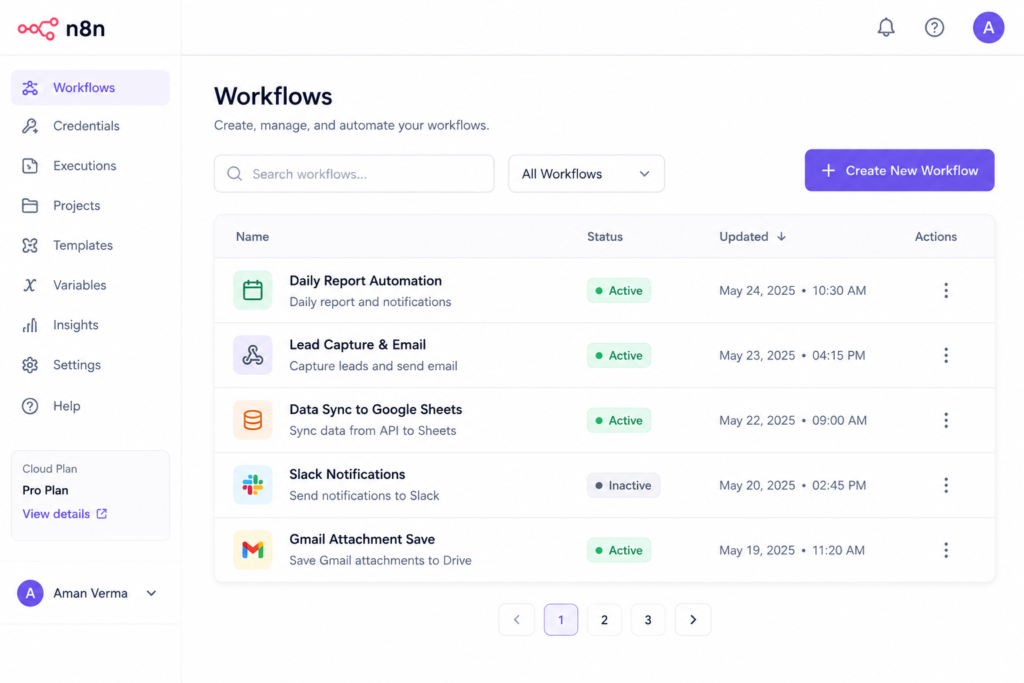
- Access Your Dashboard: Once created, you’ll be directed to your n8n dashboard, which is your central hub for creating and managing workflows.
Expected Result: A live, accessible n8n dashboard where you can begin building workflows.
Step 2: Triggering the Workflow with a New Lead Submission
Why This Step Matters: Every automation needs a starting point. For lead generation, a webhook is a flexible way to capture data from almost any form or external system instantly.
What to Do:
- Create a New Workflow: From your n8n dashboard, click “Add new workflow.”
- Add a Webhook Trigger Node:
- Search for “Webhook” in the node panel and drag it onto the canvas.
- Click on the Webhook node to configure it.
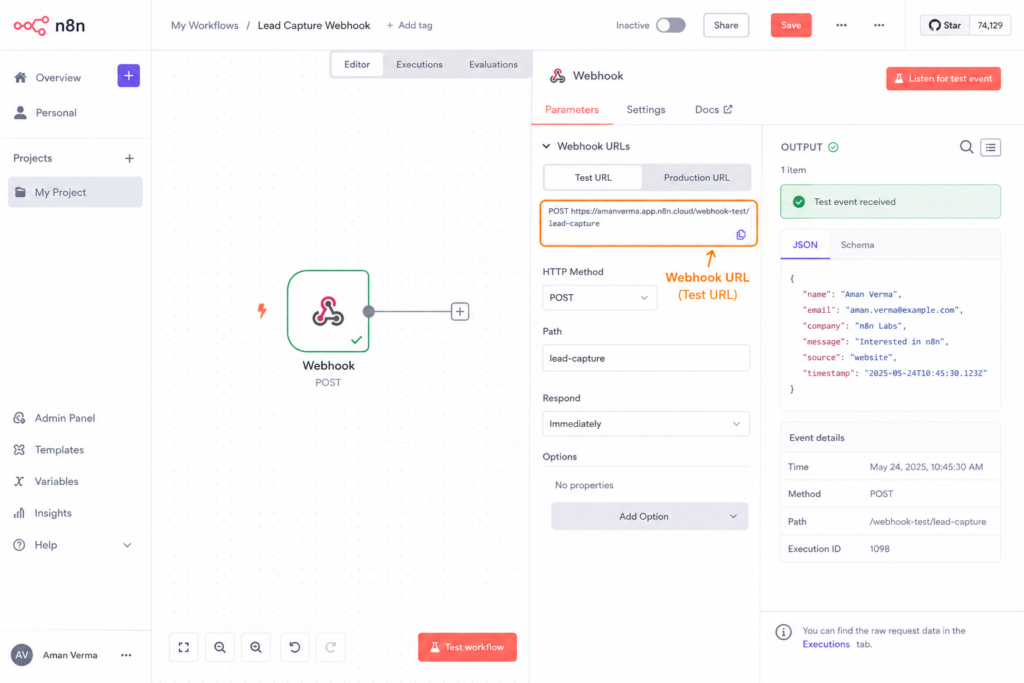
- Under “Webhook URL,” set the “HTTP Method” to
POST. - The “Webhook URL” will be automatically generated. Copy this URL – this is where your website form will send data.
- Set “Response Mode” to
Respond to Webhook.
- Test the Webhook:
- Click “Listen for test event” on the Webhook node.
- Go to your website form (or a tool like Postman/Insomnia) and submit a test lead. For a real form, update its submission action to send data to your copied n8n Webhook URL.
- Ensure the data (e.g., name, email, company, message) is sent as JSON or form data.
- The Webhook node in n8n should capture the test data, displaying it in the “Input Data” section.
Expected Result: A working Webhook node that successfully captures test lead data from your form, ready for further processing.
Step 3: Enriching and Qualifying Lead Data
Why This Step Matters: Raw lead data is often insufficient. Agencies need to qualify leads based on criteria (e.g., company size, industry) and enrich data (e.g., company domain lookup) to prioritize and personalize outreach.
What to Do:
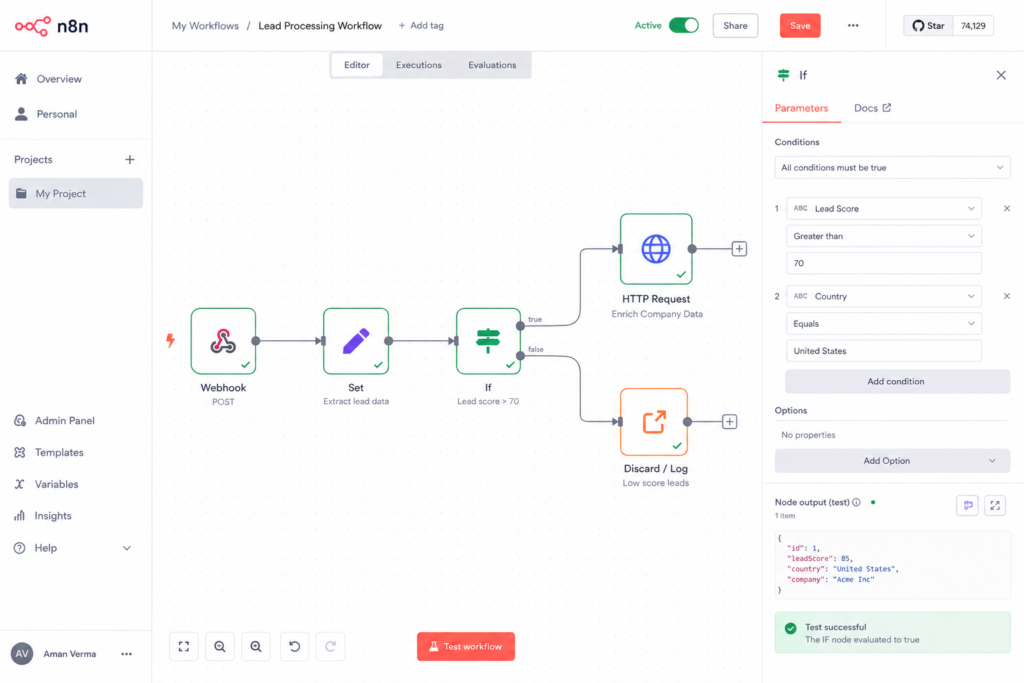
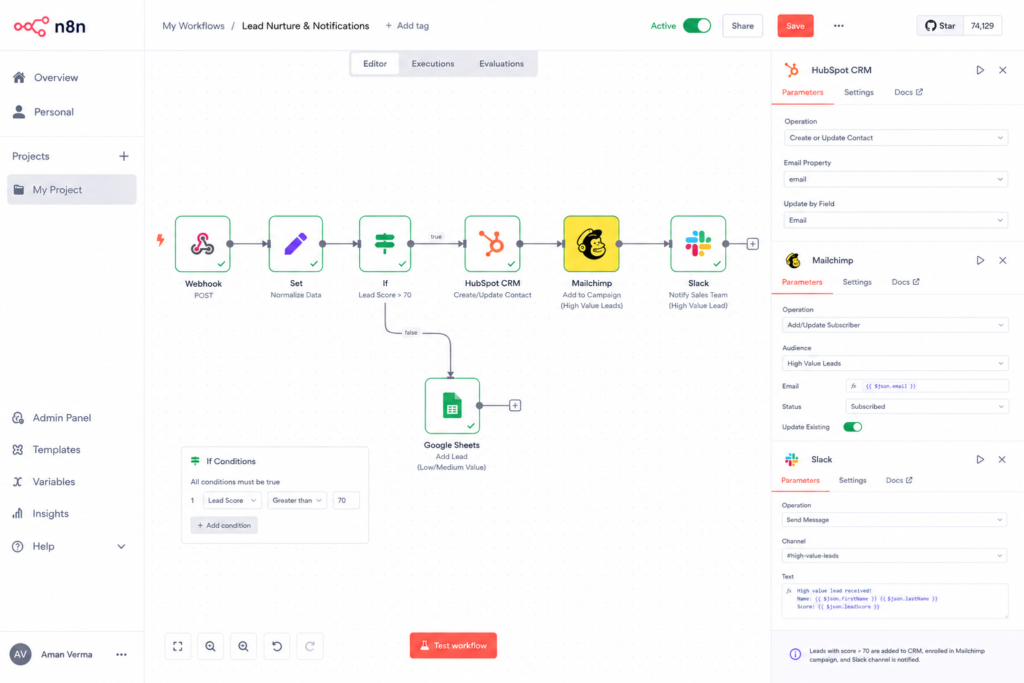
- Add a ‘Set’ Node for Initial Data Cleaning:
- Drag a “Set” node from the “Core” section after the Webhook.
- This node can clean up incoming data, rename fields, or set default values. For example, if your form uses
first_nameandlast_name, you might combine them into afull_namefield. - Add expressions like
={{ $json.first_name + ' ' + $json.last_name }}to create new fields or transform existing ones.
- Add an ‘If’ Node for Qualification:
- Drag an “If” node after the “Set” node.
- Configure conditions to qualify leads. For instance, if
company_sizeis “Enterprise” ORmessagecontains “marketing budget,” send it down one path. Otherwise, another path. - Example Condition 1:
{{ $json.company_size === "Enterprise" }}(True branch) - Example Condition 2:
{{ $json.message && $json.message.includes("marketing budget") }}(True branch) - Set the “True” branch for “High-Value Leads” and the “False” branch for “Standard Leads.”
- Optional: Data Enrichment (e.g., Clearbit, Hunter.io):
- For high-value leads, you might want to enrich data. Add an HTTP Request node (or a specific integration if available for Clearbit, Hunter.io) to look up company details based on the lead’s email domain. This demonstrates open source marketing automation at its best, allowing custom data calls.
- Configure the HTTP Request node with the API endpoint and credentials for your chosen enrichment service. Map the lead’s email domain to the service’s input.
- This can provide data like company industry, size, and social media profiles.
Expected Result: Leads are cleaned, qualified based on predefined criteria, and optionally enriched with additional data, directing them down different paths in the workflow.
Step 4: Adding the Lead to Your CRM
Why This Step Matters: Qualified leads need to be systematically captured in your CRM (Customer Relationship Management) system for sales and marketing teams to manage and track interactions.
What to Do:
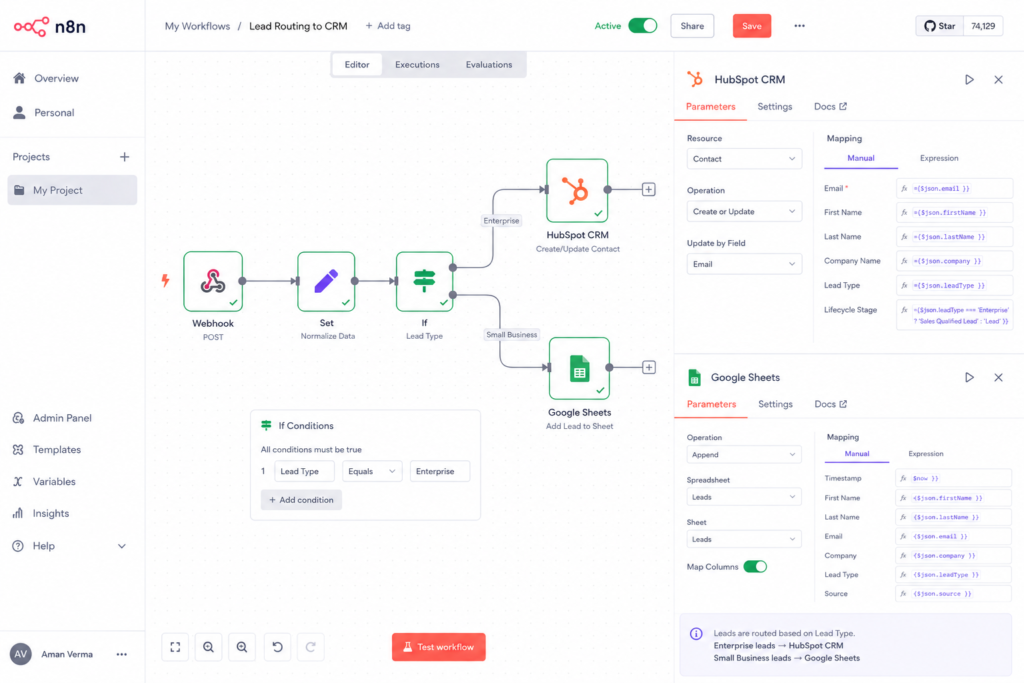
- Add CRM Node (e.g., HubSpot, Salesforce, Google Sheets):
- From the “True” branch of the “If” node (for high-value leads), search for and drag your CRM’s node (e.g., “HubSpot,” “Salesforce,” or “Google Sheets” for a simpler CRM) onto the canvas.
- Connect the “True” output of the “If” node to this CRM node.
- Authenticate Your CRM:
- Click on the CRM node. You’ll need to authenticate n8n with your CRM account. This usually involves OAuth (connecting via your CRM’s login page) or API keys.
- Configure CRM Action:
- Set the “Operation” to “Create” a “Contact” or “Lead.”
- Map the data from previous nodes (using expressions like
{{ $json.email }}) to the corresponding fields in your CRM (e.g.,Email,First Name,Last Name,Company,Lead Source). - Crucially, you can also map the qualification status (e.g., “High-Value Lead”) to a custom field in your CRM.
- Repeat for “Standard Leads”:
- Connect the “False” branch of the “If” node to another instance of your CRM node.
- Configure this node to create contacts, perhaps with a different lead status (e.g., “Standard Lead”) or in a separate list.
Expected Result: New leads are automatically created or updated in your CRM, categorized by their qualification status, ensuring no lead falls through the cracks.
Step 5: Initiating a Nurture Sequence and Internal Notification
Why This Step Matters: Prompt follow-up is critical. Automating the start of a lead nurturing sequence ensures consistent communication, while internal notifications keep your team informed. This is crucial for an effective n8n automation tutorial for digital agencies.
What to Do:
- Add Email Marketing Node (e.g., Mailchimp, SendGrid):
- Connect an email marketing node (e.g., “Mailchimp,” “ActiveCampaign,” or “SendGrid” via HTTP Request) after the CRM node for the “High-Value Leads” branch.
- Authenticate the node with your email marketing platform.
- Set the “Operation” to “Add Member to List” or “Trigger Automation.”
- Map the lead’s email and name to the relevant fields to enroll them in a targeted nurture sequence.
- You might add a separate sequence for “Standard Leads” after their respective CRM node.
- Add an Internal Notification Node (e.g., Slack, Email):
- After the email marketing node (or directly after the CRM node if no nurture sequence), add a “Slack” or “Email Send” node.
- Authenticate the node.
- Configure the message to include key lead details (e.g.,
{{ $json.full_name }} just submitted a 'High-Value' lead: {{ $json.email }}. Check CRM!). - Specify the channel or recipient email address. This could be your sales team’s Slack channel or a dedicated “New Leads” email inbox.
Expected Result: High-value leads are automatically enrolled in a relevant email nurture sequence, and your internal team receives an immediate notification about the new lead, enabling swift, coordinated follow-up.
Step 6: Error Handling and Monitoring
Why This Step Matters: No automation is foolproof. Robust error handling ensures your workflows don’t fail silently and provides mechanisms to address issues, maintaining data integrity and operational reliability.
What to Do:
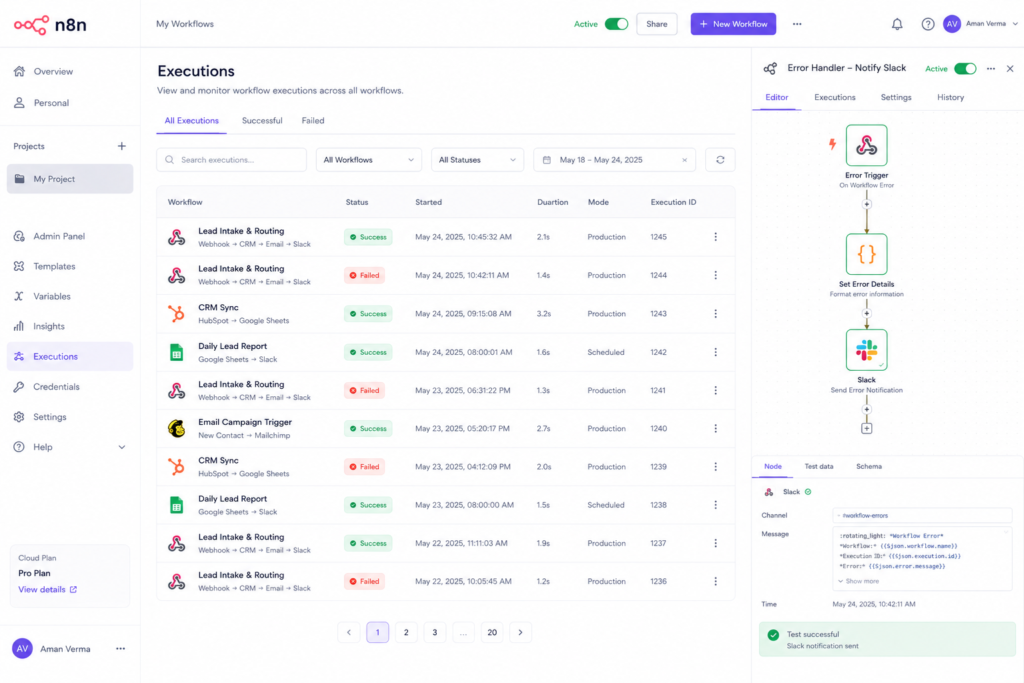
- Add ‘On Error’ Workflow:
- On the n8n canvas, click “Add new workflow” to create a separate error handling workflow, or use the “Error Workflow” setting in your main workflow.
- The trigger for this workflow will be the “Error Trigger” node.
- Configure Error Notifications:
- In the error workflow, add a “Slack” or “Email Send” node.
- Configure it to send a detailed message to your operations or development team whenever an error occurs in any workflow.
- Include error details from the “Error Trigger” node, such as workflow ID, node name, and the error message itself. Example:
{{ $json.error.workflow.name }} failed at node {{ $json.error.node.name }} with message: {{ $json.error.message }}.
- Monitoring:
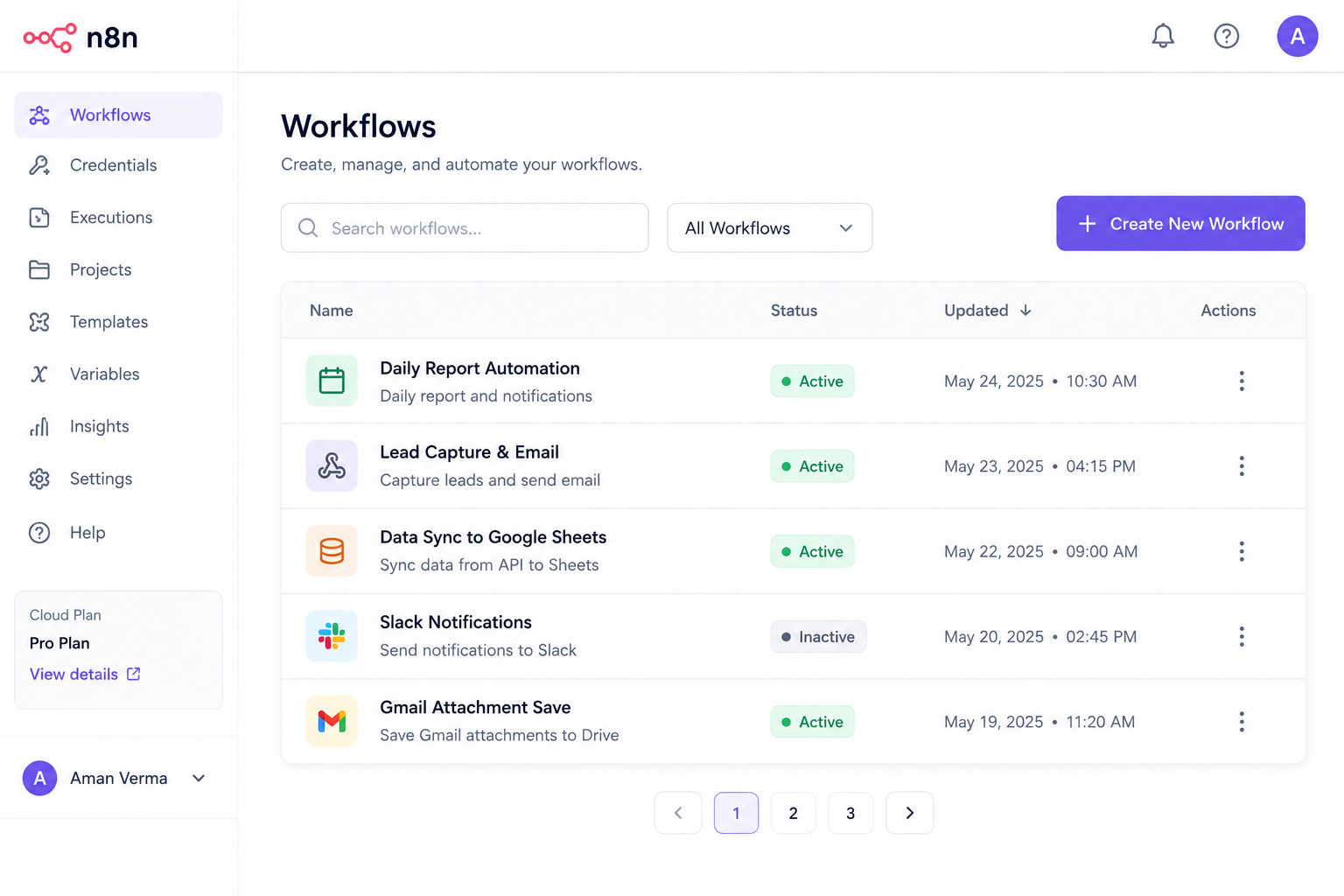
- Regularly check the “Executions” tab in your n8n dashboard. This provides a log of all workflow runs, their status (success/failure), and detailed execution data.
- Set up external monitoring (e.g., UptimeRobot) for your self-hosted n8n instance to ensure it’s always running.
Expected Result: Your n8n automations are more resilient. When issues arise, your team is immediately notified with actionable details, allowing for quick resolution and minimizing disruption to lead flow and client operations.
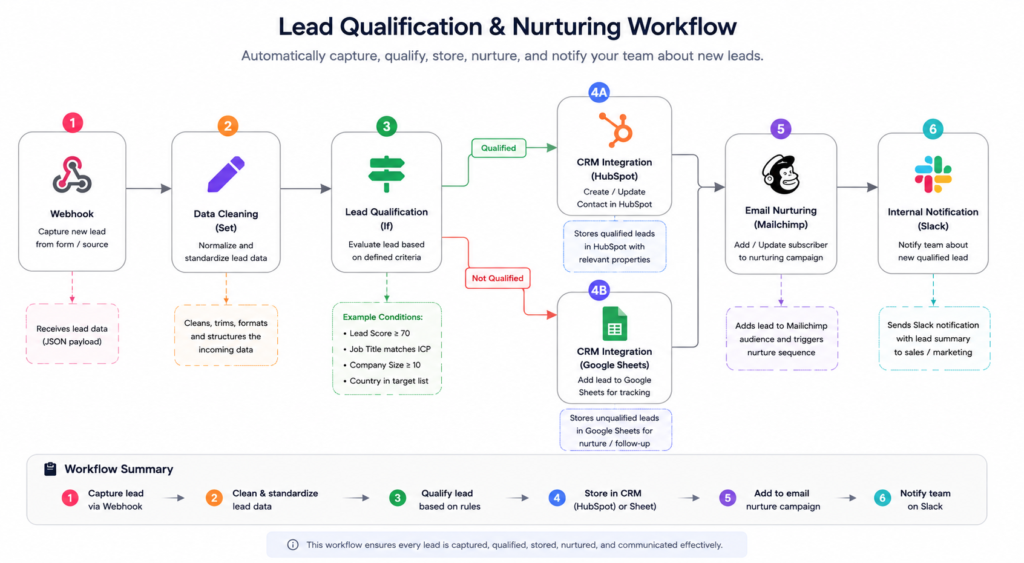
Flowchart illustrating the entire lead qualification and nurturing workflow
Webhook -> Data Cleaning (Set) -> Lead Qualification (If) -> CRM Integration (HubSpot/Google Sheets) -> Email Nurturing (Mailchimp) -> Internal Notification (Slack)
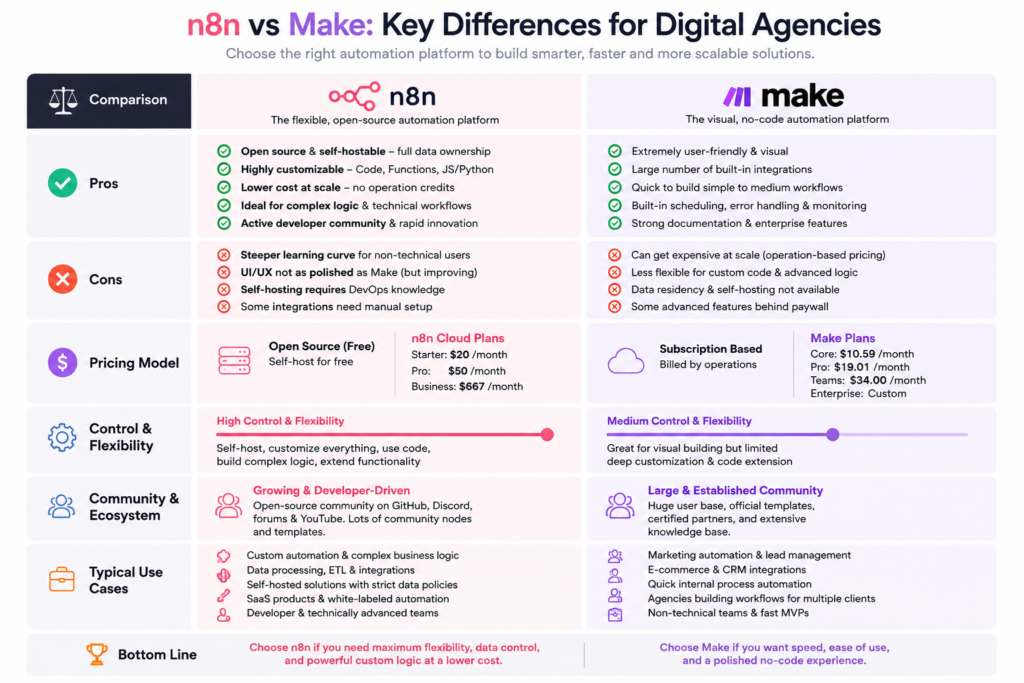
Infographic “n8n vs Make: Key Differences for Digital Agencies
This should visually present pros/cons, pricing models, control levels, community support, and typical use cases side-by-side.
How Businesses Use This Tool
n8n’s versatility makes it an indispensable asset across various business types and departments. Here’s a look at how different entities leverage this powerful automation engine:
- Startups: For early-stage companies,
workflow automation for startupsis critical for bootstrapping efficiency. n8n helps automate customer support ticket routing, onboarding new users to marketing campaigns, syncing data between different SaaS tools (e.g., Stripe to Google Sheets for revenue tracking), and managing internal task assignments, all without hiring an army of developers. - Digital Agencies: Beyond the lead nurturing example, agencies use n8n for automated client reporting (pulling data from Google Analytics, Facebook Ads, Google Ads into a client-facing dashboard), social media content scheduling and repurposing, managing project tasks based on client milestones, and automating personalized outreach sequences for business development. This makes
n8n automation tutorial for digital agencieshighly sought after. - Marketing Teams: From
open source marketing automationstrategies to granular campaign execution, n8n automates email list segmentation, personalized content delivery based on user behavior, A/B test result monitoring, and orchestrating complex multi-channel campaigns. It can connect CRMs with ad platforms, email tools, and analytics dashboards for a holistic view. - HR Teams: n8n streamlines recruitment by automating candidate screening, sending automated interview invitations, managing onboarding checklists, and syncing employee data across HRIS and other internal systems. It can also automate internal communications for policy updates or birthday reminders.
- Operations Teams: Automating supply chain logistics, inventory management (e.g., syncing e-commerce platforms with inventory databases), order processing, and internal data migration between legacy systems are common uses. n8n ensures smooth data flow and reduces manual errors in critical operational workflows.
- Creators & Influencers: Content repurposing (e.g., transcribing YouTube videos, generating blog posts, and scheduling social media snippets), managing sponsored content workflows, automating fan engagement (e.g., sending welcome emails to new subscribers), and monetisation tracking can all be handled with n8n.
- Enterprise Workflows: For larger organizations, n8n scales to handle complex system integrations, large-volume data processing, connecting bespoke internal tools with commercial off-the-shelf (COTS) software, and building custom approval workflows that span multiple departments and systems, often adhering to strict security and compliance standards via self-hosting.
Best Practices for n8n Automation
To get the most out of your n8n workflows and ensure long-term stability and maintainability, follow these best practices:
- Start Simple, Then Iterate: Don’t try to build a monolithic workflow immediately. Start with a small, manageable task, get it working reliably, and then gradually add complexity and features.
- Name Nodes Clearly: Use descriptive names for your nodes (e.g., “Trigger: New Lead Form,” “CRM: Add High-Value Contact,” “Notify: Slack Sales Channel”) to make workflows easy to understand, especially when collaborating.
- Utilize Test Mode Extensively: Before activating any workflow, use the “Test Workflow” button (or “Listen for test event” on triggers) to ensure each node and the overall flow behaves as expected with real or representative data.
- Implement Robust Error Handling: As demonstrated in the tutorial, always include an error workflow or specific error handling nodes (
Continue On Error,Merge) to catch unexpected issues and notify relevant personnel. - Document Your Workflows: Add notes to complex nodes or entire workflows explaining their purpose, specific logic, and any dependencies. This is invaluable for future maintenance or when new team members join.
- Use Credentials Securely: Always store API keys, passwords, and other sensitive information as credentials within n8n. Never hardcode them directly into nodes.
- Version Control (Self-Hosted): If self-hosting, consider using version control (like Git) for your n8n workflow files (
.json) to track changes, revert to previous versions, and collaborate more effectively. - Monitor Performance and Usage: Regularly check the “Executions” log to ensure workflows are running as expected, identify bottlenecks, and debug any recurring failures. Optimize nodes that consume excessive resources.
- Modularize Workflows: For very complex processes, break them down into smaller, interconnected workflows using “Execute Workflow” nodes. This improves readability, maintainability, and reusability.
- Regularly Review and Optimize: Business needs and integrated apps change. Periodically review your active workflows to ensure they’re still relevant, efficient, and using the latest node functionalities or API versions.
Common Mistakes to Avoid
Even with the best intentions, users often fall into common pitfalls when working with automation tools like n8n. Being aware of these can save you significant time and frustration.
- Over-Automation: Automating everything without strategic consideration. Not every task needs to be automated, especially those requiring nuanced human judgment or infrequent occurrence. Automate where there’s clear ROI in time or error reduction.
- Neglecting Error Handling: Assuming workflows will always run perfectly. A lack of error handling leads to silent failures, corrupted data, and frustrated clients or team members. Always plan for what happens when an API fails or data is missing.
- Ignoring Data Validation: Accepting all incoming data without checks. Invalid or malformed data can break downstream systems. Use “If” nodes or “Code” nodes to validate data formats, presence, and logic early in the workflow.
- Hardcoding Sensitive Information: Embedding API keys, tokens, or credentials directly within workflow nodes. This is a severe security risk. Always use n8n’s dedicated “Credentials” system.
- Testing Only Once: Relying on a single successful test run. Thoroughly test with various scenarios, including edge cases (missing data, unexpected values), to ensure robustness.
- Lack of Documentation: Building complex workflows without adding internal notes or external documentation. Six months later, neither you nor your team will remember the intricate logic, leading to maintenance nightmares.
- Uncontrolled Loops: Creating infinite loops accidentally, which can consume resources rapidly and lead to system crashes or rate-limit violations with external services. Be careful with “Looping” nodes and ensure clear exit conditions.
- Ignoring Rate Limits: Hitting API rate limits by making too many requests in a short period. This can lead to temporary blocks. Implement delays (
Waitnode) or batch processing where appropriate. - Misunderstanding Data Flow: Incorrectly mapping data between nodes, leading to incorrect information being passed. Always inspect the input and output data of each node during testing to understand its structure.
- Not Backing Up Workflows (Self-Hosted): Losing your meticulously built automations due to a server crash or accidental deletion. Regularly back up your n8n instance or export your
.jsonworkflow files.
FAQ Section
Q1: Is n8n free for digital agencies?
A1: Yes, n8n offers a free self-hosted version that digital agencies can deploy on their own servers or cloud infrastructure. This gives agencies full control and avoids per-task costs. n8n also provides a paid cloud service with managed hosting and additional features for convenience and scalability.
Q2: How does n8n compare to Make (formerly Integromat) for marketing automation?
A2: When comparing n8n vs make, n8n offers significantly more flexibility and control due to its open-source nature, allowing for self-hosting and deeper customization with code nodes. Make is a fully cloud-based, proprietary solution known for its polished UI and extensive pre-built app integrations. n8n is often preferred by tech-savvy agencies and startups seeking data sovereignty and cost control, while Make is excellent for those prioritizing ease of use and a fully managed solution.
Q3: Can n8n handle complex marketing funnels and ad platform integrations?
A3: Absolutely. n8n excels at building complex marketing funnels by connecting various platforms like CRMs, email marketing tools, analytics dashboards, and even custom ad platform APIs (via HTTP Request nodes). It can automate lead scoring, dynamic content delivery, ad campaign reporting, and personalized customer journeys across multiple touchpoints, making it ideal for open source marketing automation.
Q4: Is n8n suitable for small startups or agencies with limited technical resources?
A4: While n8n offers powerful capabilities, it does require a slightly higher technical aptitude compared to more no-code tools like Zapier for initial setup (especially self-hosting). However, its visual builder is beginner-friendly, and for workflow automation for startups looking for a cost-effective, scalable solution, the learning curve is a worthwhile investment. The n8n Cloud option also reduces technical overhead.
Q5: What are some common n8n workflows for digital marketing agencies?
A5: Digital agencies commonly use n8n for:
* Automated lead qualification and CRM integration.
* Scheduling and cross-posting social media content.
* Generating client performance reports from various ad and analytics platforms.
* Automating email sequences for client onboarding or lead nurturing.
* Synchronizing client data across different marketing tools.
* Automating internal project management updates.
Q6: What are the benefits of using an open-source automation tool like n8n for businesses?
A6: The benefits include:
* Cost Savings: No subscription fees for self-hosted versions, saving money as your automation scales.
* Data Control: Full ownership and privacy of your data, crucial for compliance and security.
* Flexibility & Customization: Ability to extend functionality with custom code and integrate any API, eliminating vendor lock-in.
* Transparency: Open-source code means you can inspect and understand how the tool works.
* Community Support: Access to a vibrant community for troubleshooting and sharing workflows.
Alternatives Section
While n8n is a fantastic choice, especially for agencies seeking flexibility and control, it’s wise to be aware of other players in the automation space. Each has its strengths and ideal use cases.
- Make (formerly Integromat)
- What it does: Make is a powerful cloud-based visual workflow automation platform that allows users to connect apps and automate tasks using a robust drag-and-drop interface. It’s renowned for its ability to handle complex, multi-step scenarios and data transformations.
- When it’s better: If your agency prefers a fully managed, hosted solution with a highly polished user interface and extensive pre-built integrations, and you don’t mind the subscription costs that scale with usage. It often feels more intuitive for those new to advanced automation.
- Who should use it: Digital agencies, marketing teams, and businesses that prioritize ease of use, a visually appealing builder, and don’t require the deep customization or self-hosting options of n8n. Often the top contender in
n8n vs makediscussions for ease of entry.
- Zapier
- What it does: Zapier is one of the most popular and easiest-to-use cloud-based automation tools. It connects thousands of apps through simple “Zaps” (workflows) consisting of a trigger and one or more actions.
- When it’s better: For simpler, linear automations between widely used SaaS applications. If you need to connect two apps quickly without complex logic or data manipulation, Zapier is incredibly fast to set up. It has the largest app directory by far.
- Who should use it: Small businesses, individual marketers, and agencies just starting with automation who need quick wins and don’t require advanced logic, self-hosting, or extensive data transformation capabilities. It’s ideal for tasks like “new lead in Typeform -> add to Mailchimp.”
- Integrately
- What it does: Integrately is another cloud-based automation platform positioned as a simpler, more affordable alternative to Zapier, focusing on a one-click activation of pre-built automations.
- When it’s better: If you’re looking for a budget-friendly option for fairly straightforward automations, similar to Zapier but potentially with a lower entry price for a higher volume of tasks.
- Who should use it: Small to medium-sized businesses and agencies who need basic integrations and want to avoid the higher costs associated with Zapier, but still prefer a fully managed solution over self-hosting.
Key Takeaways
- n8n empowers digital agencies to move beyond manual bottlenecks, fostering scalability and competitive advantage through robust workflow automation.
- Open-source advantage: n8n’s fair-code license offers unparalleled flexibility, data control, and cost-effectiveness, especially for self-hosting.
- Mastering the basics: Setting up your n8n instance and understanding trigger nodes (like Webhooks) is the foundational step to unlocking automation power.
- Strategic workflow design: Implementing steps for data cleaning, qualification, CRM integration, and multi-channel nurturing transforms raw leads into actionable opportunities.
- Prioritize resilience: Integrating error handling and consistent monitoring is crucial for maintaining reliable and trusted automations.
- Choose wisely: While n8n excels in customization and control, alternatives like Make, Zapier, and Integrately offer different balances of ease-of-use vs. power, depending on your agency’s specific needs and technical comfort.
- Continuous improvement: Automation is an ongoing journey. Regularly review, optimize, and expand your n8n workflows to adapt to evolving business requirements and technological advancements.