Learn how corporate teams use AI knowledge bases to streamline internal documentation, boost productivity, and eliminate information silos — step by step.
Why Internal Documentation Is Broken — and How AI Fixes It
Most teams don’t have a knowledge problem. They have a retrieval problem.
Documentation exists — in Notion pages, shared drives, old Slack threads, onboarding PDFs, and email chains that nobody can find. When a new employee needs an answer, they ask a colleague. That colleague interrupts their own work to answer a question that was already answered six months ago in a document no one remembers exists.
This is the core inefficiency that AI knowledge bases are designed to solve.
An AI knowledge base is a centralized, intelligent documentation system that doesn’t just store information — it understands it. Teams can query it in natural language, get precise answers, and link knowledge across departments automatically.
This guide is built for corporate teams, HR departments, startups, and business professionals who want to stop losing knowledge and start using it strategically. Whether you’re setting up your first internal documentation system or rebuilding a broken one, the steps here are practical, proven, and immediately actionable.
Quick Summary
- AI knowledge bases eliminate information silos by centralizing and making documentation searchable with natural language
- Teams can reduce onboarding time, support ticket volume, and knowledge loss from employee turnover
- Setup requires choosing the right tool, structuring your content, training the AI, and building a maintenance workflow
- Business ROI is measurable: fewer repeated questions, faster answers, more autonomous teams
Table of Contents
- What Is an AI Knowledge Base?
- Why Businesses Are Investing in Internal Documentation AI
- How to Build an AI Knowledge Base — Step by Step
- Video Tutorial: Full Setup Walkthrough
- How Businesses Use This Tool
- Best Practices for AI Documentation Workflows
- Common Mistakes to Avoid
- Alternatives to Consider
- FAQ
- Key Takeaways
- Conclusion
What You’ll Learn
- What makes an AI knowledge base different from a traditional wiki
- Which tools are best suited for different team sizes and use cases
- How to structure, tag, and maintain documentation for AI accuracy
- How to measure ROI and adoption across your organization
- How to avoid the most common implementation pitfalls
What Is an AI Knowledge Base?
An AI knowledge base is a documentation system that combines structured content storage with AI-powered search, summarization, and retrieval. Unlike a static wiki or shared drive, it allows users to ask questions in plain language and receive precise, contextual answers pulled directly from your internal content.
You might also like: How Executives Use AI Productivity Systems to Save Time
Related guide: How to Use NotebookLM for Research and Meeting Summaries
Traditional internal wikis (Confluence, Notion, SharePoint) are built for browsing. AI knowledge bases are built for querying.
Key Features to Look For
- Natural language search — ask questions the way you’d ask a colleague
- AI-generated summaries — distill long documents into key points instantly
- Automatic tagging and categorization — reduce manual maintenance
- Permissions and access control — keep sensitive content secure
- Integrations — connect to Slack, Google Drive, Notion, Confluence, and CRMs
- Analytics — see what questions go unanswered, identify documentation gaps
Why Businesses Choose AI-Powered Documentation
The shift from static wikis to AI knowledge bases reflects a simple truth: information only has value when people can find it quickly. AI closes the gap between “we documented this” and “anyone can actually use this.”
Common business drivers include:
- Reducing onboarding time for new hires
- Cutting down repetitive internal support requests
- Preserving institutional knowledge when employees leave
- Making remote and distributed teams more self-sufficient
- Supporting compliance and audit readiness with version-controlled documentation
Ideal Use Cases
- Onboarding documentation — standard operating procedures, culture guides, tool walkthroughs
- HR policy management — leave policies, benefits, compliance requirements
- Product and engineering wikis — technical specs, API docs, architecture decisions
- Sales enablement — playbooks, objection handling, case studies
- Customer support — internal FAQs, escalation procedures, troubleshooting guides
Tools Referenced in This Guide
This guide focuses on practical workflows applicable across leading platforms. The tools most commonly used for AI knowledge bases in business settings include:
Guru Official Website: https://www.getguru.com Official Documentation: https://help.getguru.com
Notion AI Official Website: https://www.notion.so Official Documentation: https://www.notion.so/help
Confluence + Atlassian Intelligence Official Website: https://www.atlassian.com/software/confluence Official Documentation: https://support.atlassian.com/confluence-cloud/
Tettra Official Website: https://tettra.com Official Documentation: https://tettra.com/resources/
How to Build an AI Knowledge Base — Step by Step

Step 1: Audit Your Existing Documentation
Why it matters: Starting with a tool before understanding what you have leads to a cluttered, low-quality knowledge base. The AI is only as good as the content it indexes.
What to do:
- Go to https://tettra.com
- List every location where internal knowledge currently lives (Google Drive, Confluence, email, Slack, Notion, shared drives)
- Categorize documents by department and content type
- Flag outdated, duplicated, or incomplete content for removal or revision
- Identify critical knowledge gaps — things your team is regularly asked but no doc covers
Expected result: A clean content inventory that tells you exactly what to migrate, what to rewrite, and what to create from scratch.

Step 2: Define Your Information Architecture
Why it matters: How you organize content determines how accurately the AI can retrieve it. Flat, unstructured content produces vague, unhelpful answers.
What to do:
- Create a top-level category structure (e.g., HR, Engineering, Sales, Operations, Product)
- Define subcategories within each (e.g., HR → Onboarding, Policies, Benefits, Compliance)
- Establish a naming convention for documents (consistent, descriptive titles)
- Decide on tagging standards — what tags will every document require?
Expected result: A documented architecture that your team can follow as content is added over time.
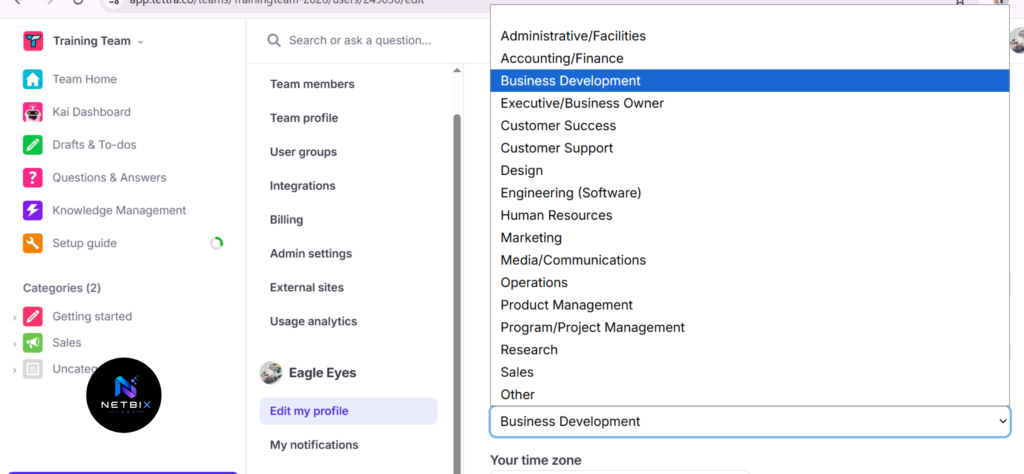
Step 3: Choose the Right Tool for Your Team
Why it matters: Not every AI documentation tool is built for the same use case. The wrong choice means a system your team won’t actually use.
What to do:
- Evaluate tools based on integrations with your existing stack (Slack, Google Workspace, Microsoft 365)
- Consider team size — some tools are priced and designed for startups, others for enterprise
- Run a proof of concept with one department before committing organization-wide
- Check admin controls, permission levels, and SSO support
Key comparison factors:
| Feature | Guru | Notion AI | Tettra | Confluence AI |
|---|---|---|---|---|
| Natural language search | ✓ | ✓ | ✓ | ✓ |
| Slack integration | ✓ | Limited | ✓ | ✓ |
| AI answer generation | ✓ | ✓ | Limited | ✓ |
| Best for | Teams, Sales | Startups | SMBs | Enterprise |
Expected result: A shortlisted tool chosen based on your team’s size, tech stack, and documentation maturity.
Step 4: Import and Structure Your Content
Why it matters: Migrating raw documents without formatting or structure produces poor AI outputs. Clean input equals clean retrieval.
What to do:
- Import documents in formats the tool supports (PDF, Google Docs, Notion exports, Markdown)
- Apply your predefined category structure and tags during import
- Break long documents into focused, topic-specific articles (one topic per article)
- Add short summaries or TL;DR sections at the top of each article — the AI uses these for quick answers
- Assign owners to each article for future maintenance
Expected result: A populated knowledge base with structured, tagged, owner-assigned content ready for AI indexing.
Step 5: Configure AI Settings and Permissions
Why it matters: Out-of-the-box AI settings are generic. Tuning them to your content and team structure significantly improves answer quality and prevents unauthorized access to sensitive information.
What to do:
- Set access permissions by role (e.g., only HR can view compensation policy docs)
- Configure verification workflows — decide which articles require expert review before going live
- Set up AI confidence thresholds — if the AI is unsure, it should direct users to a human or the source document
- Enable feedback loops so users can flag unhelpful or inaccurate answers
Expected result: An AI knowledge base that returns accurate, permission-appropriate answers and flags low-confidence responses.
Step 6: Train Your Team and Drive Adoption
Why it matters: The best knowledge base in the world fails if your team doesn’t use it. Adoption requires training, visibility, and low friction.
What to do:
- Run a short onboarding session per department (30 minutes is enough)
- Integrate the knowledge base directly into Slack or Microsoft Teams so it’s accessible without switching tools
- Add a link to the knowledge base in every new-hire onboarding checklist
- Create a “how to use the knowledge base” article inside the knowledge base itself
- Identify internal champions in each department who actively use and promote it
Expected result: Team-wide awareness, initial usage habits established, and a feedback channel open for early issues.
Step 7: Monitor, Measure, and Maintain
Why it matters: Documentation degrades over time. A knowledge base without a maintenance workflow becomes the very problem it was built to solve.
What to do:
- Review analytics weekly — which queries returned no results? Those are documentation gaps
- Schedule quarterly content reviews per department
- Set article expiration dates for time-sensitive content (compliance policies, pricing, tool versions)
- Track adoption metrics: active users, queries per week, answer satisfaction scores
- Build a documentation culture by including knowledge base contributions in team norms and review cycles
Expected result: A living knowledge base that improves over time, with measurable impact on team productivity and support ticket reduction.
Video Tutorial
A practical walkthrough showing how to audit existing docs, structure an information architecture,
How Businesses Use AI Knowledge Bases
Startups
Early-stage teams document fast but forget faster. An AI knowledge base gives a 10-person startup the documentation discipline of a 100-person company — without a dedicated knowledge manager. Common use cases: onboarding docs, product decisions, investor FAQs.
Marketing Agencies
Agencies juggle dozens of clients, brand guidelines, and creative briefs simultaneously. AI knowledge bases keep brand voices, client preferences, and campaign histories organized and instantly searchable. Account managers stop emailing colleagues and start querying the knowledge base.
HR Departments
HR teams answer the same questions every week: leave policy, benefits enrollment, performance review timelines. An AI knowledge base handles these queries at scale, freeing HR professionals for strategic work. It also ensures policy compliance by surfacing the most current version of every document.
Engineering Teams
Developers need architecture decision records, API documentation, deployment procedures, and incident postmortems — fast. AI knowledge bases integrate with tools like GitHub and Jira to keep technical documentation close to the work.
Operations Teams
Standard operating procedures, vendor contracts, procurement checklists, and compliance documentation — operations teams maintain the institutional memory of an organization. AI makes that memory queryable in seconds.
Enterprise Workflows
Large organizations use AI knowledge bases to bridge knowledge across geographies and time zones. When a team in Singapore needs context that lives with a team in London, the knowledge base eliminates the dependency. Enterprise use cases often include compliance audit trails, regulatory documentation, and cross-departmental SOPs.
Best Practices for AI Documentation Workflows
Write for retrieval, not for reading. Short, focused articles outperform long, comprehensive ones. One topic per article is the golden rule.
Use consistent naming conventions. “Q3 2024 Sales Playbook” and “Sales Playbook Q3” are the same document — but the AI may not connect them. Standardize titles across your organization.
Add summaries to every article. A two-sentence summary at the top of each article dramatically improves AI answer quality. Many tools use these summaries as the primary source for quick answers.
Assign article owners, not just creators. The person who created a document may have left the company. Ownership means someone is accountable for keeping it current.
Treat unanswered queries as a content backlog. Every failed search is a documentation gap. Review your “no results” list weekly and turn it into a content creation queue.
Integrate where your team already works. A knowledge base no one visits fails. Surface it inside Slack, Teams, or your CRM so it meets people in their existing workflow.
Version-control sensitive documents. Compliance policies, legal templates, and pricing docs need version histories. Ensure your tool supports this before committing.
Common Mistakes to Avoid
Migrating everything at once. Bulk importing years of disorganized documentation creates an AI knowledge base that returns noisy, unreliable answers. Start with high-value, high-frequency content and expand from there.
Skipping the information architecture. Jumping straight to import without defining categories and tags means spending months cleaning up what could have been structured from the start.
No ownership model. Documentation without owners becomes outdated documentation. Every article needs a named person responsible for keeping it accurate.
Over-relying on AI confidence. Even well-configured AI systems produce incorrect or incomplete answers. Keep human escalation paths visible — the AI should point users to source documents and subject-matter experts when confidence is low.
Treating launch as the finish line. A knowledge base is not a project with a completion date. It’s an operational system that requires ongoing maintenance. Teams that treat launch as the end quickly find their knowledge base abandoned.
Ignoring adoption analytics. If you’re not measuring who’s using it, what they’re searching for, and whether they’re satisfied, you have no way to improve it.
FAQ
What is an AI knowledge base and how is it different from a regular wiki? A traditional wiki requires users to browse or use keyword search to find information. An AI knowledge base allows users to ask questions in natural language and receive synthesized, contextual answers pulled from across your documentation — without knowing exactly where the information lives.
How long does it take to set up an AI knowledge base? A functional knowledge base can be operational within two to four weeks for a mid-sized team. The timeline depends primarily on how much existing documentation needs to be audited and restructured. Teams starting from scratch with clean content can move faster; teams migrating years of legacy documentation should plan for a longer runway.
Is an AI knowledge base secure for sensitive HR and legal documents? Yes, provided the tool offers role-based access control, SSO, and data encryption at rest and in transit. Always verify your vendor’s SOC 2 compliance status and data residency options before storing sensitive content.
What is the best AI knowledge base tool for small teams? Tettra and Notion AI are well-suited for teams under 50 people. Both offer straightforward setup, intuitive interfaces, and pricing structures that don’t require enterprise budgets. Guru is a strong option if the team has a significant sales or customer-facing component.
Can an AI knowledge base replace a dedicated knowledge manager? It can significantly reduce the workload of a knowledge manager — handling routine queries, surfacing content automatically, and flagging outdated material. However, strategic content curation, cross-department coordination, and quality control still benefit from human oversight, particularly in organizations where documentation accuracy has compliance implications.
How do I measure ROI on an AI knowledge base? Track these metrics before and after implementation: time-to-answer for common internal questions, volume of repetitive support requests, new hire time-to-productivity, and employee satisfaction scores related to finding information. Teams typically see measurable impact within the first 60 to 90 days.
What types of content should I prioritize adding first? Start with your highest-frequency, highest-impact content: onboarding guides, HR policies, frequently asked team questions, and product or service overviews. These deliver the fastest adoption and the clearest ROI.
Alternatives to Consider
Confluence (Atlassian)
What it does: Confluence is a mature team wiki with Atlassian Intelligence features layered on for AI-powered search and summarization. When it’s better: Best for engineering and product teams already using Jira. The Atlassian ecosystem integration is difficult to replicate elsewhere. Who should use it: Mid-size to enterprise software teams. Official website: https://www.atlassian.com/software/confluence
Notion AI
What it does: Notion AI adds natural language querying, content generation, and summarization to Notion’s flexible workspace platform. When it’s better: Ideal for teams that use Notion as their primary workspace and want AI without switching tools. More flexible in structure than purpose-built knowledge base tools. Who should use it: Startups and creative teams with varied documentation needs. Official website: https://www.notion.so
Tettra
What it does: Tettra is a lightweight knowledge management tool built specifically for internal documentation, with Slack integration and AI-powered search. When it’s better: Best for SMBs that want a simple, focused documentation tool without the complexity of an all-in-one platform. Who should use it: Teams under 200 people looking for a fast, clean setup with strong Slack integration. Official website: https://tettra.com
Guru
What it does: Guru combines a knowledge base with AI answer suggestions that surface directly inside Slack, browsers, and CRMs in real time. When it’s better: Exceptional for sales and support teams who need knowledge at the point of work — inside a CRM or live chat — rather than in a separate tool. Who should use it: Revenue teams, customer support departments, and any team that needs answers without context-switching. Official website: https://www.getguru.com
Slite
What it does: Slite is a collaborative documentation tool designed for async teams, with AI search and a strong emphasis on clean, minimal UX. When it’s better: Great for remote-first teams that prioritize readability and async collaboration over deep integrations. Who should use it: Distributed startups and remote-first companies. Official website: https://slite.com
Key Takeaways
- An AI knowledge base transforms static documentation into a queryable, intelligent system that teams can interact with in natural language
- The most critical step is not the tool — it’s the information architecture. Structure determines retrieval quality
- Start small: focus on high-frequency content first, measure adoption, and expand deliberately
- Assign article owners and build content review cycles into your team workflow — documentation without maintenance degrades quickly
- Integrate the knowledge base where your team already works (Slack, Teams, CRM) to maximize adoption without friction
- Measure success with real metrics: query resolution rate, onboarding time, support ticket reduction, and employee satisfaction
- The best internal documentation AI strategy is one your team will actually use — prioritize simplicity and relevance over completeness at launch
Conclusion
Building an AI knowledge base for internal documentation is one of the highest-leverage investments a team can make. It doesn’t just organize information — it makes that information accessible to the right person at the right moment, without interrupting anyone else’s workflow.
The teams that succeed with internal documentation AI share a few common traits: they audit before they build, they structure before they import, and they treat their knowledge base as a living system rather than a one-time project. They also measure relentlessly — tracking not just what’s in the system, but how well it’s serving the people who depend on it.
For corporate teams, HR departments, startups, and growing businesses, the cost of poor documentation is real and measurable: slower onboarding, repeated questions, lost institutional knowledge, and teams that can’t operate independently. An AI-powered documentation workflow addresses all of these at once.
The tools exist. The process is proven. The only remaining step is starting — and the best place to start is with the content your team needs most right now.