Learn how businesses build AI-powered content pipelines using Buffer — from ideation to scheduling and publishing across social media. Free plan available.
Introduction
Most businesses don’t have a content production problem. They have a content consistency problem.
Ideas exist. Intent exists. But content doesn’t get made consistently because the process behind it is manual, disconnected, and dependent on whoever happens to have time that week. One person writes captions. Another schedules them. A third decides what to post next. And when any one of those people is busy, the entire content output stalls.
An AI-powered content pipeline solves this at the process level — not by producing more ideas, but by creating a repeatable system where ideas move automatically from concept to scheduled post without requiring a different tool, a different platform, or a different person for each step.
For most businesses, the highest-volume and most immediately impactful content operation is social media. It’s where consistency matters most, where the gap between intent and execution is widest, and where an AI pipeline delivers visible results the fastest.
This guide uses Buffer — a free social media management platform with a built-in AI Assistant — to show exactly how businesses build a functional AI content pipeline for social media. No integrations. No API setup. No switching between platforms. Buffer handles ideation, writing, scheduling, and publishing in one place, on a free plan that any business can start using today.
Quick Summary
- An AI content pipeline for social media means having a repeatable system where content moves from idea to published post inside one platform, with AI handling the repetitive parts.
- Buffer’s free plan includes an AI Assistant that generates post ideas, writes captions, repurposes content across platforms, and adjusts tone — all within the same scheduling and publishing workflow.
- A complete social media content pipeline can be built and operational in under two hours using Buffer alone.
- Works for startups, marketing teams, agencies, HR departments, and any business that publishes social media content regularly.
- No technical setup, no API, and no integration with other tools required.
Table of Contents
- What You’ll Learn
- What an AI Content Pipeline Actually Means for Social Media
- Tool Overview: Buffer
- Step-by-Step: Build Your Social Media AI Content Pipeline
- Video Tutorial
- How Businesses Use This Tool
- Best Practices
- Common Mistakes to Avoid
- Alternatives Worth Considering
- FAQ
- Key Takeaways
- Conclusion
What You’ll Learn
- What a functioning AI content pipeline looks like for social media — and why most businesses don’t have one yet
- How Buffer’s AI Assistant handles the writing and ideation stages of a content pipeline without leaving the platform
- How to build a complete pipeline — from topic idea to scheduled post — using only Buffer’s free plan
- How to repurpose one piece of content across multiple platforms automatically
- Real use cases across marketing teams, startups, agencies, and corporate communications teams
- What mistakes prevent most social media content pipelines from running consistently
What an AI Content Pipeline Actually Means for Social Media
The term “content pipeline” can sound more complex than it needs to be. For social media specifically, a pipeline is simply a defined, repeatable process where content moves through the same stages every time — without being rebuilt from scratch for each post.
You might also like: How to Automate Business Workflows Using Zapier and AI
Related guide: How Agencies Scale Content Design Using AI Image Tools
A functional social media AI content pipeline has four stages:
- Ideation — generating topic and post ideas based on your business, audience, and content goals
- Production — writing the actual caption, copy, or content for each post
- Review — a human checks the output for accuracy, brand voice, and appropriateness before it goes out
- Distribution — scheduling and publishing the post to the right platform at the right time
Most businesses handle these four stages manually, across different tools, by different people, with no consistent process connecting them. The result is inconsistent posting frequency, wildly varying content quality, and an enormous amount of time spent on work that follows the same pattern every single week.
Buffer with its built-in AI Assistant collapses all four stages into one platform. Ideation happens inside Buffer. Writing happens inside Buffer. Scheduling and publishing happen inside Buffer. The only stage that stays human — by design — is the review, which takes minutes rather than hours when AI has handled the production work.
Tool Overview: Buffer
Buffer is a social media management platform that lets businesses plan, write, schedule, and publish content across multiple social channels from a single dashboard. Its built-in AI Assistant — available at no cost on the free plan — handles the content generation and repurposing stages of the pipeline, making Buffer the most accessible all-in-one starting point for any business building its first AI content pipeline.
What makes Buffer particularly suited for this guide is that it requires no external tools, no API connections, and no technical background to use. The AI Assistant is activated directly inside the post composer, meaning content generation and scheduling happen in the same interface with no context switching.
Key Features:
- AI Assistant (free on all plans) — generates post ideas from a topic or keyword, writes full captions from a brief description, repurposes existing content for different platforms, and adjusts tone on demand
- Multi-channel scheduling — publish to Instagram, LinkedIn, Facebook, X (Twitter), TikTok, Pinterest, and YouTube Shorts from one dashboard
- Content calendar — visual monthly and weekly view of all scheduled content across channels
- Queue management — set preferred posting times per channel and Buffer fills the queue automatically
- Analytics — track reach, engagement, and clicks per post to inform future content decisions
- Start Page — a built-in link-in-bio landing page for Instagram and TikTok
Why businesses use it:
- AI Assistant is genuinely free with no usage limits — not a trial or a restricted preview
- Writing and scheduling happen in the same interface — no switching between a writing tool and a scheduler
- Supports the most important social channels for most businesses out of the box
- Clean, simple interface that any team member can learn in under thirty minutes
Free plan includes:
- 3 social media channels
- 10 scheduled posts per channel at any time
- Full AI Assistant access with no usage limits
- Basic analytics
- 1 user
Ideal use cases:
- Social media content pipeline for small to mid-sized businesses
- Agency content management for individual client accounts
- Corporate communications and employer branding content
- Startup social media presence building pre-launch and post-launch
- HR and recruitment marketing content
Official Website: https://buffer.com Official Documentation: https://support.buffer.com
Step-by-Step: Build Your Social Media AI Content Pipeline
This tutorial builds a complete, functioning social media content pipeline inside Buffer — from generating a week’s worth of content ideas to having scheduled posts ready to publish across your channels.
Step 1: Set Up Your Buffer Account and Connect Your Channels
Why it matters: Buffer needs to know which platforms you’re publishing to before you can schedule anything. Connecting your channels upfront — even just two or three — is what transforms Buffer from a writing tool into an actual publishing pipeline. This takes five minutes and only needs to be done once.
What to do:
- Go to https://buffer.com and click Get Started for Free
- Sign up with your work email or Google account — no credit card required
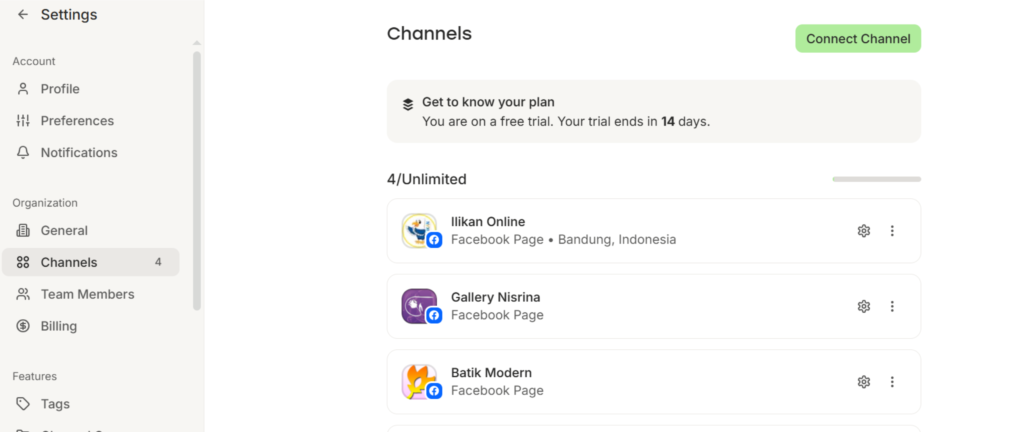
- Once inside the dashboard, click Connect a Channel
- Select your first platform — for most businesses, LinkedIn or Instagram is the highest-priority starting point
- Follow the authorization prompts to connect your account — Buffer uses standard OAuth, the same secure login method used by all major apps connecting to social platforms
- Repeat for up to two additional channels on the free plan
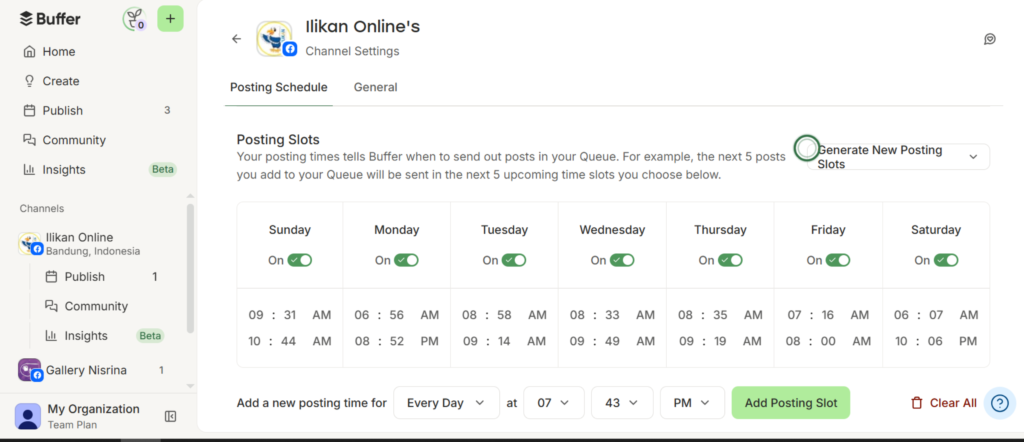
- For each connected channel, go to Settings → Posting Schedule and set your preferred posting times — for example, Tuesday and Thursday at 9am and 12pm. Buffer will use these times to fill your queue automatically
Expected result: Two to three social channels connected to Buffer, each with a defined posting schedule. Buffer’s queue is now ready to receive content that will publish automatically at your preferred times.
Step 2: Generate Your Content Ideas Using Buffer AI
Why it matters: The ideation stage is where most social media content pipelines stall. Deciding what to post requires creative energy that teams often don’t have consistently — especially when posting frequency is three to five times per week across multiple channels. Buffer’s AI Assistant generates a week’s worth of content ideas in under two minutes, removing the blank-page problem entirely.
What to do:
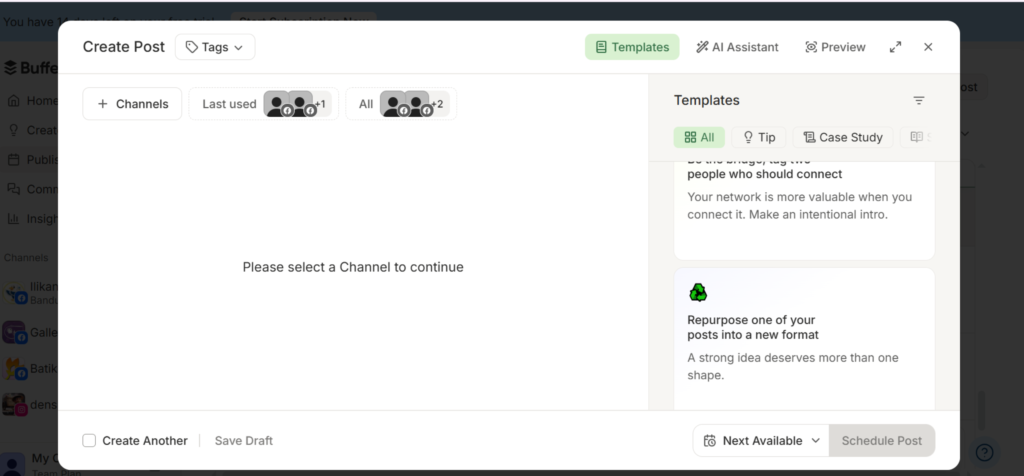
- Click Create Post in the top left of Buffer’s dashboard
- In the post composer, look for the AI Assistant button — it appears as a small star or sparkle icon inside the text field
- Click AI Assistant → Generate Ideas
- In the prompt field, describe your business and what you want to post about. Use this structure:
Generate 7 social media post ideas for [Company Name],
a [type of business] that helps [target audience] with
[main product or service]. Mix educational, promotional,
and engagement-focused ideas. Keep each idea to one sentence.
- Review the seven generated ideas — select the four or five that are most relevant to your current business priorities
- Save the selected ideas as draft posts — click Save Draft for each one before moving to the production stage
Expected result: Four to five draft posts saved in Buffer, each with a clear content idea that the AI will write in full in the next step — replacing the weekly “what should we post this week?” conversation entirely.
Step 3: Write the Full Post Captions with AI
Why it matters: This is the production stage — where a one-sentence idea becomes a full, ready-to-publish caption. Buffer’s AI Assistant writes the caption directly inside the composer, meaning there’s no copy-pasting between a writing tool and a scheduler. The entire production stage happens inside the same interface where the post will be scheduled.
What to do:
- Open the first saved draft post from Step 2
- With the content idea visible, click AI Assistant → Write Post
- Describe the post briefly in the prompt — for example:
Write a LinkedIn post about [content idea from Step 2].
Tone: professional but approachable.
Length: 150–200 words.
End with a question to encourage comments.
Include 3 relevant hashtags at the end.
- Review the generated caption — read it fully before making any edits
- Edit the caption for:
- Accuracy — ensure any facts, figures, or claims are correct
- Brand voice — adjust any phrasing that doesn’t sound like your business
- Specificity — replace generic statements with specific examples from your actual work
- If the tone isn’t quite right, click AI Assistant → Adjust Tone and select from options like More Professional, More Casual, More Concise, or More Detailed
- Once satisfied, the caption is ready — move to scheduling in Step 4
Expected result: A fully written, edited, and brand-appropriate caption for each content idea — produced inside Buffer without opening any other tool, and ready to schedule in the same interface.
Step 4: Repurpose Each Post Across Multiple Platforms
Why it matters: Writing one caption per platform from scratch multiplies the production work without multiplying the ideas. Buffer’s AI repurposing feature takes a caption written for one platform and rewrites it for another automatically — adapting the length, tone, and format to match each platform’s norms. One idea becomes three or four platform-specific posts in under a minute.
What to do:
- With your LinkedIn caption finalized in the composer, click Add to Another Channel — Buffer will open a parallel composer for a second platform
- Instead of rewriting the caption manually, click AI Assistant → Repurpose for [Platform]
- Buffer’s AI rewrites the caption for the new platform automatically — for example:
- LinkedIn caption (180 words, professional, with hashtags) → Instagram caption (shorter, more visual language, more hashtags, emoji-friendly)
- LinkedIn caption → X (Twitter) post (under 280 characters, punchy opening, one key point)
- Review and edit each repurposed version — check that the platform-specific formatting feels natural and that key information hasn’t been lost in condensing
- Repeat for each additional platform connected to your Buffer account
Expected result: One content idea producing two to three platform-specific posts, each written in the appropriate style for its channel — all produced inside Buffer without switching tools or rewriting captions from scratch.
Step 5: Schedule and Activate Your Content Pipeline
Why it matters: Content that exists as drafts but hasn’t been scheduled isn’t a pipeline — it’s a backlog. This step is what activates the pipeline, turning drafted content into a publishing schedule that runs automatically without anyone manually pushing posts live each day.
What to do:
- With each post finalized in the composer, click Add to Queue — Buffer places the post into your next available scheduled slot based on the posting times you set in Step 1
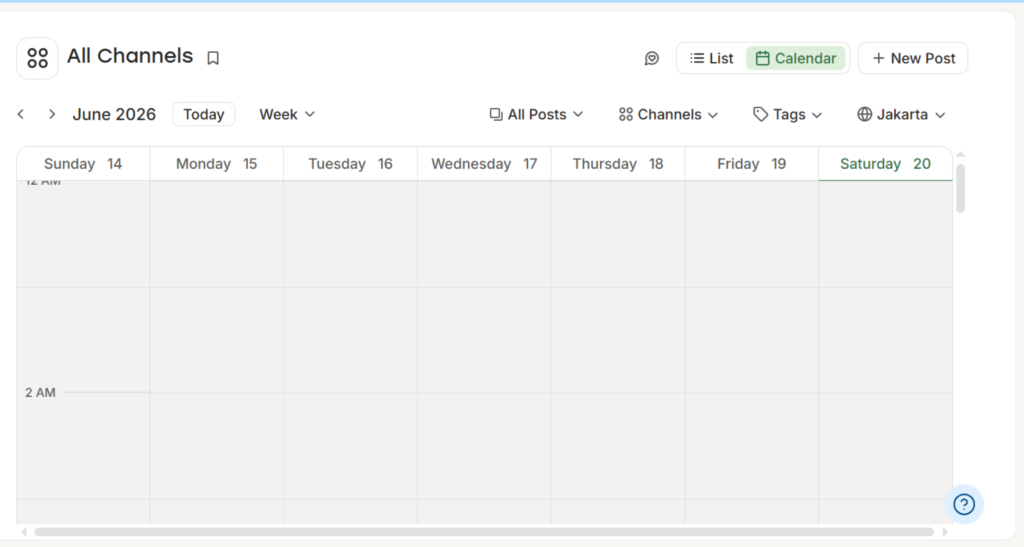
- Go to Calendar view in the left sidebar to see all queued posts across channels in a visual monthly layout
- Review the calendar:
- Are posts distributed evenly across the week?
- Is any one channel over- or under-represented?
- Are there any dates where no content is scheduled that should have a post?
- Drag and drop any post to a different time slot if the distribution needs adjustment
- For time-sensitive posts — a product launch, a company announcement, an event — click Schedule for a Specific Time instead of Add to Queue, and set the exact date and time
Once posts are in the queue, Buffer publishes them automatically at the scheduled time. Your pipeline is live.
Expected result: A full week of social media content scheduled across your connected channels, publishing automatically at your preferred times — with no manual action required on the day of publishing.
Video Tutorial
Understanding an AI-powered social media workflow is much easier when you can see the entire process in action. Rather than jumping between multiple tools for content creation, scheduling, and publishing, Buffer AI brings everything together in a single workspace. The video tutorial below demonstrates the complete workflow from start to finish — from setting up your account and connecting social channels, to generating weekly content ideas with AI, writing engaging captions, repurposing content for multiple platforms, and activating an automated content calendar that keeps your publishing schedule running smoothly.
Designed for marketing managers, social media teams, agencies, and business owners, this tutorial provides a practical look at how a modern AI content pipeline can be built using a single free platform. You’ll see how businesses can streamline content production, maintain a consistent posting schedule, and manage multiple social media channels more efficiently — all without additional tools, complex integrations, or technical expertise.
How Businesses Use This Tool
Startups
Early-stage startups use Buffer’s AI pipeline to maintain a consistent social media presence before they have a dedicated marketing hire. Founders spend thirty minutes each week generating and scheduling a full week of content — keeping the brand visible and active without diverting significant time from product and growth work.
Marketing Teams
In-house marketing teams use Buffer to standardize the social media production process across team members. Instead of each person managing their own posting workflow differently, the entire team uses the same Buffer pipeline — ensuring consistent brand voice, posting frequency, and content distribution across channels.
Agencies
Small digital agencies use Buffer to manage social media content pipelines for multiple clients, with each client’s channels connected in a separate Buffer workspace. The AI Assistant generates client-specific content ideas and captions, with account managers reviewing before scheduling — significantly reducing the time spent on content production per client.
HR Departments
HR and employer branding teams use Buffer to maintain a consistent presence on LinkedIn — sharing company culture content, employee spotlights, open roles, and workplace updates on a regular schedule without requiring someone to manually post each item. The AI Assistant generates caption drafts that HR reviews for accuracy and tone before scheduling.
Operations Teams
Operations teams use Buffer’s pipeline for internal-facing announcements distributed via company social channels — office updates, team achievements, operational milestones — using the AI Assistant to draft communications quickly and the queue to ensure timely distribution.
Enterprise Teams
Large organizations use Buffer at the department or business unit level — each team managing its own social channels with a consistent pipeline structure, while a central marketing team oversees brand guidelines and approves content before it enters the publishing queue.
Creators and Consultants
Individual consultants, coaches, and content creators use Buffer’s free plan to run a professional-looking social media operation without a team. The AI pipeline lets one person maintain consistent presence across LinkedIn, Instagram, and X without spending more than an hour per week on content production.
Best Practices
Batch your pipeline work into one weekly session. Rather than creating and scheduling one post at a time throughout the week, dedicate thirty to forty-five minutes on Monday morning to generate ideas, write captions, and schedule the entire week. Batching is what makes the pipeline feel like a system rather than a recurring task.
Always review AI-generated captions before scheduling. Buffer’s AI produces strong first drafts — but first drafts. Read every caption before it goes into the queue and check for accuracy, brand voice, and anything that needs a specific example or company-specific detail that the AI cannot know on its own.
Set your posting schedule first, then fill it. Define your preferred posting days and times per channel in Buffer’s settings before adding any content. When your schedule is set, Buffer fills available slots automatically as you add posts to the queue — eliminating the manual decision of when each post should go live.
Use the repurpose feature every time, not occasionally. If you’re connected to two or three channels, repurposing every post across all of them doubles or triples your content output from the same production effort. Make it a non-negotiable step in your pipeline process, not an optional one.
Review analytics monthly, not daily. Buffer’s analytics show which posts generated the most engagement per channel. A monthly review of the top and bottom performers informs the next month’s ideation — what topics to do more of, what formats to avoid, and which channels are growing fastest.
Keep the pipeline running even when you have nothing promotional to say. Educational content, industry observations, questions for your audience, and behind-the-scenes posts keep the pipeline consistent during periods when there’s no product news or campaign to promote. Use the AI Assistant to generate these filler ideas when your natural content ideas run dry.
Common Mistakes to Avoid
Scheduling AI-generated content without reviewing it. The most common mistake in any AI content pipeline is treating generated output as finished output. Buffer’s AI produces good first drafts — not final posts. A two-minute review catches brand voice issues, factual inaccuracies, and tone problems before they reach your audience.
Connecting too many channels on the free plan. The free plan supports three channels. Connecting channels you post to infrequently dilutes the pipeline’s focus. Start with the one or two channels where your audience is most active and your content gets the most engagement — add more channels only when the pipeline is running consistently on the first two.
Posting the same caption identically across all platforms. Buffer’s repurpose feature exists for this reason — LinkedIn audiences expect different content length and tone than Instagram or X audiences. Using the repurpose feature rather than posting identical captions to every channel produces noticeably better engagement per platform.
Building a full month of content in one session. Batching is efficient; over-batching creates rigidity. A month of pre-scheduled content can’t respond to breaking news, trending topics, or relevant industry moments. Schedule one to two weeks ahead, leaving room to add timely content as opportunities arise.
Measuring success by posting frequency alone. Consistency matters, but engagement per post matters more. If you’re posting five times per week to LinkedIn and getting minimal engagement, a pipeline producing three high-quality posts per week is more valuable. Use analytics to find the right frequency for your specific audience, not a generic target.
FAQ
What is an AI-powered content pipeline for social media? An AI content pipeline for social media is a defined, repeatable process where content moves from idea to scheduled post using AI assistance at the production stage — generating ideas and writing captions — with a human reviewing before publishing. Rather than creating each post manually from scratch, the pipeline produces consistent content at scale through a structured workflow inside one platform.
Is Buffer’s AI Assistant really free with no limits? Yes. Buffer’s AI Assistant is available on the free plan with no usage limits — meaning you can generate as many post ideas and caption drafts as you need without hitting a cap or being prompted to upgrade. The free plan’s limits are on the number of connected channels (three) and scheduled posts per channel (ten at any time), not on AI usage.
How much time does it actually take to run a social media pipeline with Buffer each week? For a business posting three to four times per week across two channels, most users complete the full pipeline — ideation, caption writing, repurposing, and scheduling — in thirty to forty-five minutes per week. The first session takes longer as you set up the account and learn the interface; subsequent weeks become significantly faster as the process becomes routine.
Can Buffer’s AI write captions that match my brand voice? Buffer’s AI Assistant can adjust tone (more professional, more casual, more concise) and can incorporate brand context when you include it in your prompt. For consistent brand voice across all generated content, include a brief brand description in every AI prompt — for example, “Our brand tone is direct, knowledgeable, and slightly irreverent.” The more context you provide, the more consistently the output reflects your voice.
What happens when I hit the ten-post limit on the free plan? Buffer’s free plan allows ten scheduled posts per channel at any given time. Once you have ten posts queued for a channel, you can’t add more until some publish and the queue drops below ten. For most businesses posting three to five times per week, this is sufficient. If you need more queue capacity, Buffer’s paid plan starts at $6 per month per channel.
Can Buffer publish directly to all social platforms, or does it require manual posting? Buffer publishes directly and automatically to LinkedIn, Facebook, X (Twitter), Pinterest, and YouTube Shorts. For Instagram and TikTok, Buffer supports direct publishing for feed posts and Reels — though some Instagram story formats may require a mobile notification and manual final tap to publish, depending on the content type.
Is the content pipeline approach in this guide suitable for B2B businesses, not just consumer brands? Yes — and in many ways it’s more valuable for B2B. LinkedIn is Buffer’s most commonly used channel for B2B businesses, and the AI Assistant’s ability to generate professional, thought-leadership-style content makes it particularly well-suited for B2B social media. The pipeline structure ensures consistent LinkedIn presence even when the team is busy with client work.
Alternatives Worth Considering
Hootsuite
What it does: A comprehensive social media management platform with AI content suggestions, scheduling, analytics, and team collaboration across unlimited channels. When it’s better: When your business manages more than three social channels simultaneously and needs team collaboration features, advanced analytics, and content approval workflows that Buffer’s free plan doesn’t include. Best for: Marketing teams managing high-volume social media operations across multiple channels and multiple team members, where the additional cost is justified by the scale of output. Official Website: https://hootsuite.com
Later
What it does: A visual social media planning and scheduling tool with AI caption generation, a visual content calendar, and strong Instagram-specific features including link-in-bio and story scheduling. When it’s better: When your content pipeline is primarily visual and Instagram-first — Later’s drag-and-drop visual calendar and Instagram-specific features make it more intuitive for image and video-heavy content strategies than Buffer’s interface. Best for: Brands, creators, and e-commerce businesses whose social media strategy is built around Instagram and TikTok visual content rather than text-heavy LinkedIn or X posts. Official Website: https://later.com
Key Takeaways
- An AI content pipeline for social media is a repeatable system where content moves from idea to scheduled post inside one platform — Buffer handles ideation, writing, repurposing, and scheduling without requiring any other tools.
- Buffer’s AI Assistant is genuinely free with no usage limits — available on the free plan alongside three connected channels and ten scheduled posts per channel.
- The most valuable habit in running a content pipeline is batching — one weekly session of thirty to forty-five minutes produces a full week of scheduled content across multiple channels.
- Always review AI-generated captions before scheduling. Buffer’s AI produces strong first drafts; human review catches the accuracy and brand voice issues that drafts always contain.
- Use the repurpose feature for every post across every connected channel. It doubles or triples content output from the same production effort without additional writing time.
- Review analytics monthly to identify which topics, formats, and posting times generate the most engagement — and feed those insights back into the next month’s ideation to continuously improve pipeline output.
- Start with two channels and one week’s content. Prove the pipeline works consistently before expanding to more channels or a longer scheduling horizon.
Conclusion
A social media content pipeline doesn’t need to be technically complex to be genuinely effective. What it needs is a repeatable process — the same stages, the same platform, the same quality check — running consistently week after week without depending on anyone’s creative energy or available time on any given day.
Buffer makes this achievable for any business on its free plan. One platform handles ideation, caption writing, platform-specific repurposing, and automatic publishing. The AI Assistant removes the blank-page problem at every stage. And the queue means content publishes on schedule even when the team is focused entirely on other priorities.
The businesses building the most consistent social media presence right now are not the ones with the largest content teams. They’re the ones that built a simple, reliable pipeline and ran it every week without exception — using AI to handle the production work and keeping human judgment focused on quality and strategy.
Build your Buffer pipeline this week. Generate your first week of content ideas, write the captions, repurpose across your channels, and activate the queue. The consistency starts from the first week it runs.