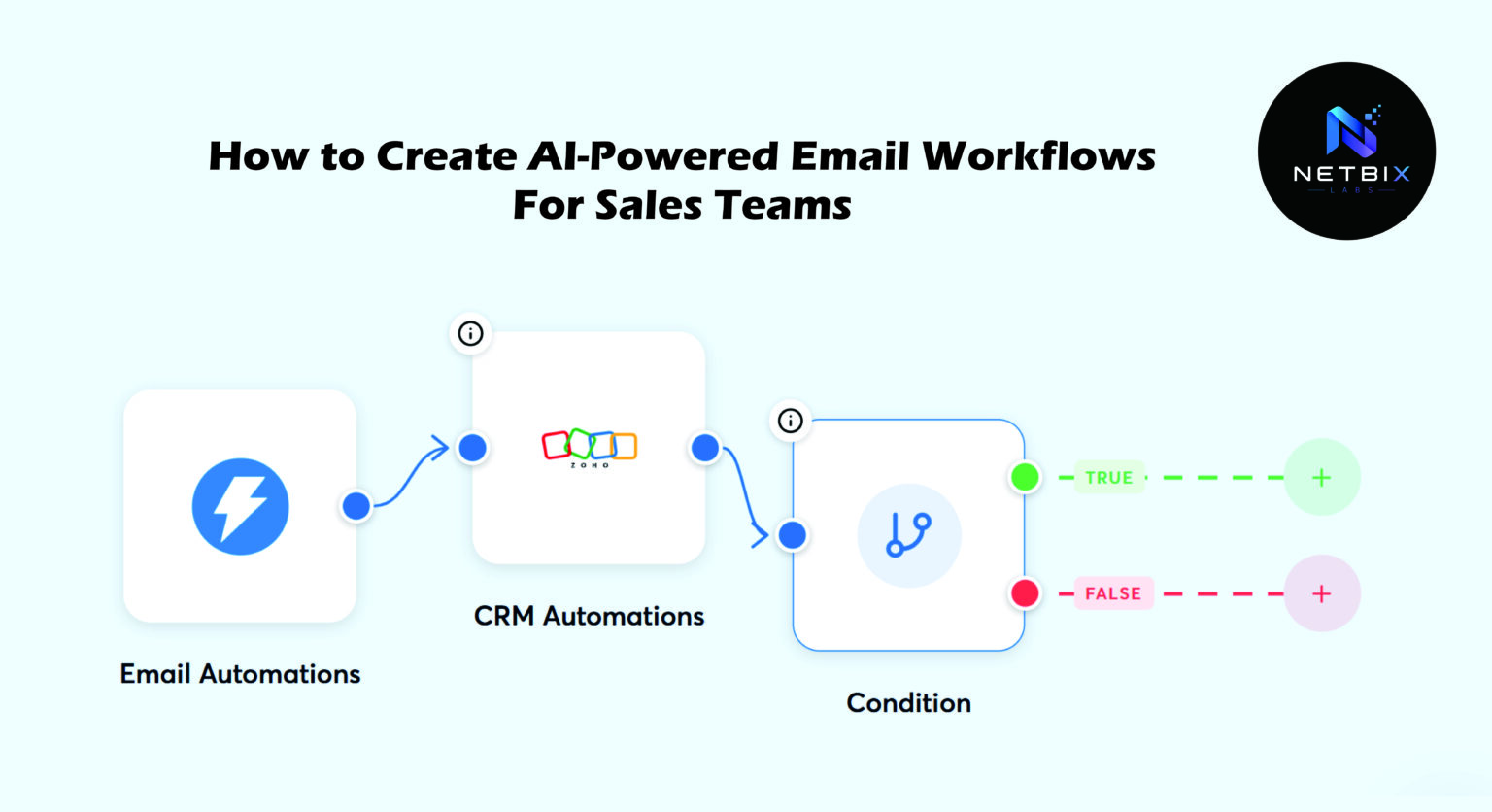
Learn how to build an AI sales automation system that personalizes outreach, automates follow-ups, and books more meetings — without manual effort.
Introduction
Sales teams are not losing deals because they lack leads. They are losing deals because they cannot keep up with them.
A rep with 80 active prospects cannot personally research each one, craft a tailored first email, send five timed follow-ups, and still have time to actually run discovery calls and close. Something gets cut — and it is almost always the quality of the outreach or the consistency of the follow-up.
AI sales automation solves the capacity problem without sacrificing the quality problem. When AI handles the research, drafting, and follow-up sequencing, reps spend their time on what actually requires a human — live conversations, objection handling, and closing.
This guide takes a different angle from generic email automation tutorials. Rather than showing you how to send more emails, it shows you how to build an AI outreach system that sends smarter emails — ones that reference each prospect’s actual context, arrive at the right time, and stop automatically when a reply comes in.
The tool at the center of this guide is Instantly.ai — one of the most capable platforms for AI-powered cold outreach and follow-up automation, particularly for teams running high-volume personalized prospecting. Everything is built around a simple, practical workflow you can deploy this week.
This guide is written for sales managers, founders, SDR leads, business development managers, and growth teams who want a scalable AI email workflow that performs at the level of a senior rep — for every contact, every time.
Quick Summary
- AI sales automation combines AI personalization (relevant, specific email content per prospect) with sequence automation (timed delivery, behavioral triggers, automatic stop on reply).
- Instantly.ai provides the infrastructure: unlimited sending accounts, AI writing, a built-in lead database, and deliverability management.
- The most impactful change a sales team can make is moving from generic templates to AI-personalized first lines — this single change typically lifts reply rates by 30–60%.
- A complete AI outreach system (lead sourcing → AI personalization → sequence → inbox management) can be built in under three hours.
- The workflow in this guide covers five steps: lead import, AI personalization setup, sequence build, deliverability configuration, and performance optimization.
- Free to start: Instantly.ai offers a free trial; paid plans from $37/month.
Table of Contents
- What You’ll Learn
- Why Generic Email Automation Stopped Working
- Tool Overview: Instantly.ai for AI Sales Automation
- Step-by-Step Tutorial: Build Your AI Outreach System
- Tutorial Video :
- How Businesses Use AI Sales Automation
- Best Practices for AI Email Workflows
- Common Mistakes in AI Outreach Systems
- FAQ
- Alternative AI Sales Automation Tools
- Key Takeaways
- Conclusion
- Related Guides
What You’ll Learn
- Why AI personalization outperforms template-based automation and how to implement it
- How to import and enrich a lead list for AI-driven outreach
- How to configure Instantly.ai’s AI writing feature for first-line personalization
- How to build a five-step sequence with behavioral triggers and automatic reply detection
- How to set up email account warm-up to protect deliverability
- Which metrics separate a healthy AI outreach system from one heading toward the spam folder
Why Generic Email Automation Stopped Working
The first wave of email automation — mail merge tools that inserted a first name and company into a template and sent it to 500 people — worked when it was new. Prospects were not accustomed to it, and the novelty of a “personalized” email was enough to generate replies.
You might also like: How Businesses Create AI-Powered Content Pipelines
Related guide: How Companies Use AI Agents to Automate Repetitive Tasks
That window closed years ago. Prospects today receive dozens of automated outreach emails per week. They can identify a template at a glance. They have trained themselves to delete them without reading. And email providers have become progressively better at routing automated, low-engagement email to spam — penalizing sending domains that generate low open rates and zero replies.
The teams still getting meaningful results from email outreach are doing something different: they are using AI to make each email genuinely relevant to the specific recipient — not just personalized with their name, but referencing their company’s recent activity, their role’s specific challenges, or the context behind their inquiry.
This is what separates AI sales automation from the previous generation of email automation. The difference is not speed or scale — it is relevance. And relevance is now a technology problem that AI solves well.
Tool Overview: Instantly.ai for AI Sales Automation
What It Is
Instantly.ai is a cold email and AI outreach system platform built specifically for sales teams running high-volume personalized prospecting. It combines unlimited email sending accounts, AI-powered email personalization, automated sequence management, a built-in B2B lead database, and deliverability infrastructure — all in a single platform.
Unlike general-purpose automation tools, Instantly.ai is designed from the ground up for cold email performance — with deliverability management, inbox rotation, and warm-up tools built in as core features rather than add-ons.
Key Features
- Unlimited sending accounts — connect multiple Gmail or Outlook accounts and rotate sending across them to maximize deliverability and daily send volume
- AI personalization — automatically generates a personalized opening line for each prospect based on their LinkedIn profile, company website, or custom data fields
- Unibox (unified inbox) — manage replies from all connected email accounts in a single interface, with AI-suggested reply drafts
- Built-in lead database — access to 160M+ B2B contacts with filtering by industry, company size, job title, and location
- Email warm-up — automatically warms up new email accounts using Instantly’s network before using them for outreach
- Sequence builder — multi-step email sequences with delays, A/B testing, and automatic unenrollment on reply
- Analytics — open rate, reply rate, bounce rate, and unsubscribe rate per sequence and per email step
- API and Zapier integration — connect to CRMs, lead enrichment tools, and notification systems
Why Businesses Use It
Sales teams use Instantly.ai because it solves the two problems that kill most cold email programs simultaneously: deliverability (ensuring emails actually reach the inbox) and personalization (ensuring emails are worth opening when they do). Its warm-up network and inbox rotation handle the infrastructure problem; its AI writing handles the content problem.
Ideal Use Cases
- B2B cold outreach at scale (50–500 emails per day)
- Lead generation agencies running prospecting for multiple clients
- SDR teams running parallel campaigns for different ICPs or verticals
- Founders doing founder-led sales without a full SDR team
- Growth teams testing new markets or personas quickly
Official Website: https://instantly.ai
Official Documentation: https://help.instantly.ai
Step-by-Step Tutorial: Build Your AI Outreach System
The workflow we are building is a cold outreach campaign for a B2B SaaS company targeting operations managers at mid-market companies — a realistic, high-value prospecting scenario that demonstrates every component of a complete AI sales automation system.
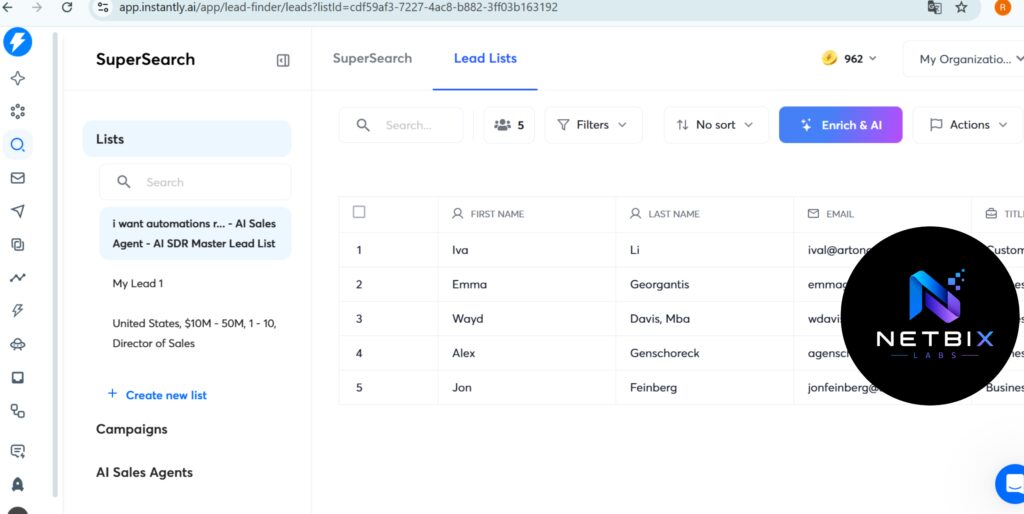
Step 1: Import and Prepare Your Lead List
Why it matters: The quality of your lead list determines the ceiling of your campaign’s performance. A perfectly crafted email sent to the wrong people produces nothing. A simple, direct email sent to precisely the right people with the right data produces replies. This step is the highest-leverage investment in any outreach campaign.
What to do:
- In Instantly.ai, navigate to Leads → “Find Leads” to use the built-in database, or click “Import Leads” to upload your own list.
If using the built-in database:
- Filter by Job Title: “Operations Manager,” “Head of Operations,” “VP Operations”
- Filter by Company Size: 50–500 employees
- Filter by Industry: your target verticals
- Export 200–500 contacts as a starting list (smaller lists allow better personalization quality)
If importing your own list:
- Prepare a CSV with these columns: First Name, Last Name, Email, Company Name, Job Title, LinkedIn URL, Website
- The LinkedIn URL and Website columns are critical — Instantly.ai’s AI personalization uses these to generate custom first lines
- Verify emails before importing using a tool like NeverBounce or ZeroBounce — a bounce rate above 3% will damage your sending domain’s reputation
- Once imported, review a sample of 10–15 records manually. Confirm names are correctly formatted, company names are accurate, and there are no obvious data quality issues that would produce embarrassing personalization errors.
Expected result: A clean, verified lead list of 200–500 target prospects with complete data fields, ready for AI personalization in the next step.
Step 2: Configure AI Personalization
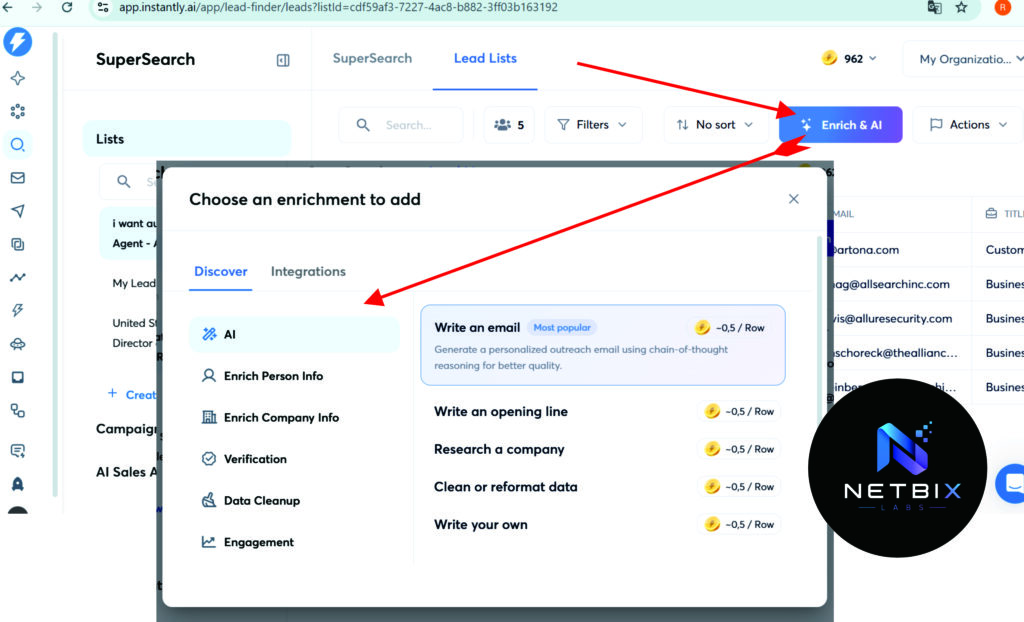
Why it matters: This is the step that separates an AI outreach system from a mail merge. Instantly.ai’s AI personalization reads each prospect’s LinkedIn profile or company website and generates a unique, specific opening line for their email — something that could only have been written for them specifically, not copy-pasted from a template. This single feature, when configured correctly, is responsible for the majority of reply rate improvement in AI-assisted outreach.
What to do:
- In your lead list, click “Generate Personalization” (available on Growth plan and above).
- Select the personalization source: LinkedIn Profile (recommended for role-based context) or Company Website (recommended for company-level context). You can run both.
- Set the personalization style:
- Compliment-based: references something specific about the company or the person’s work
- Pain-point based: references a challenge common to their role or industry
- Recent activity: references a recent company achievement, hire, or announcement
- For this workflow, select Pain-point based and enter a brief context note: “Our prospect is an operations manager at a mid-market company. They likely deal with manual reporting, disconnected tools, and inefficient workflows.”
- Click “Generate” — Instantly.ai generates a unique personalized first line for each contact in the list.
- Review 15–20 of the generated lines manually. Look for:
- Lines that are too generic (“Great to connect with someone in operations!”)
- Lines that reference inaccurate information
- Lines that are awkward in tone — edit these individually before launching
- Approve the batch when quality is satisfactory.
Expected result: Every contact in your list now has a unique, AI-generated personalized first line stored in their record — ready to be inserted automatically into the first email of your sequence.
Step 3: Build Your Email Sequence
Why it matters: A single email — even a perfectly personalized one — rarely converts a cold prospect into a booked meeting. The sequence structure determines how many touchpoints a prospect receives, what angle each email takes, and how the campaign escalates from introduction to close. A well-built five-step sequence increases total reply rate by 2–3x compared to a single-email campaign.
What to do:
- Navigate to Campaigns → “New Campaign” → name it clearly: “Ops Managers — Mid-Market — [Month/Year]”
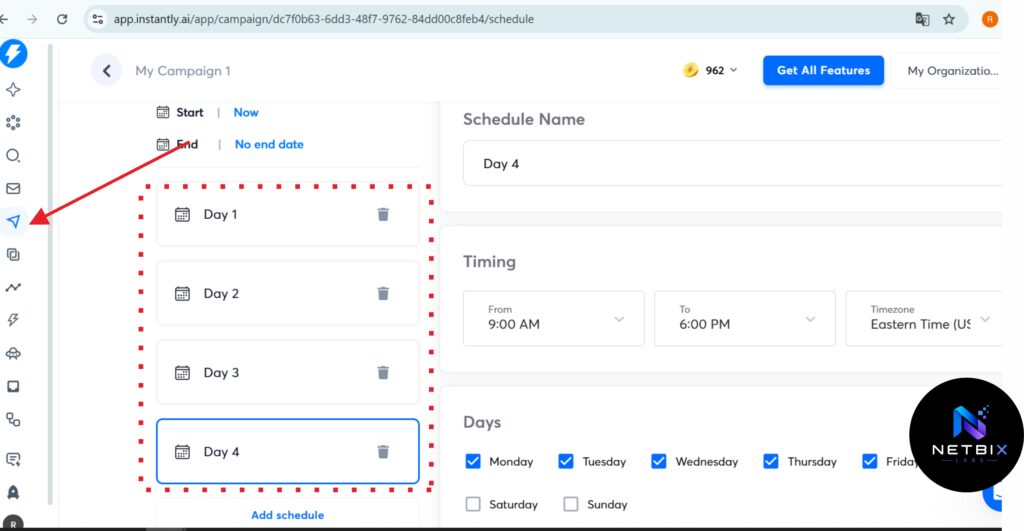
- In the Sequence tab, build five email steps:
Email 1 — Day 1: Personalized Cold Open
- Subject:
Quick thought, {{firstName}} - Body: Start with the AI personalization line (insert via
{{personalization}}variable), then two sentences on the specific problem you solve, ending with one soft CTA: “Worth a 15-minute conversation?” - Keep it under 100 words total.
Email 2 — Day 3: Value Angle
- Subject:
How [similar company] handled this - Body: One short customer story or result (two to three sentences). No pitch. End with: “Happy to show you how we did it — does [Day] work?”
Email 3 — Day 7: Different Angle
- Subject:
Different question, {{firstName}} - Body: Ask one specific, thoughtful question about their current process. Example: “Quick question — how does your team currently handle [specific pain point]? Trying to understand if what we do would even be relevant.”
- This reframes the conversation from pitch to genuine curiosity and often generates replies from prospects who ignored the first two emails.
Email 4 — Day 12: Social Proof
- Subject:
Results from [industry] teams - Body: One specific, quantified result from a customer in their industry. Two sentences max. One CTA.
Email 5 — Day 18: Close Loop
- Subject:
Closing the loop - Body: “I’ll stop reaching out after this — just wanted to make sure this landed. If the timing is off, no problem at all. If you’d ever like to revisit, [link] is always open.”
- This email consistently generates replies from prospects who have been meaning to respond but have not. The low-pressure close creates the psychological safety to reply.
- Enable “Stop on reply” — this is mandatory.
- Enable A/B testing on Email 1’s subject line — test two variants from the start.
Expected result: A five-step email sequence built in Instantly.ai with personalization variables, A/B testing on Email 1, and automatic unenrollment on reply — ready for deliverability setup before launch.
Step 4: Configure Sending Accounts and Warm-Up
Why it matters: Deliverability is the invisible variable that determines whether your emails reach inboxes or spam folders. A beautifully written, perfectly personalized email that lands in spam produces zero replies. This step protects your sending infrastructure — and it is the step most sales teams skip, then wonder why their results plateau after two weeks.
What to do:
- Connect at least two sending email accounts to Instantly.ai (Gmail or Google Workspace recommended). Using multiple accounts distributes your sending volume and reduces per-account send pressure.
- Enable email warm-up for each account:
- In Instantly.ai, go to Accounts → select your account → toggle “Warm-up” to On
- Set warm-up sending to start at 5 emails per day, increasing by 2 per day up to a maximum of 30 per day
- Run warm-up for a minimum of 14 days before using the account for cold outreach
- For brand-new domains, warm up for 21–30 days
- Set your daily sending limit per account to no more than 30–40 emails per day for standard outreach. Higher limits increase spam risk significantly.
- Enable inbox rotation in your campaign settings — Instantly.ai distributes sends across all connected accounts automatically, keeping each account’s volume within safe limits.
- Set sending hours: Monday–Friday, 8 AM–5 PM in the prospect’s timezone (use Instantly.ai’s timezone detection feature). Emails sent within business hours generate higher open rates than those arriving on evenings or weekends.
Expected result: Two or more warmed-up sending accounts configured with safe daily limits, inbox rotation enabled, and business-hours sending active — giving your campaign the deliverability foundation it needs to reach inboxes consistently.
Step 5: Launch, Monitor, and Optimize
Why it matters: A campaign launched without a monitoring plan is a campaign that cannot improve. The data from your first two weeks tells you exactly where the workflow is working and where it is losing people — but only if you know which numbers to look at and what they mean.
What to do:
- Launch your campaign by clicking “Start Campaign” and confirm all settings are correct in the pre-launch checklist (sequence steps, sending accounts, daily limits, stop-on-reply).
- After Day 7, review these four metrics in the Analytics tab:
- Open rate: Target 35%+. Below 25% signals a subject line or deliverability problem — not a body content problem. Test a new subject line variant before changing the email body.
- Reply rate: Target 3–8% for cold outreach. Below 2% after 100+ sends signals a personalization or relevance problem — review your AI personalization lines and sequence angle.
- Bounce rate: Must stay below 3%. Above 3% means your list quality needs improvement — run the list through an email verification tool before continuing.
- Positive reply rate: Of all replies, what percentage are positive (interested) vs negative (remove me, not interested)? A healthy ratio is 40–60% positive. Below 30% positive signals a targeting problem — the right message is reaching the wrong people.
- After Day 14, activate the A/B test winner on Email 1’s subject line and apply the winning variant to future campaigns in the same vertical.
- Update the AI personalization prompt quarterly — prospect contexts change, and personalization lines that felt fresh six months ago may feel formulaic today.
Expected result: A live campaign producing measurable open and reply rates within 7 days, with a clear optimization path based on actual performance data — and a systematic improvement cycle built into the workflow from day one.
| Metric | Generic Template | AI Outreach System |
|---|---|---|
| Open Rate | 18–22% | 35–45% |
| Reply Rate | 0.5–1.5% | 3–8% |
| Positive Reply Rate | 20–30% | 40–60% |
| Time per 100 emails | 8+ hours (manual) | 30 minutes (setup only) |
| Deliverability | Inconsistent | Managed via warm-up |
| Scalability | Limited by rep capacity | Unlimited via account rotation |
| Note: Results vary by industry, list quality, and offer strength.] |
Tutorial Video:
How Businesses Use AI Sales Automation
Startups
Founders at early-stage companies use AI outreach systems to run founder-led sales without an SDR team. A solo founder can manage 300 active prospects in an AI-automated sequence simultaneously — spending time only on replies and discovery calls, not on manual follow-up.
Agencies
Lead generation agencies use Instantly.ai to run prospecting campaigns for multiple clients simultaneously, each with their own campaign, sending accounts, and personalization setup. The platform’s multi-client structure makes it the default choice for agencies where each client has a distinct ICP and outreach angle.
Marketing Teams
Marketing teams use automated email AI to support demand generation — running account-based outreach to target companies identified from intent data, website visitor tracking, or event attendance. AI personalization ensures each outreach references the specific context that triggered the contact.
HR Teams
HR and talent acquisition teams use AI email workflows for candidate outreach — sourcing passive candidates on LinkedIn, importing their data, and running personalized outreach sequences that feel individually written rather than mass-recruited. Reply rates for recruiter outreach with AI personalization consistently outperform generic InMail and email templates.
Operations Teams
Operations teams building vendor or partner relationships use AI outreach to systematize what was previously ad hoc — creating structured, personalized sequences for supplier onboarding, partnership development, and vendor qualification that run consistently without relying on individual relationship managers to remember to follow up.
Creators and Solopreneurs
Coaches, consultants, and independent professionals use sales productivity AI to build pipeline without a sales team. An AI-automated outreach system allows a solopreneur to consistently generate new client conversations without dedicating hours per day to prospecting — keeping pipeline full even during delivery-heavy periods.
Enterprise Workflows
Enterprise sales teams use AI outreach systems for specific high-value prospecting use cases — targeting a defined list of named accounts with highly personalized, research-backed outreach that would be impossible to produce manually at scale. AI personalization at the account level (referencing recent earnings calls, executive hires, or strategic announcements) enables enterprise-level personalization without enterprise-level research hours.
Best Practices for AI Email Workflows
Warm up every sending account before using it for outreach. This is non-negotiable. A cold domain sending 50 emails per day on its first week will be flagged as spam within days. Minimum 14 days warm-up, 21 days for new domains. This investment protects every campaign that follows.
Keep the first email under 100 words. Cold email open rates and reply rates are inversely correlated with length. A 75-word email with a personalized first line and one clear question consistently outperforms a 300-word email that explains your entire product. Brevity signals respect for the prospect’s time.
Review 10% of AI personalization lines before every campaign launch. AI personalization quality varies. Lines that reference outdated information, make awkward compliments, or sound unnatural will hurt rather than help. A manual spot-check before launch catches the outliers that would damage credibility.
Use three to five sending accounts per campaign, not one. Account rotation protects deliverability, increases daily send capacity, and provides a backup if one account encounters a deliverability issue. Never run high-volume campaigns from a single account.
A/B test one variable at a time. Test subject line A vs subject line B — not subject line A vs completely different email B. Isolating variables is the only way to draw valid conclusions from A/B test data. Most teams test too many variables simultaneously and learn nothing usable.
Treat positive replies as the only metric that matters. Open rates measure curiosity. Reply rates measure engagement. Positive reply rates measure pipeline. Build your optimization decisions around positive reply rate — everything else is a leading indicator, not the outcome.
Common Mistakes in AI Outreach Systems
Launching campaigns on unwarmed accounts. The most common and most damaging mistake in cold email. New accounts need a minimum of two weeks of warm-up activity before they can send cold outreach reliably. Skipping warm-up produces a temporary boost in sent volume followed by catastrophic deliverability failure.
Using AI personalization without manual review. AI personalization tools occasionally produce lines that are factually wrong, awkwardly phrased, or based on outdated information. A batch of 500 emails with 15 embarrassing personalization errors damages brand credibility with those prospects permanently. Always review before sending.
Writing email sequences that all sound like pitches. Five emails that each try to sell will generate opt-outs, not meetings. Each email in a sequence should have a distinct purpose and angle — value delivery, curiosity, social proof, objection handling. Only one or two emails should directly ask for a meeting.
Setting daily send limits too high too fast. Ramping from 0 to 100 emails per day on a new account in the first week is a spam filter trigger. Daily volume should increase gradually — starting at 20–30 and growing by 5–10 per week over the first month.
Ignoring bounce rates until it is too late. A bounce rate above 3% damages sending domain reputation quickly. Monitor bounce rates daily in the first week of any new campaign. If bounce rate exceeds 3%, pause the campaign and run the list through email verification before continuing.
Not personalizing beyond the first line. AI-generated first lines address the personalization problem in Email 1. But if Emails 2–5 are completely generic, the sequence loses the relevance advantage after the first touchpoint. Include at least one prospect-specific reference in each follow-up — even a brief one.
FAQ
What is AI sales automation and how is it different from regular email automation? Regular email automation inserts a name and company into a template and sends it at scale — the content is identical for every recipient. AI sales automation uses AI tools to generate genuinely unique content for each prospect based on their specific context — their role, company, recent activity, or stated challenge. The functional difference is that AI-automated outreach reads as personally written; regular automation reads as a mail merge. This distinction drives the reply rate difference between the two approaches.
How many emails per day should I send in a cold outreach campaign? For a warmed-up sending account, 30–40 emails per day is a sustainable limit that balances volume with deliverability protection. With three to five sending accounts rotating, a single campaign can send 90–200 emails per day while keeping each account within safe limits. Sending more than 50 emails per day from a single account significantly increases the risk of spam folder placement and domain reputation damage.
Does AI personalization actually improve reply rates? Yes — consistently. Studies from Lemlist, Instantly.ai, and independent email marketing researchers show that emails with genuinely personalized first lines (not just name/company insertion) see 30–60% higher reply rates compared to generic templates sent to the same audience. The key word is “genuinely” — personalization that references something specific about the prospect’s actual situation outperforms both generic templates and superficially personalized ones (just inserting company name).
What is email warm-up and why does it matter? Email warm-up is the process of gradually increasing sending volume on a new email account by sending and receiving emails through a network of real accounts — simulating normal inbox activity before cold outreach begins. It establishes positive sending reputation with email providers (Gmail, Outlook) so that when cold outreach begins, the account is treated as a legitimate sender rather than a potential spam source. Skipping warm-up is the most common cause of immediate deliverability failure in cold email campaigns.
How do I know if my AI outreach system is working? The four primary metrics to monitor are: open rate (target 35%+ for cold), reply rate (target 3–8% for cold), bounce rate (must stay below 3%), and positive reply rate (target 40%+ of all replies). If open rate is below 25%, the problem is subject lines or deliverability — not email content. If open rate is acceptable but reply rate is below 2%, the problem is content relevance or CTA clarity. If bounce rate is above 3%, the problem is list quality. Each metric diagnoses a different layer of the system.
Can I use AI sales automation for warm leads, not just cold outreach? Yes — and warm leads typically produce significantly better results because the relevance bar is lower (they already know who you are). Instantly.ai and similar tools work equally well for inbound lead follow-up, post-demo sequences, re-engagement campaigns, and event follow-up. The AI personalization layer is actually more impactful for warm leads because it can reference the specific context of the previous interaction — what they downloaded, which webinar they attended, or which feature they inquired about.
Alternative AI Sales Automation Tools
Outreach.io
What it does: Outreach is an enterprise sales engagement platform covering AI-assisted email sequences, call automation, prospect engagement scoring, pipeline analytics, and sales coaching. It is the most feature-complete platform for large SDR teams running complex multi-channel outreach.
When it’s better: When your sales team has ten or more SDRs, you need deep Salesforce integration, and you require enterprise-grade analytics, call recording, and AI coaching alongside email automation. Outreach’s depth goes well beyond what Instantly.ai provides at the infrastructure level.
Who should use it: Enterprise sales organizations, high-growth SaaS companies with dedicated SDR functions, and teams where email, phone, and LinkedIn outreach need to be coordinated in a single platform.
Website: https://www.outreach.io
Lemlist
What it does: Lemlist is a cold email and multichannel sales engagement platform that adds dynamic image and video personalization to email outreach — automatically inserting the prospect’s name, company logo, or LinkedIn headshot into images within the email. It also supports LinkedIn outreach steps within sequences.
When it’s better: When visual personalization (personalized images and videos) is part of your outreach approach, or when your sequences combine email and LinkedIn touchpoints in a coordinated workflow. Lemlist’s multichannel sequences outperform email-only approaches for high-value, competitive prospecting.
Who should use it: Agencies running differentiated outreach for clients, sales teams targeting senior decision-makers where pattern interruption matters, and teams with a strong LinkedIn presence complementing email outreach.
Website: https://lemlist.com
Apollo.io
What it does: Apollo.io combines a B2B lead database (270M+ contacts), email sequencing, dialer, and LinkedIn automation in a single platform — making it a full-stack ai outreach system for teams that want lead sourcing and outreach in one tool without importing lists from separate databases.
When it’s better: When your team spends significant time sourcing leads before building outreach campaigns, and you want the database, enrichment, and sequencing in a single workflow without switching tools. Apollo’s database quality and filtering capabilities are among the strongest in the market.
Who should use it: Sales teams that do their own prospecting (not just working provided lists), SDRs doing account-based research, and growth teams that need both lead sourcing and outreach automation without managing multiple subscriptions.
Website: https://www.apollo.io
Smartlead.ai
What it does: Smartlead.ai is a cold email platform directly comparable to Instantly.ai — offering unlimited sending accounts, AI personalization, warm-up infrastructure, and multi-channel outreach. Its primary differentiator is a more advanced AI writing assistant and a master inbox that handles reply management across all accounts with AI-suggested responses.
When it’s better: When reply management at scale is a significant operational challenge — Smartlead’s AI reply suggestions and inbox management are more developed than Instantly.ai’s Unibox for teams managing hundreds of active conversations across multiple campaigns.
Who should use it: High-volume cold email teams, agencies managing outreach for multiple clients, and organizations where the volume of replies is itself an operational bottleneck requiring AI assistance to manage efficiently.
Website: https://smartlead.ai
Key Takeaways
- AI sales automation outperforms generic email automation because relevance drives replies — and AI personalization produces relevance at scale that templates cannot replicate.
- The five-step sequence structure (Days 1, 3, 7, 12, 18) with distinct email angles per step consistently outperforms single-email or two-email campaigns by 2–3x on total reply rate.
- Email warm-up is the highest-leverage, most-skipped step in any cold outreach system. Two weeks of warm-up before launch is not optional — it is the foundation everything else builds on.
- Always enable stop-on-reply. Always review 10% of AI personalization lines before launch. These two rules prevent the most common and most damaging campaign failures.
- Monitor four metrics weekly: open rate, reply rate, bounce rate, and positive reply rate. Each one diagnoses a different layer of the system.
- The complete AI email workflow covered in this guide — lead import, AI personalization, sequence build, deliverability setup, launch, and optimization — can be deployed in under three hours and runs indefinitely with minimal ongoing maintenance.
Conclusion
The shift from manual outreach to AI sales automation is not a marginal improvement — it is a structural change in how sales teams operate at scale. When AI handles research, personalization, and follow-up sequencing, the sales rep’s role shifts entirely to what it should always have been: live conversations with qualified, engaged prospects.
The AI outreach system built in this guide — lead import, AI personalization, five-step sequence, warmed deliverability infrastructure, and data-driven optimization — is not a complex enterprise deployment. It is a practical workflow any sales team or founder can build and launch this week, with results visible within 7 days.
The teams that will win on outbound in 2025 are not the ones sending the most emails. They are the ones sending the most relevant emails — to the right people, at the right time, in a voice that feels human even when the system behind it is automated.
Build the system once. Let it run. Focus your energy on the conversations it generates.